

Templatical is open source: every package is MIT-licensed.


Playground · Documentation · Changelog · Website · Discussions
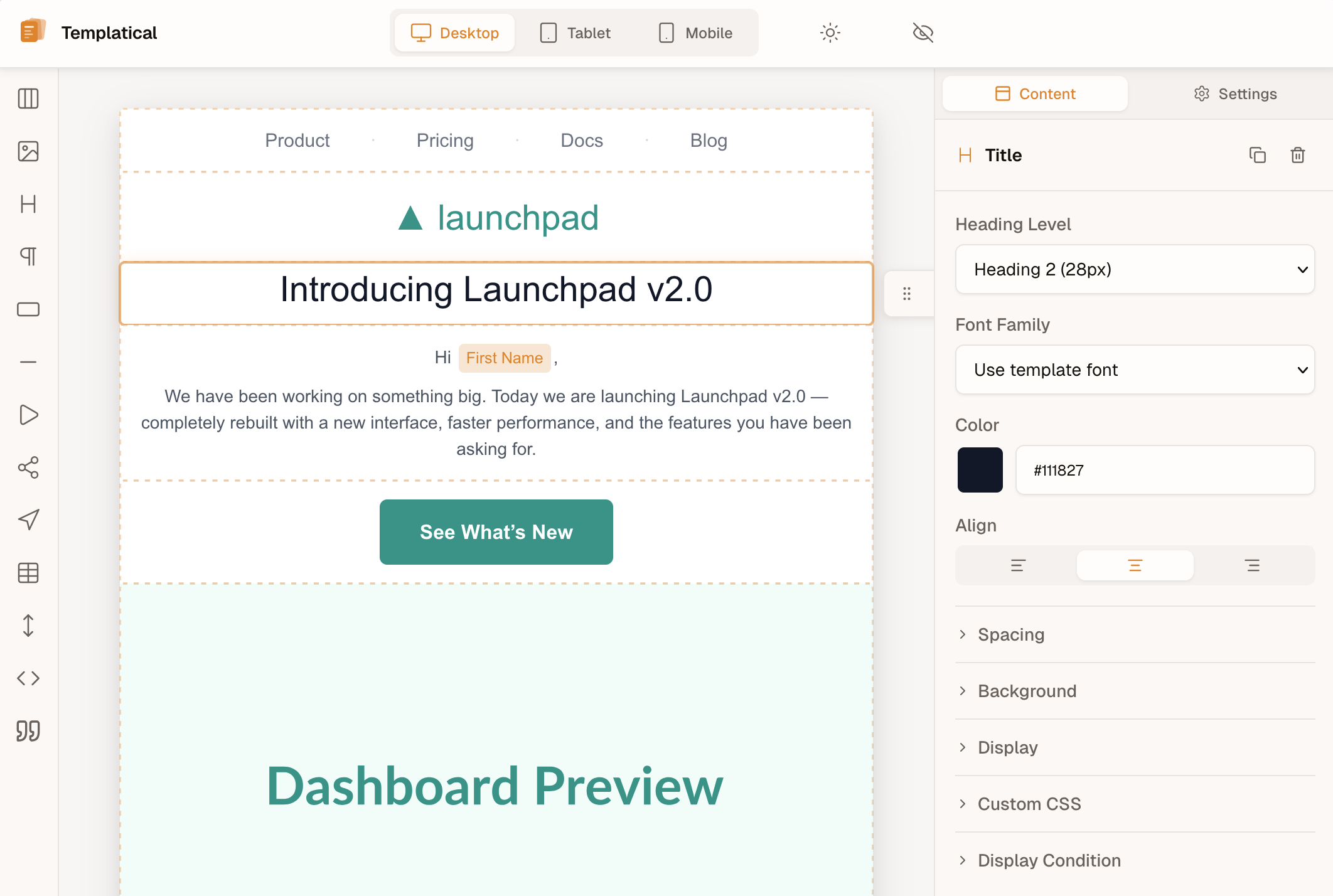
▶ Try it live in the playground
Templatical is open source: every package is MIT-licensed. Templatical is a production-ready drag-and-drop email editor you can drop into any web app with a single function call. Templates are portable JSON, output is MJML (which compiles to the table-based HTML email clients expect), and the editor itself is framework-agnostic — Vue under the hood, but you embed it in React, Svelte, Angular, or vanilla JS the same way. Comments, saved blocks, version history, test email, media, real-time collaboration and AI are providers you pass to init(). Bring your own AI backend for chat, rewrite and chat attachments. Live collaboration runs over your own backend with init({ collaboration }).
For content checks, use deliverability lint and compatibility lint; deterministic lint does not predict inbox placement.
Describe the email you want and your AI coding agent builds it — then preview it in the real editor, hand-edit anything, and export send-ready MJML/HTML. Free, open-source Agent Skill, no backend, no API key — your agent is the inference, and nothing is sent to us. Ship a one-off campaign, or generate branded starter templates for your @templatical/editor integration: if you have a coding agent, you have a complete email tool.
The templatical Agent Skill is an Agent Skills folder — Claude Code, Codex CLI, Cursor, Gemini CLI, GitHub Copilot and others all read SKILL.md. The email it exports sends through any provider — Amazon SES, Postmark, Resend, Mailchimp, anything.
Installed the earlier templatical-email skill? Remove it before installing this one: The previous templatical-email skill.
One command and you're done:
npx skills add templatical/sdkThat detects which supported agents you have and installs into the directory each one reads.
You can also preview it live: ask to "show it live" and the skill opens your template in the real Templatical editor in a browser, updating as you prompt and reconciling any edits you make by hand. It's local and installs nothing into your project (a small CLI fetched on demand via npx; the editor loads from the CDN).
For the AI assistant inside the editor, bring your own AI backend on
init().
The same skill covers the other half: installing, mounting, configuring, theming and troubleshooting @templatical/editor in your own app — just ask it, no separate install. It routes each request on its own: authoring or editing a template stays on the email side, embedding the SDK moves to the integration side, and a request that needs both ("build a welcome email and wire it into my app") gets both, template first.
The same skill guide → covers it all.
Things that are usually paid features in commercial editors — free in Templatical:
- Custom blocks with API-backed data sources — register your own block types whose content is rendered from a static template or fetched live from your API at preview time. Typically a paid-tier feature in commercial editors.
- Merge tags in your ESP's syntax —
{{handlebars}},{liquid},${js}, or your own — with automatic human-readable label replacement directly in the editor canvas. Build your CRM-aware tag picker in minutes. - Display conditions — show/hide blocks based on recipient attributes, with live preview in the editor.
- Reusable saved blocks — let users save a group of blocks and re-insert it across templates, with search, preview, rename and delete. You supply storage via a small provider interface (or use the bundled browser-local one); the editor owns the whole UI.
- Version history — browse, preview and restore a template's past versions from the header. Storage is a four-method provider you implement; the editor owns the control, the preview and the restore flow.
- Full theming via design tokens — color tokens, custom fonts, dark mode, complete theme overrides. No CSS hacking, no paid tier.
- Template & block defaults — define your brand once. New templates and new blocks pick up your brand automatically.
- Drop-in mount — one
init()call, oneunmount(). No framework lock-in. - Style-isolated, both directions — Shadow DOM by default keeps host CSS out of the editor;
tpl:Tailwind prefix and no preflight reset keep editor styles out of your app. Drops into any page, any framework, any CMS — no resets, no conflicts. Learn more → - Built-in blocks — Title, Paragraph, Image, Button, Section, Divider, Spacer, Social Icons, Menu, Table, HTML, Video, Countdown, Custom.
- JSON templates — portable, versionable, store anywhere, render anywhere.
- MJML output — works with any email provider (Postmark, Resend, SES, Mailgun, anything).
- Framework-agnostic — first-class examples for React, Vue, Svelte, Angular, vanilla.
- Multilingual — English, German, Portuguese, Spanish, Catalan, French, Dutch, Japanese & Danish built in, easy to add more locales.
- TypeScript strict — full types for blocks, config, and callbacks.
- Battle-tested — ~3,900 unit tests + Playwright E2E coverage.
npm install @templatical/editor @templatical/rendererimport { init } from "@templatical/editor";
import "@templatical/editor/style.css";
const editor = await init({
container: "#editor",
onChange(content) {
// content is JSON — store it, version it, send it anywhere
console.log("Template updated:", content);
},
});
// Render to MJML when you're ready to send
const mjml = await editor.toMjml();<div id="editor" style="height: 100vh"></div>Read the full guide → · React, Svelte, Angular examples →
| Package | Description | License |
|---|---|---|
@templatical/editor |
Visual drag-and-drop editor | MIT |
@templatical/core |
Framework-agnostic editor logic, state, history | MIT |
@templatical/media-library |
Media library — composable, components, standalone SDK | MIT |
@templatical/types |
Shared TypeScript types and block factories | MIT |
@templatical/renderer |
JSON → MJML renderer (browser + Node) | MIT |
@templatical/quality |
Template quality linter — accessibility, structure, and link rules (browser + Node) | MIT |
@templatical/template-tools |
CLI and library: validate, render (MJML/HTML), edit, import, live-preview templates | MIT |
@templatical/ai-kit |
Bring your own AI backend: the wire, an HTTP provider, a server kit and a conformance suite | MIT |
@templatical/import-beefree |
Convert Beefree templates to Templatical format | MIT |
@templatical/import-unlayer |
Convert Unlayer templates to Templatical format | MIT |
@templatical/import-html |
Convert HTML email templates (table-based) to Templatical format | MIT |
@templatical/import-mjml |
Convert MJML email templates to Templatical format | MIT |
@templatical/import-topol |
Convert Topol.io email templates to Templatical format | MIT |
@templatical/import-stripo |
Convert Stripo email templates to Templatical format | MIT |
@templatical/import-chamaileon |
Convert Chamaileon getDocument() JSON to Templatical format |
MIT |
@templatical/import-easy-email-pro |
Convert Easy Email Pro persist JSON to Templatical format | MIT |
- Getting Started — install, mount, render
- Framework examples — runnable Next.js, Nuxt, SvelteKit, React Router and React (Vite) apps from
examples/, each tested in CI - Block Reference — every built-in block
- Theming — design tokens, dark mode, custom fonts
- Custom Blocks — extend with your own
- Saving & Loading — the template lifecycle over your own storage
- Saved Blocks — reusable block groups over your own storage
- Version History — browse, preview and restore past versions over your own storage
- AI Agent Skills — generate emails from a prompt, or get integration help, in your own agent
- Migrating from Unlayer
- Migrating from Beefree
- Migrating from Stripo
- Migrating from Topol
- Migrating from Chamaileon
- Migrating from Easy Email Pro
- Migrating from MJML
- Migrating from HTML
- Changelog — every release, all packages, one page
Full docs: docs.templatical.com (English + Deutsch).
Releases are also published as GitHub Releases — one per version. Subscribe via the Atom feed or Watch → Custom → Releases.
Contributions, bug reports, and feature requests are welcome.
git clone https://github.com/templatical/sdk.git
cd sdk
pnpm install
pnpm run build
pnpm run test
See CONTRIBUTING.md for the full guide.
Templatical is open source (MIT). Company sponsors get their logo here and in the docs from $50/month, and on the templatical.com homepage from $100/month: sponsor development on GitHub, or see sponsorship tiers and supporters.
Using Templatical in production? Tell us in Who's using Templatical? to have your company listed here by name.
Templatical is open source: every package is MIT-licensed. Terms: MIT. License.