



An OpenAPI 3.1 schema and a step-by-step guide to build a custom GPT that talks to your Selldone shops.
Documentation ·
Quick start ·
Ecosystem ·
Selldone.com ·
Report an issue
Storefront · Page Builder · Components · Storefront SDK · Backoffice SDK · Vendor SDK · Community SDK · Core · CLI · Translate
This repository contains everything you need to publish a custom GPT in the OpenAI GPT Store that can read data from a Selldone® account. It ships a ready-to-use OpenAPI 3.1 document (Schema.json) that describes a small set of Selldone API operations, plus a visual walkthrough of the ChatGPT GPT editor.
Once configured, the GPT signs the user in to Selldone with OAuth, checks two-factor authentication, lists the user's shops and returns product details and sales statistics — all from a normal ChatGPT conversation.
It is for Selldone merchants, agencies and developers who want a conversational assistant on top of Selldone Business OS, and for anyone who wants a working, real-world example of a GPT Action secured with OAuth 2.0.
- Ready-made OpenAPI 3.1 schema — paste or import
Schema.jsoninto the GPT editor; no code to write. - OAuth 2.0 sign-in — users authorize the GPT with their own Selldone account using the authorization-code flow.
- Two-factor authentication aware —
Check2FAandVerify2FAactions handle accounts protected by a 6-digit 2FA code. - Shop listing —
GetShopsreturns the signed-in user's shops, with an optional search by name or URL. - Product insights —
GetProductInforeturns a product with daily statistics (sales, views, inventory) for a chosen period. - Rich response models —
User,Shop,Product,ProductDataand related enums are described undercomponents.schemas, so the GPT understands the data it receives. - Illustrated setup guide — every step of the GPT editor is documented with annotated screenshots.
- Reusable pattern — the same OAuth + OpenAPI approach works for your own back end (for example Laravel Passport).


-
Create a GPT. In ChatGPT open My GPTs → Create a GPT, then switch to the Configure tab.
-
Add an action. Click Create new action and paste the content of
Schema.jsoninto the Schema box. You can also use Import from URL with:https://raw.githubusercontent.com/selldone/gpt/main/Schema.json -
Configure OAuth. Click the gear icon next to Authentication, select OAuth and enter:
Field Value Client ID / Client Secret From the OAuth client you created for your GPT Authorization URL https://selldone.com/oauth/authorizeToken URL https://selldone.com/oauth/tokenScope read-shops profile backoffice-read-productsToken exchange method Default (POST request) -
Set the privacy policy to
https://selldone.com/privacy(needed to make the GPT publicly available). -
Register the callback URL. Copy the Callback URL shown under Actions (it looks like
https://chat.openai.com/aip/g-…/oauth/callback) and add it as the redirect URL of your OAuth client. -
Test. Use the Test buttons next to
Check2FA,Verify2FA,GetShopsandGetProductInfo, or ask the preview: "Tell me about my shops on Selldone."
The full walkthrough with screenshots is in the Create your GPT wiki page.
| Setting | Value |
|---|---|
| Authorization URL | https://selldone.com/oauth/authorize |
| Token URL | https://selldone.com/oauth/token |
| Scopes | read-shops profile backoffice-read-products |
| Privacy policy | https://selldone.com/privacy |
Separate scopes with a space. The authorization and token URLs are fixed for each OAuth provider; only the client ID, client secret and scopes change between GPTs.

Finding your callback URL
- The callback URL is shown on the Configure tab under Actions, after you save the authentication settings. You can also find it in the URL ChatGPT requests when you sign in through the GPT.
- Changing the OAuth configuration in ChatGPT also changes the callback URL — update your OAuth client each time.

Using your own server instead of Selldone
- If you use Laravel, enable Passport and run
php artisan passport:clientto create an OAuth client. - Most back-end frameworks provide an official OAuth server implementation you can use the same way.
Schema.json is an OpenAPI Specification 3.1.0 document. ChatGPT reads it to learn which API operations the GPT can call, which parameters they take and what they return.
| Section | Value |
|---|---|
openapi |
3.1.0 |
info.title |
My shops |
info.description |
Get information about my business and sales on Selldone. |
info.version |
v1.0.0 |
servers[0].url |
https://api.selldone.com |
| Operation ID | Method | Path | Purpose |
|---|---|---|---|
Check2FA |
GET |
/security/2fa/check |
Checks whether the user has two-factor authentication. If the response contains user, the user is signed in; otherwise call Verify2FA. |
Verify2FA |
POST |
/auth/2fa |
Sends the user's 6-digit 2FA code. Body: { "code": "123456" } (pattern ^[0-9]{6}$). |
GetShops |
GET |
/shops/me |
Lists the user's shops. Optional query search filters by business name or URL. |
GetProductInfo |
GET |
/shops/{shop_id}/products/{product_id}/admin |
Returns a product and its statistics. Query: offset (days from now, default 0), limit (days, default 30), with_trashed (default false). |
GetProductInfo tells the GPT to ask the user for the product's admin page URL, formatted as https://selldone.com/shuttle/shop/{shop_id}/product/{product_id}/…, and extract both IDs from it.
| Operation | Success response (example shape) | Errors |
|---|---|---|
Check2FA |
{ "user": User, "has_2fa": true } |
400 Invalid request |
Verify2FA |
{ "success": true, "token_verified": true, "user": User } |
401 Incorrect 2FA code |
GetShops |
{ "shops": [Shop] } |
400 Invalid request |
GetProductInfo |
{ "product": Product, "data": [ProductData], "orderQue": [{ count, delivery_state, type }] } |
– |
components.schemas defines the reusable models referenced by the responses:
- User, UserSocialLogin, UserPreferences, UserInterest
- Shop, ShopHome, ShopInfo, ShopOption, ShopTheme, ShopRibbon, Domain
- Product, Product.ProductType, Product.PriceInputType, Product.ProductPricing, Product.ProductCondition, Product.ProductStatus, Product.ISpec, Product.IVariant, Product.IRibbon, Product.IAR, Product.IExtra
- ProductData (daily statistics)
A field-by-field explanation of the whole schema is in the Schema reference wiki page.
- Create a new GPT — click your profile picture in ChatGPT, select My GPTs, then Create a GPT. If uploading an icon fails, generate one with DALL·E, or drop your image on the Create tab and write "set it as my GPT icon".
- Personalize it — on the Configure tab fill in the name, description, instructions and conversation starters. The Create tab can help you write them.
- Add knowledge — upload Excel, CSV (preferred), text, JSON or other files. Using the
[ ... ]format in the prompt/answer keeps the data clear and organized. - Connect APIs — add an action, configure OAuth, paste the schema, then test each operation.
Show all setup screenshots


- OpenAI may change the GPT editor or its configuration options; be ready to adjust the steps.
- If sign-in fails, check that the callback URL registered in your OAuth client matches the one shown in the GPT editor exactly.
- If
Check2FAdoes not return auser, the account has 2FA enabled: ask for the 6-digit code and callVerify2FA. A401fromVerify2FAmeans the code was incorrect. GetProductInforeads product data, so keepbackoffice-read-productsin the OAuth scope list.
| Page | What you'll learn |
|---|---|
| Home | What this project is and how the pieces fit together. |
| Getting Started | Prerequisites and the fastest path to a working GPT. |
| Create Your GPT | Step-by-step GPT editor walkthrough with screenshots. |
| OAuth Configuration | OAuth fields, scopes, callback URL and your own OAuth server. |
| Schema Reference | Every section, operation and model in Schema.json. |
| FAQ | Common questions and troubleshooting. |
The GPT is a conversational client for the same Selldone API that powers the dashboard and the SDKs. It uses OAuth to act on behalf of a shop owner, much like a custom dashboard built with the Backoffice SDK does with an access token.
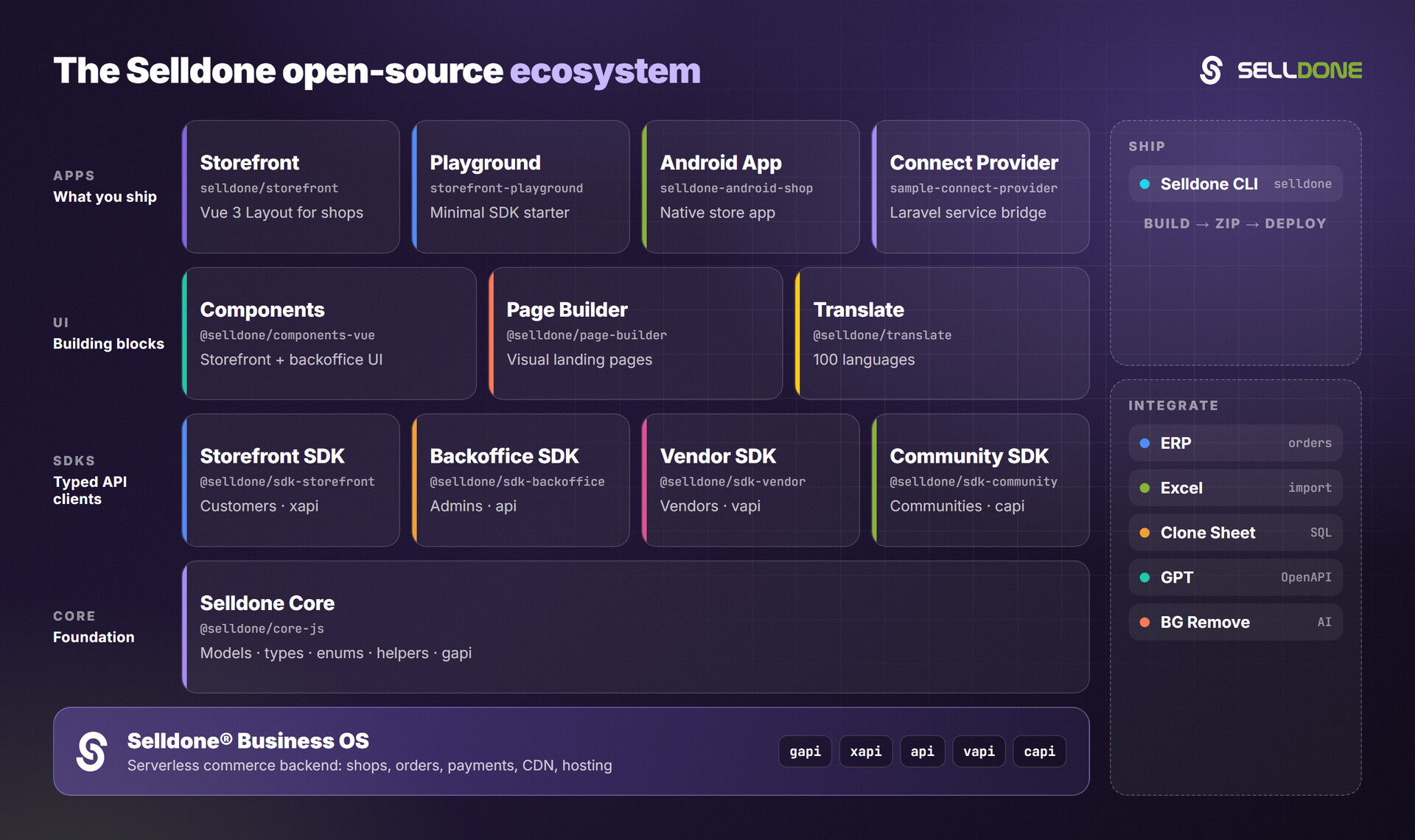
| Project | Why it is relevant |
|---|---|
| backoffice-sdk | Admin API client for custom dashboards and integrations. |
| core | Shared models, types and enums (products, shops, users). |
| erp | Guide and demos to connect ERP software to Selldone shops. |
| storefront-sdk | Customer-facing API client: products, basket, auth, user. |
| bg-remove | AI background removal service for product images. |
Contributions are welcome. Please read the organization contributing guide and code of conduct.
When you add operations to Schema.json, keep it a valid OpenAPI 3.1 document, give every operation a unique operationId and a clear description (ChatGPT uses it to decide when to call the action), and test it in the GPT editor before opening a pull request.
Please do not report security vulnerabilities in public issues. Follow the security policy and email security@selldone.com. Never commit OAuth client secrets or tokens to this repository.
This project is licensed under the GNU General Public License v3.0. See LICENSE for the full text.
Part of the Selldone® Business OS open-source ecosystem · selldone.com