



The command-line tool that logs you in, builds, packages and deploys your custom storefront Layout to Selldone.
Documentation ·
Quick start ·
Ecosystem ·
Selldone.com ·
Report an issue
Storefront · Page Builder · Components · Storefront SDK · Backoffice SDK · Vendor SDK · Community SDK · Core · CLI · Translate
Selldone CLI (selldone-cli on npm, selldone on your command line) is the deployment tool for custom storefronts
on Selldone® Business OS. Run it in the root of your storefront project and it signs you in with your Selldone
account, checks your manifest.json, builds the project, packages the build output as a ZIP file and uploads it to
Selldone as a new Layout version.
A Layout is a custom storefront web app that runs on Selldone. It lets you change the look and behavior of an online shop while Selldone keeps running the backend: products, baskets, payments, customers and more. The fastest way to start a Layout is the open-source Storefront project, and the CLI can clone and prepare it for you.
Use Selldone CLI if you are a front-end developer, agency or theme designer who builds storefronts for Selldone shops and wants a repeatable, one-command release process. After a deployment, you manage your Layouts in the Selldone Layouts dashboard.
Tip
The CLI is updated often. Update it each time you start working with it:
npm update -g selldone-cli
- Interactive menu — run
selldoneand choose New, Deploy, Layouts, Login, Logout or Exit. - One-step deploy —
selldone deploygoes from source code to a live Layout version in one command. - Secure sign-in — OAuth2 login in your browser with a local callback on
http://localhost:3777/callback. - Two-factor authentication — asks for your six-digit 2FA code when your account requires it.
- Manifest checks — validates the
package,version,name,storefrontandbackofficefields before building. - Version control — asks Selldone to confirm the version is new before uploading, so every release is unique.
- Build and ZIP — runs your
build-productionscript with npm or yarn and packages the contents ofdist/. - Upload with progress — uploads
dist.zipwith a progress bar and prints the Layout and deployment details. - Project scaffolding — the New action clones the Storefront project and writes a fresh
manifest.json. - Packaging skill for coding agents — a bundled skill with the Layout artifact contract, bundler recipes and validators.

Run selldone |
Successful deployment |
|---|---|
 |
 |
Requirements
- Node.js 14 or later (see
enginesinpackage.json) and npm or yarn. - A Selldone account. Deploying Layouts requires a premium account (see Premium requirement).
- A front-end project with a
manifest.jsonin its root and abuild-productionscript that writes the build todist/. The Storefront project already has both.
Install and deploy
# 1. Install the CLI globally
npm install -g selldone-cli

# 2. Go to your storefront project (the folder that contains manifest.json)
cd my-storefront

# 3. Open the interactive menu and choose "Deploy" ...
selldone

# ... or deploy directly
selldone deploy
If you are not signed in yet, the CLI opens your browser to sign in. It then asks you to confirm the Layout name and
version, builds, uploads and finally prints a link such as https://selldone.com/developer/layouts/<layout_id>.
| Method | Command |
|---|---|
| Global (recommended) | npm install -g selldone-cli |
| Local dev dependency (npm) | npm install selldone-cli --save-dev |
| Local dev dependency (yarn) | yarn add selldone-cli --dev |
| Update | npm update -g selldone-cli |
| Command | Description |
|---|---|
selldone |
Opens the interactive menu. |
selldone deploy |
Builds and deploys the project in the current folder (same as Deploy in the menu). |
selldone --debug |
Opens the menu in debug mode. This mode is for Selldone platform development against a local backend; see Debug mode. |
Actions in the interactive menu:
| Action | Shown when | What it does |
|---|---|---|
| New | Always | Creates a new Layout project from selldone/storefront in a storefront folder. |
| Deploy | Always (default) | Builds and uploads the Vue storefront Layout in the current folder. |
| Layouts | Signed in | Lists the Layouts in your account (package, name, verified, penalty, stable and beta versions, created date). |
| Logout | Signed in | Removes the saved access token from your computer. |
| Login | Signed out | Signs in to your Selldone account. |
| Exit | Always | Closes the CLI. |
- Authentication. If a saved token exists, the CLI checks the 2FA status with it. Otherwise it starts the browser login (see Authentication flow).
- Premium check. Only premium accounts can deploy Layouts.
- Manifest check. The CLI reads
./manifest.jsonand validates its fields. - Version check. The CLI asks Selldone whether the
packageandversionpair is still available. - Confirmation. You confirm the name and version by typing
yes. - Build. The CLI runs
npm run build-productionoryarn run build-production. If it cannot detect your package manager, it asks you to choose (default: yarn). - ZIP. The contents of
dist/(not thedist/folder itself) are compressed intodist.zipin the project root. - Upload.
dist.zipand the text ofmanifest.jsonare uploaded. On success the CLI prints the Layout and deployment details and the management URL.
The CLI reads manifest.json from the project root and sends it with every upload. Example:
{
  "package": "my-custom-storefront",
  "version": "1.0.0",
  "name": "My Custom Storefront",
  "description": null,
  "storefront": true,
  "backoffice": false
}| Field | Rule checked by the CLI before building | Rule checked by the server |
|---|---|---|
package |
Required; lowercase letters, digits, dashes and dots (^[a-z0-9\-.]+$) |
12–64 characters; unique identifier of your Layout |
version |
Required; lowercase letters, digits, dashes and dots (^[a-z0-9\-.]+$) |
1–64 characters; must not be deployed before |
name |
Required | 8–255 characters |
description |
— | String or null |
storefront |
At least one of storefront or backoffice must be true |
Boolean, required |
backoffice |
At least one of storefront or backoffice must be true |
Boolean, required |
Keep package stable across releases and increase version for every deployment. A duplicate version stops the
deployment with: Version is duplicated! Please change the version in the 'manifest.json' and try again.
Selldone loads a Layout from fixed paths inside the uploaded ZIP. Your build must produce at least:
dist/
└── app/
    ├── shop.js     # unhashed ES-module entry, mounts into Selldone's #app element
    └── shop.css    # primary stylesheet (may be empty)
The ZIP must contain app/, app/shop.js and app/shop.css at its root, without a dist/, project or version
folder above them, and must not exceed 50 MiB. After upload, app/shop.js is served from
https://layouts.selldone.com/<package>/<version>/app/shop.js. The full rules, Vite/Rollup recipes and a validator are
in the Packaging Layouts wiki page.
Deploying Layouts is a premium feature. When a non-premium account tries to deploy, the CLI stops with this message:
Only premium users can deploy layouts. Please upgrade your account to premium. It costs only $8 per month or $84 per year.
You can subscribe at selldone.com/shuttle/wallet/subscriptions. The CLI also notes that if you cannot subscribe, you can email Selldone once your Layout design is complete; free premium badges are offered to outstanding designers.
For AI coding agents: read
package-selldone-storefront-layout before building or
packaging a storefront Layout. It defines the required build and ZIP structure and includes validation and packaging
tools:
# Validate the build folder before deploying
python .agents/skills/package-selldone-storefront-layout/scripts/validate_layout_package.py dist --manifest manifest.json

# Create a ZIP with an explicit app/ entry (only when you need the archive without deploying)
python .agents/skills/package-selldone-storefront-layout/scripts/package_layout.py dist dist.zip --manifest manifest.json
The scripts need Python 3.8 or later and use only the standard library.
The CLI checks that the requested version is available before uploading the built Layout. Both requests include
Authorization: Bearer <access_token> and Accept: application/json.
| Action | Endpoint | Content type | Required backend scope |
|---|---|---|---|
| Check version | POST https://api.selldone.com/developer/layouts/check-version |
application/json |
SCOPE_SELLDONE_DEVELOPER_READ |
| Upload deployment | POST https://api.selldone.com/developer/layouts/deploy |
multipart/form-data |
SCOPE_SELLDONE_DEVELOPER_WRITE |
The request body contains:
| Field | Type | Validation |
|---|---|---|
package |
string | Required; 12–64 characters; must match ^[A-Za-z0-9.-]+$ |
version |
string | Required; 1–64 characters; must match ^[A-Za-z0-9.-]+$ |
{
  "package": "com.example.layout",
  "version": "1.0.0"
}
When the version is available, the HTTP 200 response is:
{
  "success": true,
  "version": "1.0.0",
  "layout": null
}
layout contains the existing Layout object when the package already exists, or null for a new package. A duplicate
version returns an application-level error response:
{
  "error": true,
  "error_msg": "Version is duplicated! Please change the version in the 'manifest.json' and try again.",
  "layout": {}
}
The shown API implementation also returns the duplicate result with HTTP 200; consumers must therefore check
success or error in the response body. Invalid parameters return HTTP 422 validation errors.
The upload request is multipart/form-data. Let the HTTP client generate the multipart boundary.
| Part | Type | Validation |
|---|---|---|
manifest |
text containing JSON | Required and must contain valid JSON |
file |
ZIP file | Required; ZIP MIME type; maximum 51,200 KiB (50 MiB); must pass the ClamAV scan |
The decoded manifest JSON uses this schema:
| Field | Type | Validation |
|---|---|---|
package |
string | Required; 12–64 characters; must match ^[A-Za-z0-9._-]+$ |
version |
string | Required; 1–64 characters; must match ^[A-Za-z0-9._-]+$ |
name |
string | Required; 8–255 characters |
description |
string or null |
Optional; include it as null when there is no description |
storefront |
boolean | Required |
backoffice |
boolean | Required |
{
  "package": "com.example.layout",
  "version": "1.0.0",
  "name": "Example Layout",
  "description": null,
  "storefront": true,
  "backoffice": false
}
For compatibility with the complete CLI flow, use lowercase letters, digits, dots, and hyphens in package and
version. Although the upload validator accepts underscores, the version-check endpoint does not. The current CLI also
requires at least one of storefront or backoffice to be true.
A successful upload returns HTTP 200:
{
  "success": true,
  "message": "Layout uploaded successfully!",
  "layout": {},
  "deploy": {
    "layout_id": 123
  }
}
layout and deploy are the serialized server-side model objects; their complete field sets may evolve. The CLI uses
deploy.layout_id to print the Layout management URL. Before returning, the server creates or reuses the Layout,
creates a new deployment, and sets the deployment version as layout.version_beta. Invalid multipart fields or manifest
content return HTTP 422 validation errors. Decoded-manifest errors are returned as a field-keyed JSON error bag; the
application's standard validation envelope is used for invalid top-level multipart fields.
POST /shops/{shop_id}/layout is routed to ShopLayoutController::api_setShopLayout, with shop_id as a path
parameter. It is not called by the current CLI. The route declaration alone does not define its authorization scope,
request body, response schema, or API host, so those details are intentionally not inferred here.
Running selldone and choosing Login, or deploying without a saved token, starts the following OAuth2 flow:
| Step | Request | Input | Output used by the CLI |
|---|---|---|---|
| 1. Browser login | GET https://selldone.com/developers/login?state=<state> |
state: a random, URL-safe 64-character value generated by the CLI |
Redirect to http://localhost:3777/callback?code=<authorization_code> |
| 2. Token exchange | POST https://selldone.com/oauth/token |
JSON: { "grant_type": "authorization_code", "client_id": 6663, "redirect_uri": "http://localhost:3777/callback", "code": "<authorization_code>", "code_verifier": "<state>" } |
{ "access_token": "..." } (other fields are ignored) |
| 3. 2FA status | GET https://api.selldone.com/security/2fa/check |
Authorization: Bearer <access_token> |
JSON containing has_2fa and, when authentication is complete, user |
| 4. 2FA verification (when required) | POST https://api.selldone.com/auth/2fa |
Bearer token plus JSON: { "code": "<6-digit-code>" } |
{ "success": true, "user": { ... } } on success |
The CLI listens on http://localhost:3777/callback during login. If the 2FA status response already contains user, login completes immediately. Otherwise, the CLI asks for a six-digit numeric 2FA code and verifies it; the access token is persisted only after that verification succeeds. The token is stored in ~/.selldone-dev/.persist (or .persist-debug in debug mode), and Logout clears it. If the 2FA status check fails, the saved token is cleared and the browser login flow starts again.
The Layouts action uses the same token to call GET https://api.selldone.com/developer/layouts.
The full guide lives in the wiki.
| Page | What you'll learn |
|---|---|
| Home | What the CLI is and where it fits. |
| Getting Started | Install the CLI, create a project and deploy your first Layout. |
| Commands | Every command and menu action, plus debug mode. |
| Deployment Workflow | Each step of a deployment and the manifest rules. |
| Packaging Layouts | The required build and ZIP structure, bundler settings and validators. |
| Authentication | OAuth2 login, 2FA and where the token is stored. |
| Layout Deployment API | The check-version and deploy endpoints in detail. |
| FAQ | Answers to common questions and errors. |
Selldone CLI is the release step of the ecosystem. You build a storefront with the Storefront app, the Storefront SDK, Components and the Page Builder, then the CLI ships the result to Selldone Business OS, where it is served as a Layout for your shops.
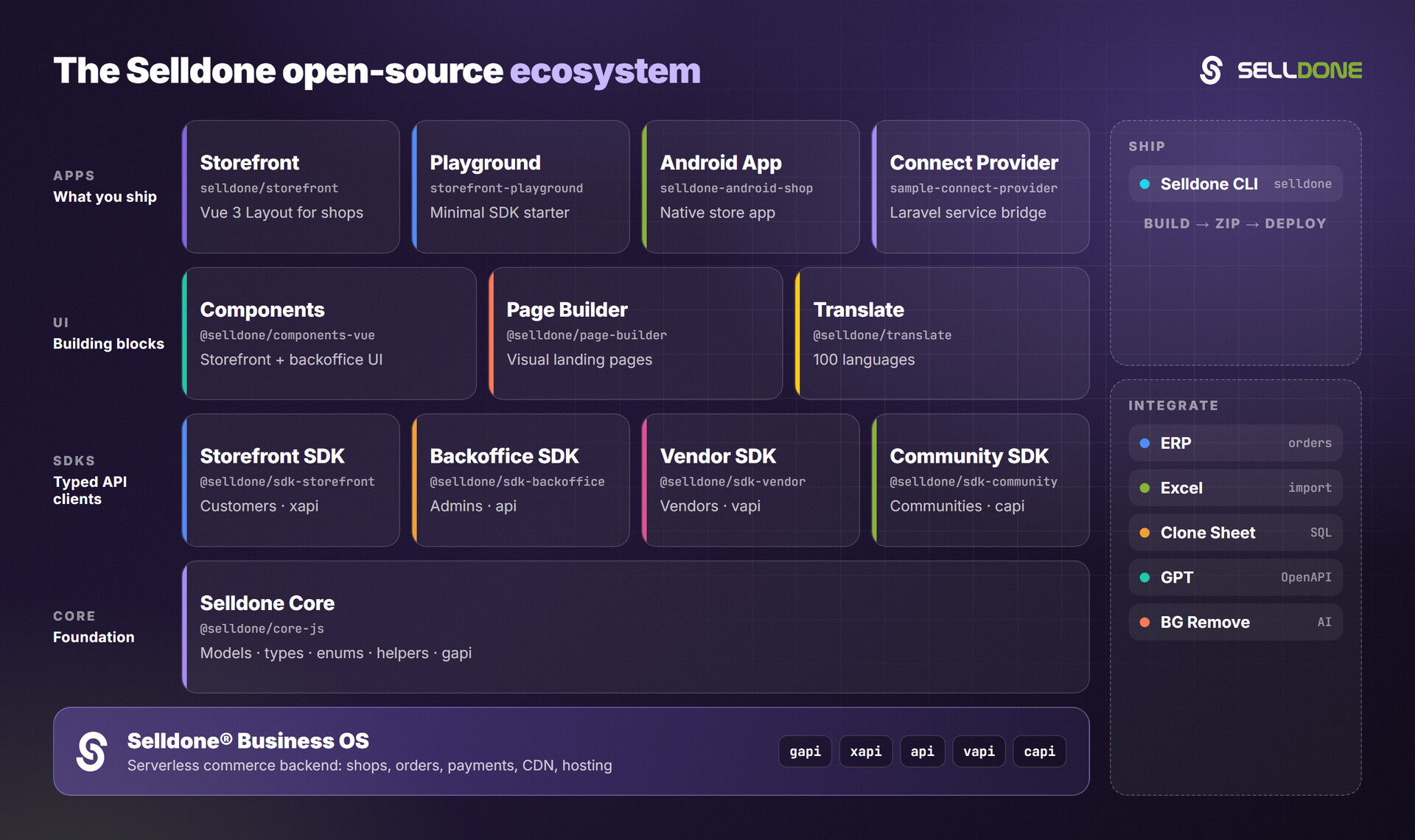
| Project | Why it matters here |
|---|---|
| Storefront | Production-ready Vue 3 + Vite storefront; the project the CLI deploys and scaffolds. |
| Storefront SDK | Customer-facing API client (window.$storefront) used inside a Layout. |
| Components | Pre-built Vue 3 commerce components for storefront and backoffice. |
| Page Builder | Visual drag-and-drop page builder; pages stored as structured JSON. |
| Core | Shared models, types, enums and helpers. |
| Storefront Playground | Minimal Storefront SDK starter. |
Contributions are welcome. Please read the organization contributing guide and code of conduct, then fork the repository, make your changes and open a pull request.
Development notes:
# Run your local checkout as the global "selldone" command (dev mode)
npm uninstall -g selldone-cli
npm install -g .

# Or run it without installing
npm run deploy        # same as: node main.mjs
Maintainers publish the package to npm with npm publish.
Please do not report security vulnerabilities in public issues. Follow the Selldone security policy and email security@selldone.com.
This project is licensed under the MIT License - see the LICENSE file for details.
Part of the Selldone® Business OS open-source ecosystem · selldone.com