


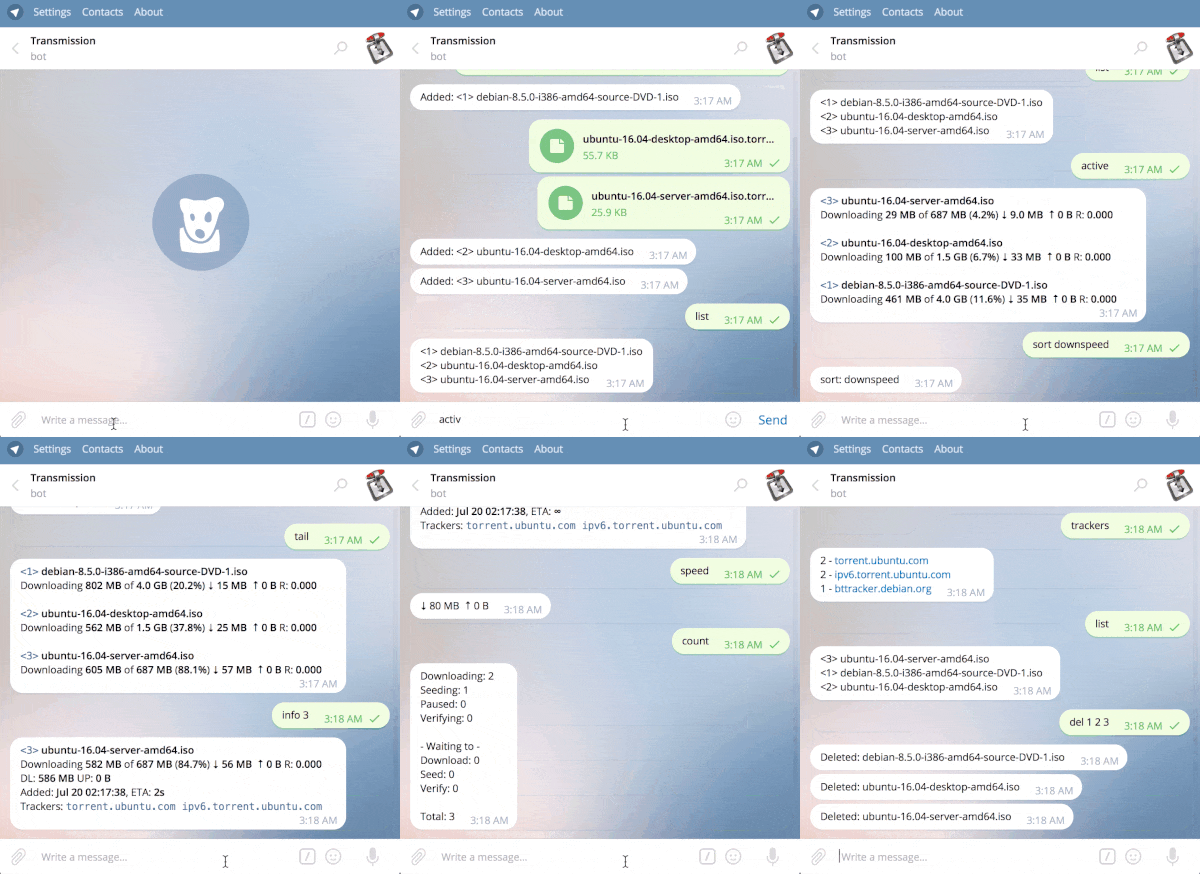

- 📋 Lists and cards: lists come ten torrents a page, with a button for each torrent that opens its card. A card pauses, resumes, verifies, reannounces, and removes its torrent, with or without its data (asking first), and
/filesskips files or changes their priority. - ➕ Adding: send magnet links, URLs, or
.torrentfiles, and choose their folder and labels, or add them paused. - 🔔 Notifications: torrents that finish, including those that finished while the bot was down; Transmission going down and coming back; torrent errors; and low disk space. Each chat chooses which it gets.
- 📊 Status and digests: a pinned status message that stays up to date, and a summary every day, week, or month.
- 🐢 Speed and order: global limits, turtle mode and its schedule, the download queue, labels, and moving data to another folder.
- 🔒 Careful: only the users you name may use the bot, secrets stay out of logs and replies, and a button never acts on another torrent than its own.
- 🧩 Runs anywhere: binaries for Linux, macOS, Windows, and FreeBSD, a container image for five platforms, and
-installto start it with the system.
-
Create a bot: send
/newbotto @BotFather, and copy the token it gives you. -
Start transmission-telegram with the placeholder master
1, a setup mode in which the bot tells whoever writes to it their Telegram user ID, and does nothing else:TT_BOT_TOKEN=123456789:replace-with-your-token transmission-telegram -master=1
-
Send your bot any message. It answers with your user ID.
-
Start it again with your user ID, and send
/help:TT_BOT_TOKEN=123456789:replace-with-your-token transmission-telegram -master=123456789
/whoami shows your user ID, and the chat's, at any time. When Transmission is not on the same machine, or asks for a password, add -url and TR_AUTH (see Configuration).
Download an archive for Linux, macOS, Windows, or FreeBSD from the Releases page. Each release includes SHA-256 checksums.
Go 1.26 or newer is required; an older 1.26 release downloads Go 1.26.10, the first without known vulnerabilities that affect the bot.
go install github.com/pyed/transmission-telegram/v2@latestThe image is ghcr.io/pyed/transmission-telegram, for amd64, arm64, armv7, armv6, and 386; see Docker.
-install saves the settings you give it, from flags, a config file, or the environment, to a config file only you can read, checks that Telegram takes the token and that Transmission answers, and installs a service that runs transmission-telegram -config FILE:
- Linux (systemd): run as yourself, a user service, which starts at boot when your user may linger; with
sudo, a system service that runs as you. - macOS (launchd): a LaunchAgent that starts when you log in; with
sudo, a LaunchDaemon that starts at boot. - Windows: from an elevated prompt, a service that starts with Windows and logs next to its config file.
TT_BOT_TOKEN=123456789:replace-with-your-token transmission-telegram -install \
  -master=123456789 -url=http://localhost:9091/transmission/rpc
It says where it saved the settings and where the logs are, and how to restart the service after editing the settings. transmission-telegram -uninstall removes the service and keeps the settings.
transmission-telegram is configured with command-line flags, a config file, or environment variables:
| Flag | Environment variable | Description |
|---|---|---|
-token |
TT_BOT_TOKEN (TT_BOTT legacy) |
Telegram bot token (required) |
-master |
TT_MASTERS |
Authorized Telegram user ID or username (required; repeatable, or separated by commas); 1 alone is the setup mode of the Quick start |
-url |
TR_URL |
Transmission RPC URL (default: http://localhost:9091/transmission/rpc) |
-username |
TR_AUTH (user:password) |
Transmission RPC username |
-password |
TR_AUTH (user:password) |
Transmission RPC password |
-config |
— | Read settings from a file (see below) |
-state |
TT_STATE |
File where the bot keeps what it remembers: where notifications go, each chat's sort order, status message and digest, which torrents were not done (default: transmission-telegram/state.json in the user's config directory; /config/state.json in the Docker image) |
-logfile |
— | Send logs to a file only its owner can read, moved aside to FILE.1 at 10 MiB (default: standard output) |
-watch-interval |
— | How often to check Transmission for notifications (default: 10s) |
-low-disk |
— | Free space below which chats that chose disk notifications are warned (default: 5GB; 0 turns it off) |
-no-live |
— | Don't keep editing replies to show live speeds |
-install |
— | Save the settings to a config file and start the bot with the system (see Start with the system) |
-uninstall |
— | Stop starting the bot with the system; its settings are kept |
-transmission-logfile |
— | Deprecated and ignored: notifications come from Transmission's RPC |
-version |
— | Print the version and exit |
Flags given on the command line win over a config file, and the file over environment variables. Prefer numeric Telegram user IDs for -master: a username its owner gives up can be claimed by someone else, who would then control the bot, so the bot warns about usernames at startup. Keep the token and passwords out of command lines on shared machines, where other users can see them; use the environment or a config file instead.
A config file holds a flag name and its value per line, without quotes; a true-or-false flag may stand alone, and lines starting with # are comments. Since it holds the bot token, make it readable only by you (chmod 600); the bot warns at startup when others can read it.
# transmission-telegram -config /path/to/transmission-telegram.conf
token = 123456789:replace-with-your-token
master = 123456789
url = http://localhost:9091/transmission/rpc
username = transmission
password = replace-with-the-passwordList commands show ten torrents a page, with ◀ ▶ buttons and a numbered button for each torrent that opens its card. A card shows the torrent's status, progress, speeds, time left, size, ratio, folder, labels, error, and trackers, with buttons to pause or resume it, refresh the card, verify its data, reannounce it, list its files, and remove it, or remove it with its data, which asks first. /head, /tail, /active, /speed, and /info keep their speeds up to date for about a minute, unless -no-live is set.
Card and file buttons keep working after the bot restarts. Page buttons, and the question /deldata asks, are forgotten when it does; send the command again.
/sort orders this chat's lists, and is remembered: id, name, age, size, progress, downspeed, upspeed, download, upload, or ratio, with rev before it for the reverse, as in /sort rev size.
/add takes magnet links and links to .torrent files, any number of them, and then options:
d=FOLDER(ordir=) downloads into that folder;l=LABEL(orlabel=) labels them, and may be given more than once (labels need Transmission 3.00 or newer);pausedadds them without starting them.
Pasting a link without /add also adds it, with the options after it, and so does sending a .torrent file, with the options as its caption. A torrent Transmission already has is reported as already added.
/limit shows the global speed limits and turtle mode; /limit down 500 up 100 sets the limits in KB/s, 0 or off removes one, and /limit off removes both. /downlimit and /uplimit set one each.
/turtle switches turtle mode, Transmission's alternative speed limits, on or off. /turtle limits 50 10 sets those limits, and /turtle schedule 01:00-07:00 weekdays has Transmission switch turtle mode on and off by itself; give the days as weekdays, weekends, or names such as mon,wed,fri, and /turtle schedule off to stop.
The bot watches Transmission over RPC and tells chats about:
- completed: torrents that finish downloading, each with a button that opens its card, or in one message when more than three finish at once; and those that finished while the bot was not running, when it is back.
- outages: Transmission not answering three checks in a row, once, and answering again.
- errors: torrents that get a new tracker or local error (not passing tracker warnings), grouped by message.
- disk: free space where Transmission downloads falling below
-low-disk, once until it recovers.
Send /notify in a chat to see what it gets, and /notify on, /notify off, or /notify <kind> on|off to change it. Until any chat chooses, completions and outages go to the chat a master used last, as in earlier versions; the bot remembers that chat across restarts in its state file. Notifications Telegram does not take at first are tried again for a day.
/status pins a message in the chat, without notifying anyone, that shows the speeds against the limits in force, what Transmission transferred this session, how many torrents are downloading, seeding, and failing, and the free space. The bot updates it every minute, and its 🔄 button at once; /status again moves it to a new message, and /status off stops it. In a group, the bot needs the right to pin messages.
/digest 08:00 sends a summary every day at 08:00: the torrents that finished and were added since the last one, with their labels, what Transmission uploaded and downloaded, the torrents by state with their errors, and the free space. /digest 08:00 weekly sends it on Mondays, /digest 08:00 monthly on the 1st, /digest now shows one at once, and /digest off stops it. A digest missed while the bot was down comes when it is back. Times are in the bot's time zone, which the TZ environment variable sets in Docker.
Add the bot to a group to use it there; only masters can, and messages from anyone else are ignored. Commands may carry the bot's name, as in /list@YourBot, and commands meant for another bot are ignored. With privacy mode on, as BotFather sets it, the bot sees only commands and replies to its messages, so add links with /add.
Torrent lists
| Command | Aliases | What it does |
|---|---|---|
/list [tracker] |
/li, /ls |
List torrents, or only those of a tracker |
/head [n] |
/he |
Show the first n torrents (5), updating live |
/tail [n] |
/ta |
Show the last n torrents (5), updating live |
/active |
/ac |
Show the torrents transferring now, updating live |
/downs |
/dg |
List downloading and queued torrents |
/seeding |
/sd |
List seeding and queued torrents |
/paused |
/pa |
List stopped torrents |
/checking |
/ch |
List torrents being verified |
/errors |
/er |
List torrents with errors, and why |
/latest [n] |
/la |
List the n newest torrents (5) |
/search <words> |
/se |
Find torrents by name |
/labels [label|-] |
— | Count torrents per label, or list a label's torrents |
/queue [top|up|down|bottom <id…>] |
/qu |
Show the download queue, or move torrents in it |
/info <id…> |
/in |
Show torrents' details, with buttons |
/files <id> |
/fi |
List a torrent's files, to skip them or change their priority |
Torrent control
| Command | Aliases | What it does |
|---|---|---|
/add <link…> [d=folder] [l=label] [paused] |
/ad |
Add torrents from links or magnets, or send .torrent files with the options as a caption |
/stop <id…|all> |
/sp |
Pause torrents |
/start <id…|all> |
/st |
Resume torrents |
/check <id…|all> |
/ck |
Verify torrents' data |
/move <id…> <folder> |
/mv |
Move torrents' data to another folder |
/setlabel <id…> <label…|-> |
— | Set torrents' labels, or remove them with - |
/reannounce <id…|all> |
/ra |
Ask trackers for peers now |
/del <id…> |
/rm |
Remove torrents and keep their data |
/deldata <id…> [confirm] |
— | Remove torrents and delete their data, after asking |
Session and settings
| Command | Aliases | What it does |
|---|---|---|
/status [off] |
— | Pin a status message that stays up to date |
/digest [HH:MM [weekly|monthly]|now|off] |
— | Get a summary every day, week, or month |
/speed |
/ss |
Show the current speeds, updating live |
/stats |
/sa |
Show session and total statistics |
/count |
/co |
Count torrents in each state |
/trackers |
/tr |
Count torrents per tracker |
/sort [rev] <method> |
/so |
Choose the order of lists |
/turtle [on|off|schedule …|limits …] |
/alt, /tu |
Switch the alternative speed limits, or set their schedule or limits |
/free [path] |
/space, /disk |
Show free disk space |
/port |
— | Check whether peers can reach Transmission's port |
/limit [down N] [up N] | off |
— | Show or set the global speed limits, in KB/s |
/downlimit [KB/s|off] |
/dl |
Show or set the global download limit; 0 or off removes it |
/uplimit [KB/s|off] |
/ul |
Show or set the global upload limit; 0 or off removes it |
/downloaddir <path> |
/dd |
Set the default download folder |
/notify [on|off|<kind> on|off] |
— | Choose the notifications this chat gets |
/whoami |
— | Show your Telegram user ID and this chat's ID |
/version |
/ver |
Show Transmission's and the bot's versions |
/help |
— | List the commands |
The command menu, for BotFather
The bot sets Telegram's command menu itself, and keeps one set in BotFather. To set it yourself, send /setcommands to @BotFather, choose the bot, and paste:
list - List torrents, or only those of a tracker
head - Show the first n torrents (5), updating live
tail - Show the last n torrents (5), updating live
active - Show the torrents transferring now, updating live
downs - List downloading and queued torrents
seeding - List seeding and queued torrents
paused - List stopped torrents
checking - List torrents being verified
errors - List torrents with errors, and why
latest - List the n newest torrents (5)
search - Find torrents by name
labels - Count torrents per label, or list a label's torrents
queue - Show the download queue, or move torrents in it
info - Show torrents' details, with buttons
files - List a torrent's files, to skip them or change their priority
add - Add torrents from links or magnets, or send .torrent files with the options as a caption
stop - Pause torrents
start - Resume torrents
check - Verify torrents' data
move - Move torrents' data to another folder
setlabel - Set torrents' labels, or remove them with -
reannounce - Ask trackers for peers now
del - Remove torrents and keep their data
deldata - Remove torrents and delete their data, after asking
status - Pin a status message that stays up to date
digest - Get a summary every day, week, or month
speed - Show the current speeds, updating live
stats - Show session and total statistics
count - Count torrents in each state
trackers - Count torrents per tracker
sort - Choose the order of lists
turtle - Switch the alternative speed limits, or set their schedule or limits
free - Show free disk space
port - Check whether peers can reach Transmission's port
limit - Show or set the global speed limits, in KB/s
downlimit - Show or set the global download limit; 0 or off removes it
uplimit - Show or set the global upload limit; 0 or off removes it
downloaddir - Set the default download folder
notify - Choose the notifications this chat gets
whoami - Show your Telegram user ID and this chat's ID
version - Show Transmission's and the bot's versions
help - List the commands
docker run -d --name transmission-telegram \
  --restart unless-stopped \
  --add-host=host.docker.internal:host-gateway \
  -e TT_BOT_TOKEN="<YOUR_BOT_TOKEN>" \
  -e TR_URL="http://host.docker.internal:9091/transmission/rpc" \
  -e TR_AUTH="<username>:<password>" \
  -e TZ="Etc/UTC" \
  -v transmission-telegram:/config \
  ghcr.io/pyed/transmission-telegram:latest \
  -master="<YOUR_NUMERIC_TELEGRAM_ID>"
The example connects to Transmission on the Docker host. When both run in Compose, use the Transmission service's name instead. The /config volume keeps the bot's state file, such as where notifications go, when the container is replaced. Set TZ to your time zone, such as Europe/Berlin, for /digest and /status times.
Create a local .env file (never commit it):
TT_BOT_TOKEN=123456789:replace-with-your-token
TELEGRAM_MASTER_ID=123456789
TRANSMISSION_PASSWORD=replace-with-a-strong-password
Then use:
services:
  transmission:
    image: lscr.io/linuxserver/transmission:latest
    container_name: transmission
    environment:
      PUID: 1000
      PGID: 1000
      TZ: Etc/UTC
      USER: transmission
      PASS: ${TRANSMISSION_PASSWORD}
    volumes:
      - /path/to/config:/config
      - /path/to/downloads:/downloads
    ports:
      - "9091:9091"
      - "51413:51413"
      - "51413:51413/udp"
    restart: unless-stopped

  telegram-bot:
    image: ghcr.io/pyed/transmission-telegram:latest
    container_name: transmission-telegram
    depends_on:
      - transmission
    restart: unless-stopped
    environment:
      TT_BOT_TOKEN: ${TT_BOT_TOKEN}
      TR_URL: http://transmission:9091/transmission/rpc
      TR_AUTH: transmission:${TRANSMISSION_PASSWORD}
      TZ: Etc/UTC
    volumes:
      - /path/to/bot-config:/config
    command: ["-master=${TELEGRAM_MASTER_ID}"]
The image runs as user 1000:1000, so a directory mounted at /config must be writable by that user (sudo chown 1000:1000 /path/to/bot-config). Without a writable /config, the bot still runs, but forgets its settings when the container is replaced.
- Treat the Telegram bot token and Transmission credentials as secrets. Keep them in the environment, a config file only you can read, or a secret store, and never commit
.envfiles. The bot never logs them, nor the credentials in a Transmission URL. - Prefer numeric Telegram user IDs in
-master, especially for bots that can delete torrent data. - Keep Transmission's RPC on a trusted network, or behind access controls; never expose an endpoint without a password to the internet.
- Buttons name torrents by ID and info-hash, so an old button never acts on another torrent that came to have its ID. Removing a torrent's data always asks first,
/deldataincluded; only/deldata <id…> confirm, meant for scripts, deletes at once, so use it carefully.
Please report vulnerabilities according to SECURITY.md, not in a public issue.
- Install path: install with
go install github.com/pyed/transmission-telegram/v2@latest. The old…/cmd/bot@latestinstalled a development snapshot namedbot. - Docker image: use
ghcr.io/pyed/transmission-telegram. Thepyed/transmission-telegramimage the 2.1 README named was never published. Mount a volume at/config, where the bot keeps its state file. - State file: the bot now remembers, across restarts, where notifications go, each chat's sort order, and which torrents were not done, so that those finishing while it is down are announced when it is back.
/deldataasks first: it shows the torrents and asks with buttons;/deldata <id…> confirmdeletes at once, as before.0removes a limit:/downlimit 0and/uplimit 0, andoff, now remove the limit, rather than setting one of 0 KB/s that stalls every transfer.- Groups: commands addressed to another bot, as in
/stop@OtherBot all, are now ignored. -transmission-logfileis ignored: Transmission 4 does not log completions at its default level, so notifications come from RPC on every version. Remove the flag when convenient.- Command menu: the bot no longer replaces a menu set in BotFather.
- Replies use Telegram's HTML formatting, and show torrent names and paths exactly as they are.
Every command, alias, flag, and environment variable of 2.1 still works, and so do the buttons of 2.1 cards and the pause and resume buttons of 2.0 cards.
See CONTRIBUTING.md for the local checks and the contribution workflow.
Licensed under the Apache License 2.0.