

Native software and open-source integrations for Odoo.
Oudu Software builds focused tools around Odoo: a native desktop client for working across Odoo instances, printing reports and using local files, and edge hardware that connects scanners, scales, receipt printers and cameras to Odoo.
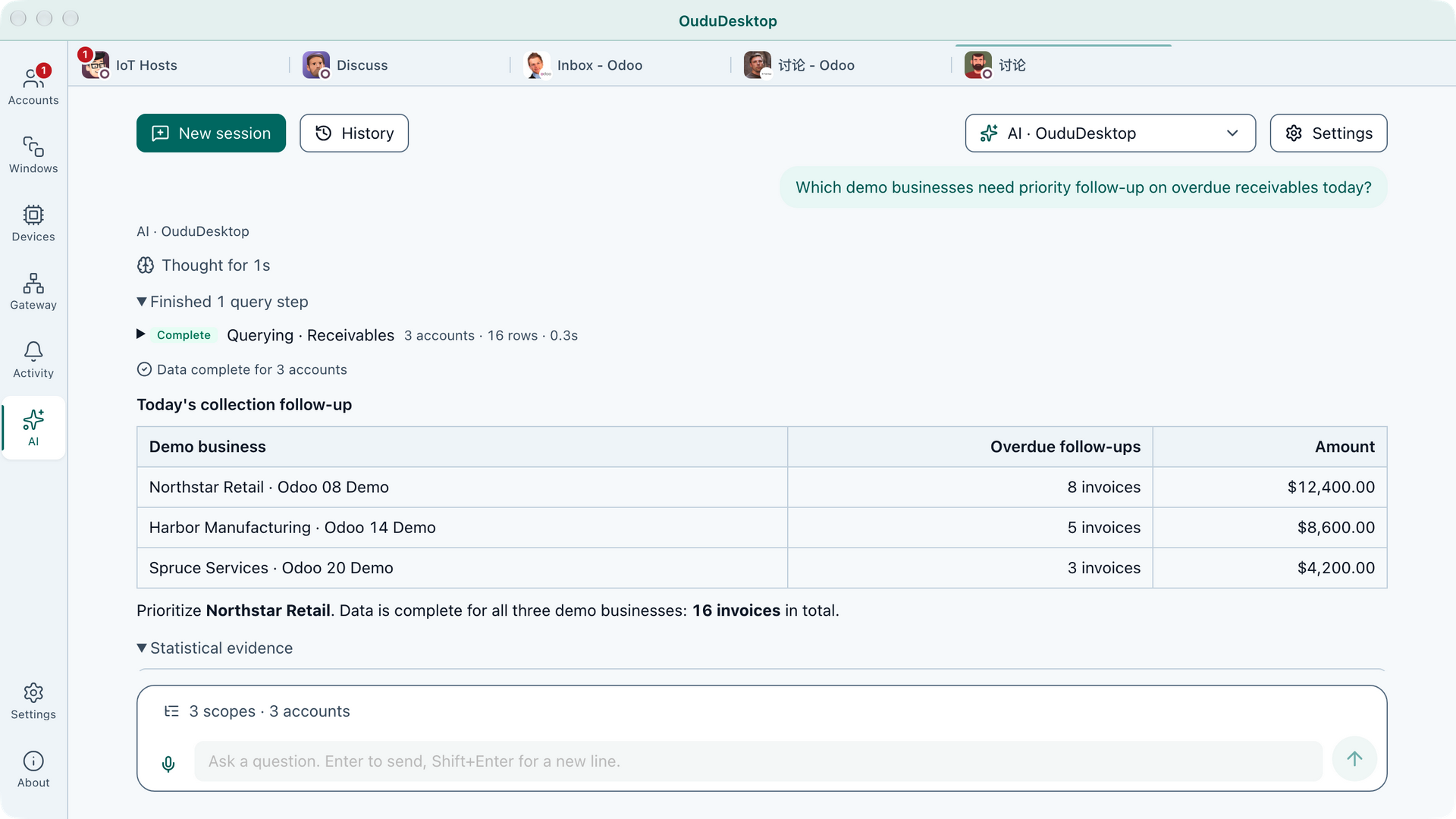
A free native Odoo desktop client for Windows, macOS and Linux. Connect to Odoo 8–20 and keep multiple servers and accounts open in isolated sessions.
- Ask the AI Center read-only questions across the accounts you select, with sources you can verify.
- Work across multiple Odoo instances and accounts side by side.
- Print Odoo reports directly through system and network printers.
- Use local files, screenshots, cameras, microphones and scanners through explicit controls.
- Bring Odoo into native windows, notifications, downloads and shortcuts.
Download Oudu Desktop · Microsoft Store
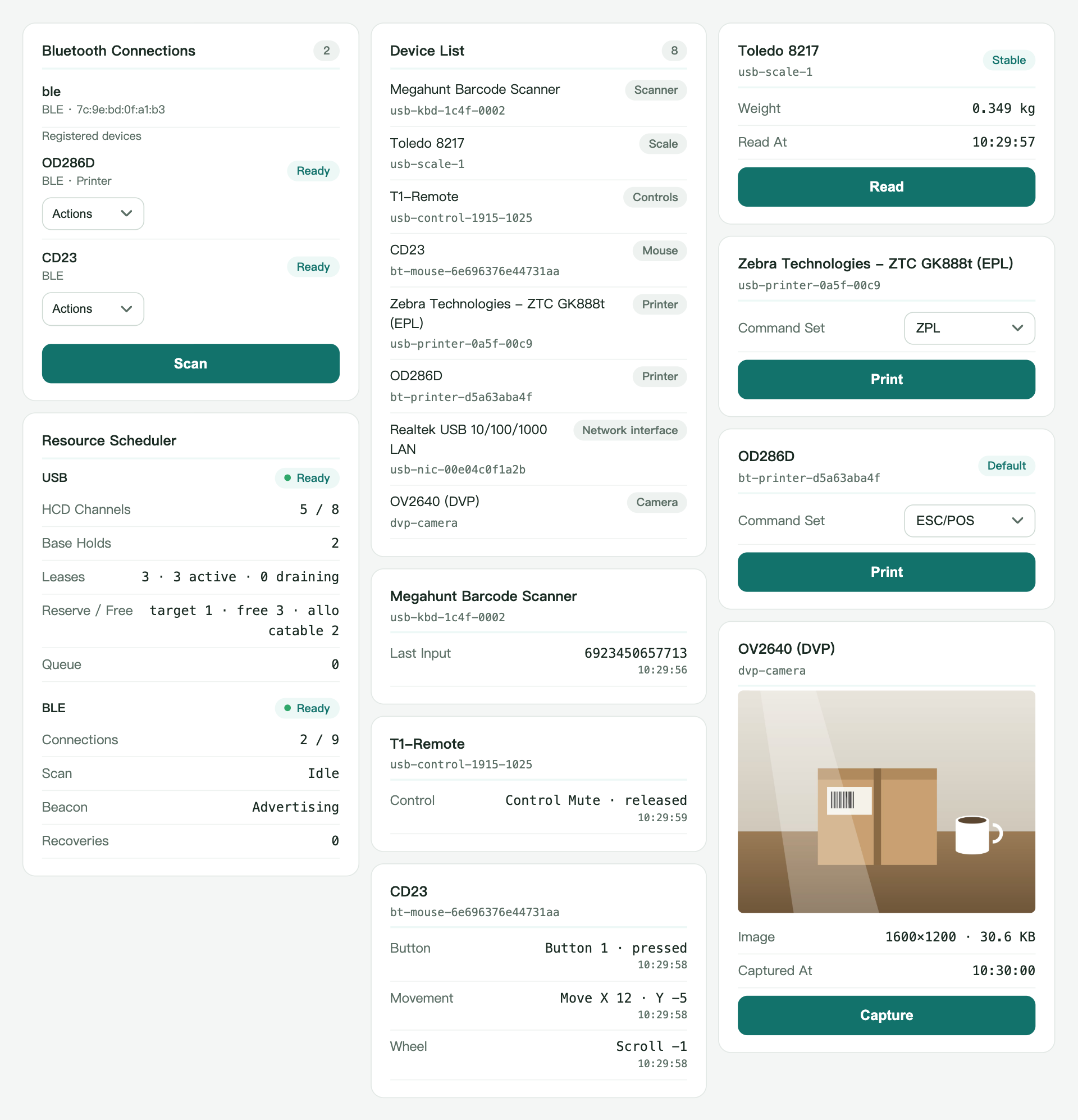
A native Odoo ESP32 edge hardware gateway. It reduces the IoT Box access layer to a single chip and works with standard Odoo 8–20 without any Oudu module.
- Connect barcode scanners, scales, receipt printers and cameras through the IoT Box and ePOS interfaces Odoo already speaks.
- Use them natively in Point of Sale and other Odoo apps.
- Flash an ESP32 board online from the browser and join it to Wi-Fi from its setup page.
- Manage each host from its own gateway page: status, network clock, pin configuration and firmware update.
Flash Oudu IoT online · Learn more
Free LGPL-3 server modules for Odoo 13–20. They are optional: they add shared Oudu Software settings, instance identity, capability discovery, Oudu Desktop policies and Oudu IoT host management without modifying Odoo itself.
oudu_base— shared settings, instance name/color/icon and the public capability manifest.oudu_desktop— desktop integration guidance, report printing policy, file upload policy and local source controls.oudu_iot— Oudu IoT host list, browser connection test, gateway shortcut and Point of Sale setup hint.
Website · Oudu Desktop · Oudu IoT · Contact
面向 Odoo 的原生软件与开源集成。
欧度软件围绕 Odoo 打造专注的工具:原生桌面客户端让用户同时处理多个 Odoo 实例、直接打印报表并使用本地文件;边缘硬件把扫码枪、电子秤、小票打印机和摄像头接入 Odoo。
免费的 Windows、macOS 和 Linux 原生 Odoo 桌面客户端,可连接 Odoo 8–20,并以隔离会话同时运行多个服务器和账号。
- AI 中心在你选定的账户范围内只读跨账户查询,并给出可核验的来源;
- 多实例、多账号并行工作;
- 通过系统及网络打印机直接打印 Odoo 报表;
- 在明确授权下使用本地文件、截图、相机、麦克风和扫描仪;
- 获得原生窗口、通知、下载和快捷键体验。
免费下载 Oudu Desktop · Microsoft Store
Odoo 原生 ESP32 边缘硬件网关,把 IoT Box 接入层精简到一颗芯片;不装任何欧度模块,也能用于标准 Odoo 8–20。
- 扫码枪、电子秤、小票打印机和摄像头经 Odoo 原生 IoT Box 与 ePOS 接口接入;
- 在 POS 及其他 Odoo 应用中原生使用;
- 在浏览器里在线刷写 ESP32 开发板,并在设备配网页加入 Wi-Fi;
- 每台主机自带网关页:状态、网络时钟、引脚配置与固件升级。
适用于 Odoo 13–20 的免费 LGPL-3 服务端模块,按需安装,在不修改 Odoo 源码的前提下,提供统一的欧度软件设置、实例标识、能力发现、Oudu Desktop 策略与 Oudu IoT 主机管理。
oudu_base— 统一设置、实例名称/颜色/图标与公开能力清单;oudu_desktop— 桌面集成引导、报表打印策略、文件上传策略与本地来源控制;oudu_iot— Oudu IoT 主机清单、浏览器连接测试、网关入口与 POS 接入提示。
官网 · Oudu Desktop · Oudu IoT · 联系