Repository navigation
wrong layout for controller when expanding inventory #46

Description

Game version
D2R RotW 3.4.95032, on linux
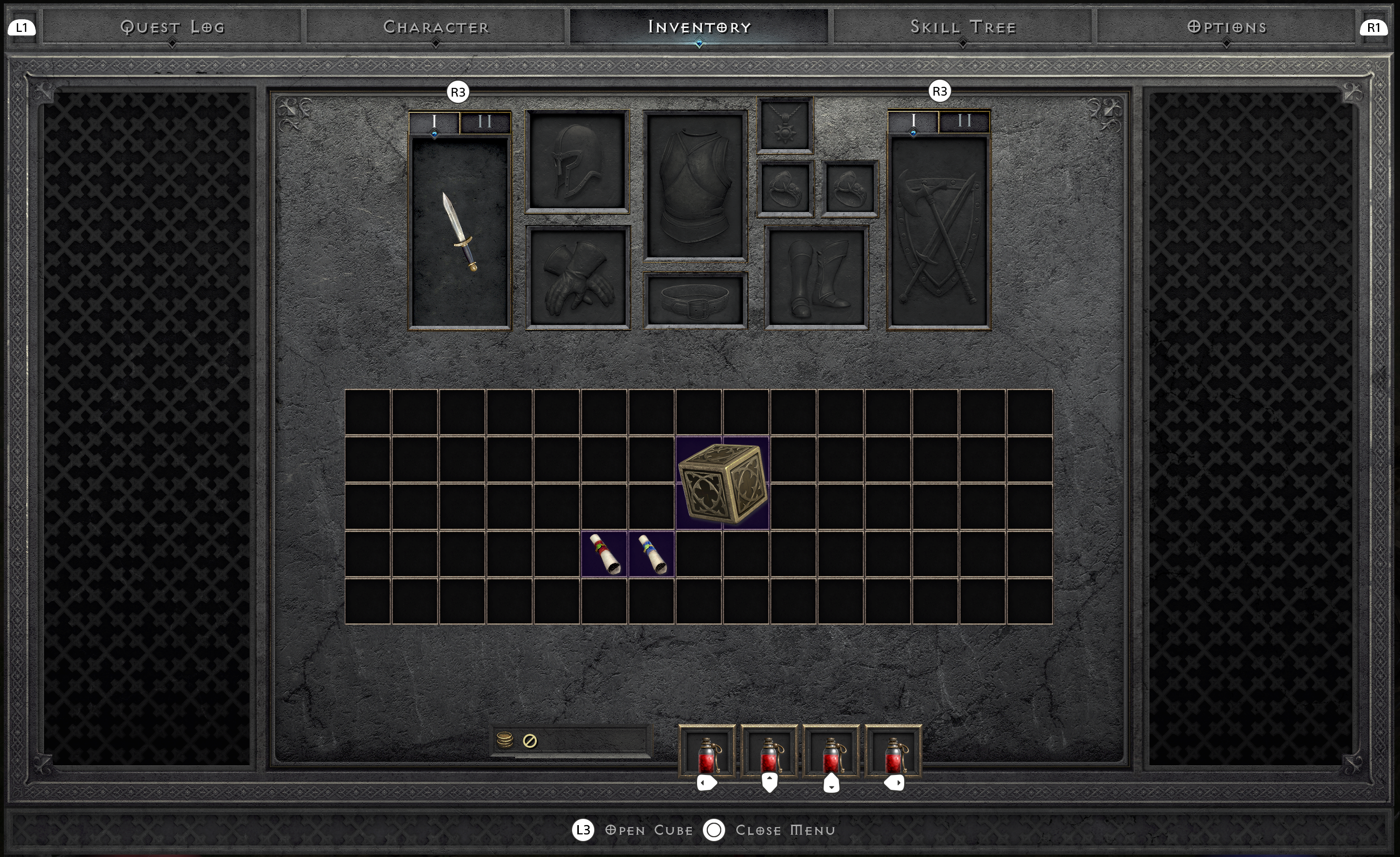
The expanded layout works with mouse and keyboard, but break for controller:

This is 5x12 layout
I have a working version here, fixed by claude. I could open a PR if you ok with using AI.
Metadata
Metadata
Assignees
Labels
No labels
Activity
leduythuccs commentedon Nov 10, 2026
Here is the result after the fix, this is 5x15
mapron commentedon Nov 10, 2026
@leduythuccs have no idea how to test with controller. I know by debug dumps I saw ih looks similar to first amage you posted, Was thinking too look at it later. I understood it has transparent backround so I have to redo my back filling stuff, I also want like use controller back for main version as well, so I need to do a lot
I watched commit you get with AI, I don't like draw blended for now, but as temporary fix I will accept a PR.
And will refactor code later. Go ahead
mapron commentedon Nov 10, 2026
I am anti-gen-AI, but not zealot, have to compromise. it is not new 5000 lines of code, we get there.
leduythuccs commentedon Nov 11, 2026
I'm not too comfortable to merge this code to main, given that i don't understand most of it 🙁 But i think it's not critical to fix, not a lot of user is using a controller to play D2R on PC
I would keep the fix in my local, but here is the idea behind the fix to anyone would love to attempt:
(maxCols − cols) * cellWidth / 2offsetdrawBlendedis actually not needed, usingdrawwill result in the filled background, which is fine. I added it in because I like the default menu backgroundmapron commentedon Nov 11, 2026
I mean I like it too, if I figured how to reuse back for MKB, i would not generate procedural bakc texture.
I am not in any rush, so take your time. For me is top1 priority is crash fixes. There no known crashes with this feature (though MKB is not perfect. if you were on Llama Stream he tried it and like rightmost 20% of panel was transparent for some reason. no idea why and where is mistake).
mapron commentedon Nov 11, 2026
I mean there are probably controller emulator for PC or something, if I emulate one, then D2R automatically will switch to controller UI? how it works? plug-unplug and it switches UI?
leduythuccs commentedon Nov 11, 2026
I'm using a Ps5 controller, and this is how it behave:
If the game is showing MKB layout and i press a button on the controller, the UI switch
If the game is showing controller layout, I press a keyboard key (mouse seem not to work), the UI switch back
IIRC, the layout will not change if you are in menu/inventory/..., only when you are playing.
mapron commentedon Nov 11, 2026
Did not help much with understanding how I can test this. One way just copy json profile and see but I am not so sure that did not miss anything important.
mapron commentedon Nov 11, 2026
Can you try to change code so that all 4 sprites (or 8 if we count loweres but they like just scaled down version) use transparent background, so remove that texture I generated (tile with stone texture) and move all 4 to that background we have for controller?
well MKB version should still be non-full screen but a chore of dealing with non-existing universally textured background will be gone.
Not sure if it is a big ask but that would be great.
mapron commentedon Nov 11, 2026
data:data\hd\global\ui\controller\panel\mainpanelbg.sprite
this is path to this interesting controller back (it is fullscreen though).
so 1) either make a cut of it and generate back for right panel
2) somehow reuse it with offsets or something. Did not notice that json layouts support crop though.
Also did not found reference to mainpanelbg in ui. maybe harcode? I dunno.
leduythuccs commentedon Nov 12, 2026
Added it in #49 , I need to scale it up, because somehow the MKB panel is larger the controller panel.