Repository navigation
Hot keys and text block #38
Description

It'd be very useful
- to have hot keys for switching between upper case/lower case
- to assign an arbitrary rectangle text block and be able to cut/copy/paste/move it
I just very recently migrated from Win to LxMint and try to omit Win totally. However, I used EditPad Light very intensively which has the two above useful options. Now, I use XED, which is really excellent. Still I miss these options.
Activity
ocafebabe commentedon Oct 6, 2016
+1 Block or column selection (a la Sublime Text) is a must have!
starkgate commentedon Aug 26, 2017
I'd also like to see the block selection feature. Using the alt+shift keyboard shortcut like in Notepad++ would be ideal.
jondo commentedon May 23, 2019
This issue contains two separate features. According to the duplicates (#133, #223), it should just focus on the "text block / column mode" topic. Please rename it to make it findable and move "hot keys for switching between upper case/lower case" into a new issue.
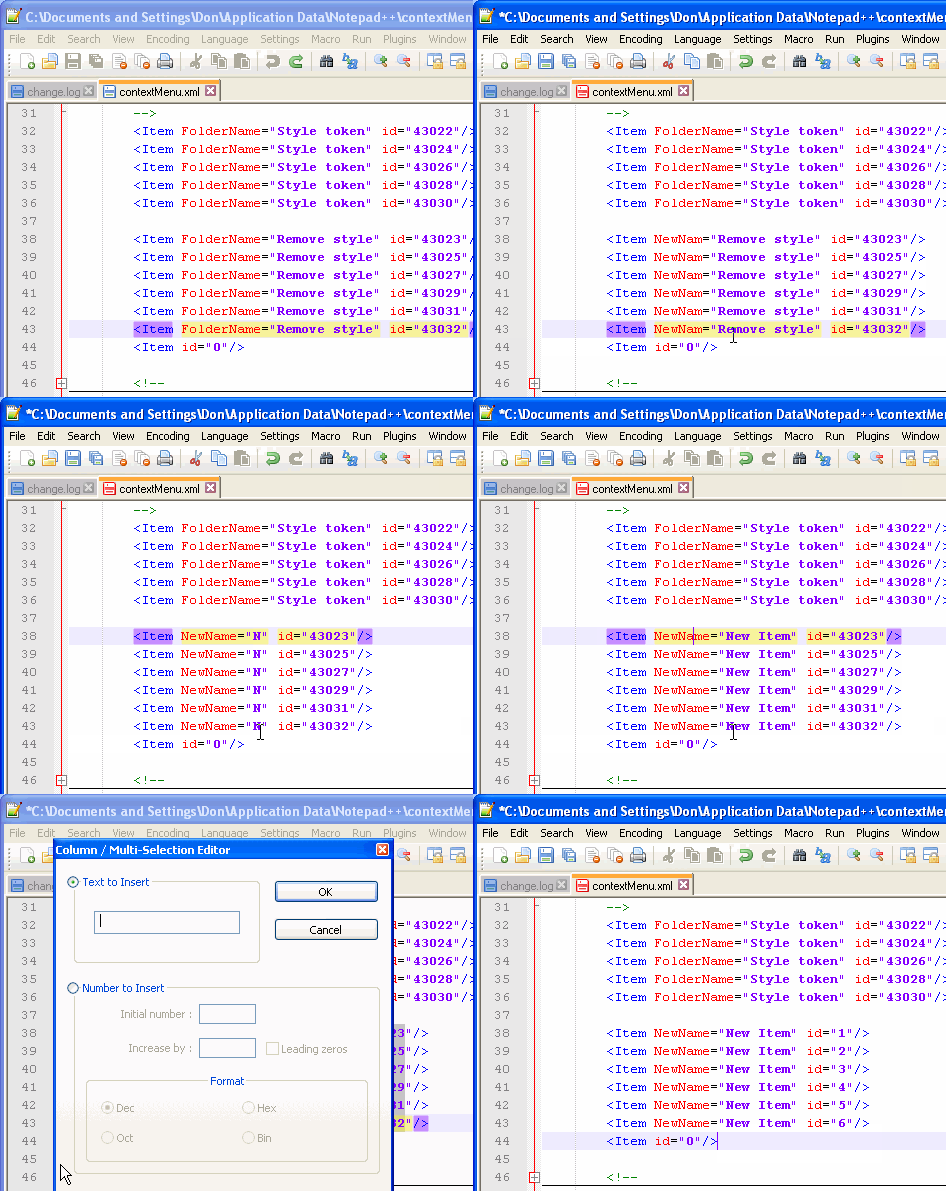
See the following animation (from Notepad++) for an example of column mode:
RogerLevy commentedon Mar 17, 2020
+1 and please rename the request to help it gain traction! @Napaja
ocafebabe commentedon Mar 17, 2020
This feature request is more than 3 years old so don't hold your breath...
silocoder commentedon Aug 1, 2020
+1 would be very handy
OS2User commentedon Dec 21, 2022
+1, but the columnar text block manipulation needs to exceed what Notepad++ can do.
I would like to have something like in the 1989+ era QEdit for DOS and its successor TSE (The SemWare Editor) where one can freely rearrange (move/cut/paste) a selected columnar block of text within the document.
That feature is sorely missed in XED.
zpangwin commentedon Dec 3, 2024
I am able to do this part in Xed 3.4.5
Shift+ arrow keysCtrl+Uto switch to uppercase orCtrl+Lto switch to lowercase orCtrl+Tfor Title caseNot sure from description but if this means column editing like in jondo's comment above (present in Sublime Text using
Shift+Alt+up/down arrowsand also in Notepad++ apparently) then I too would love that feature.Disclaimer: I am using Fedora Cinnamon instead of Mint, but it's still Cinnamon/Xed so I don't see why OS would matter.
duncanj commentedon Feb 18, 2025
#671 also requests similar.
yixophoenix commentedon Apr 9, 2026
Holy shit how does this still not exist???
fashion64 commentedon Oct 15, 2026
+1 for block/rectangular selection — this is the one feature I miss most since switching to xed.
Suggested interaction: hold Alt and drag with the mouse to select a rectangular region (instead of whole lines). This is how Keil works, which I use daily. Screenshot attached.
This complements the keyboard-based approaches mentioned above (Notepad++ Alt+Shift, Sublime Shift+Alt+arrows) — a mouse-based rectangular selection feels more natural for quick edits.
Use case: I often need to cut/copy/paste aligned columns in log files, CSV data and code. Currently I have to open another editor (Kate/Geany) just for this.