

Orphanix Media Cleanup is an intelligent, high-performance media management and storage optimization plugin engineered for WordPress. It accurately detects unused, unattached, and orphaned media assets, locates broken media references (404 links) across your posts and pages, and safely reclaims valuable web hosting storage without risking critical site content.
Unlike simplistic cleanup tools that only check post attachment tables, Orphanix combines deep database introspection with live frontend output validation—safeguarding dynamically rendered assets used by visual page builders, widgets, menus, and theme templates.
- Content Creators & High-Volume Bloggers: Websites with years of revisions, draft deletions, and unused image variations bloating the
/wp-content/uploads/directory. - WooCommerce Store Owners: E-commerce stores with obsolete product galleries, replaced variant images, and orphaned thumbnails consuming expensive SSD hosting storage.
- Web Agencies & Maintenance Professionals: Developers managing high-traffic client websites who need periodic audits, automated storage cleanup, and broken image detection.
- Designers & Page Builder Users: Sites built using Elementor, Gutenberg blocks, or Advanced Custom Fields (ACF) where dynamic image references must never be accidentally deleted.
- Reclaim Hosting Disk Space: Instantly free up gigabytes of disk space by eliminating unreferenced media files and unneeded auto-generated thumbnails.
- Eliminate Broken 404 Media: Discover missing image links and broken assets before they damage your user experience and SEO ranking.
- Zero Accidental Deletions (Protected Live Scan): Advanced frontend simulation verifies whether media is loaded in active hero sections, sliders, or dynamic builders before flagging it.
- Two-Step Safe Trash & Restore: Files are moved to an isolated plugin trash staging folder first. You can preview, verify, and restore any file with 1-click before final permanent deletion.
- 100% Private & Server-Native: Zero external API calls, zero telemetry, zero data leaves your server.
- Unused & Orphaned File Detection: Scans the physical
/uploads/directory against all recorded database references to detect abandoned images, videos, audio, and documents. - Unattached Asset Locator: Identifies media files uploaded directly to the media library that are not attached to any parent post or page.
- Filter by File Type: Granular filtering across images (
.jpg,.png,.webp,.svg,.gif), documents (.pdf,.docx), audio, and video files.
- Missing Media Scanner: Checks all post content, excerpts, and pages for missing images or corrupt URLs.
- SEO Health Protection: Identifies broken asset paths before search engine crawlers index 404 media errors.
- Frontend Rendering Verification: Validates rendered DOM elements to ensure dynamically loaded assets and background CSS images are recognized as active.
- Builder-Level Compatibility: Deep detection for Elementor, Gutenberg, WooCommerce, ACF (Advanced Custom Fields), widgets, navigation menus, and active theme templates.
- Staged Deletion: Never directly unlinks files without safety barriers. Flagged assets are moved into a secure quarantine directory.
- One-Click Instant Restore: Easily restore mistakenly flagged media back to its exact original uploads path.
- Automatic Thumbnail Purge: On permanent deletion, cleanly deletes all thumbnail crops (
150x150,300x300,1024x1024, custom sizes) to prevent residual clutter.
- Interactive Dashboard: Visual reports illustrating reclaimed disk space, scan histories, categorized file distributions, and cleanup timelines.
- Memory-Efficient Batch Engine: Optimized chunking algorithms that process tens of thousands of media records without memory exhaustion or server timeouts.
- WP-CLI Support: Built-in command line interface support for automated server-side scheduled cleanups.
| 1. Dashboard Overview | 2. Media Scan Wizard |
|---|---|
 |
 |
| 3. Advanced Scan Configuration | 4. Real-Time Scan Progress |
|---|---|
 |
 |
| 5. Detailed Scan Results | 6. Broken Media Scanner |
|---|---|
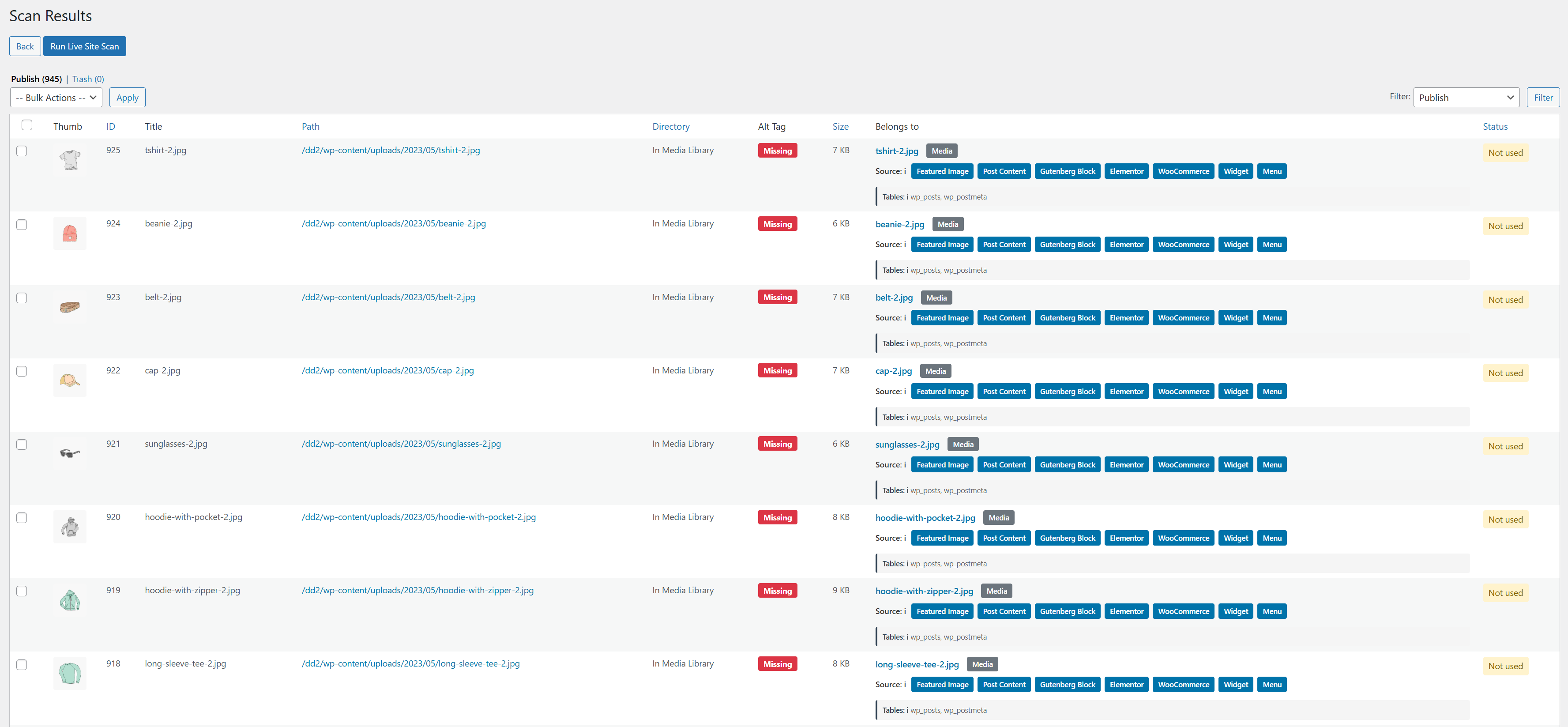 |
 |
| 7. Production Live Site Scan | 8. Analytics & Storage Insights |
|---|---|
 |
 |
┌─────────────────┐       ┌─────────────────┐       ┌─────────────────┐
│   1. SCAN       │  ──>  │   2. REVIEW     │  ──>  │   3. CLEAN      │
│ Choose Media,   │       │ Inspect list,   │       │ Move to Trash,  │
│ Broken, or Live │       │ preview images, │       │ verify or       │
│ Site scan type. │       │ confirm usage.  │       │ 1-Click Restore.│
└─────────────────┘       └─────────────────┘       └─────────────────┘
| Specification | Requirement / Details |
|---|---|
| WordPress Core | Version 5.0 or higher (Tested up to 6.9) |
| PHP Version | 7.4 or higher (Fully compatible with PHP 8.0, 8.1, 8.2, 8.3) |
| Builders Supported | Gutenberg, Elementor, Divi, Beaver Builder, WPBakery |
| E-Commerce | WooCommerce (Products, Variations, Downloadable files) |
| Custom Fields | Advanced Custom Fields (ACF), Meta Box, Pods |
| WP-CLI Support | Yes, full native CLI commands included |
| License | GNU General Public License v2 or later (GPLv2) |
- Open your WordPress dashboard and navigate to Plugins > Add New.
- In the search bar, type Orphanix Media Cleanup.
- Click Install Now and then Activate.
- Click on Orphanix in the admin sidebar to start your first cleanup scan.
- Download
orphanix-media-cleanup.zipfrom WordPress.org or clone this repository:git clone https://github.com/limpu/Orphanix.git wp-content/plugins/orphanix-media-cleanup
- Activate Orphanix Media Cleanup from the Plugins menu.
Orphanix Media Cleanup is built with a strict Privacy-First architecture:
- No External Communication: Operates 100% locally on your WordPress host.
- No Telemetry or Tracking: Does not collect, transmit, or monetize site metrics or user data.
- Admin-Restricted Access: All destructive operations require administrator capabilities (
manage_options) and cryptographic nonce verification.
Orphanix Media Cleanup is open-source software licensed under the GNU General Public License v2.0 or later.
Crafted with care by Atique Ullah (limpu).