|
 |
Web Testing • Mobile Testing • API Testing
🔎 Manual Testing • ⚙️ Functional Testing • 🔄 Regression Testing
🚦 Smoke & Sanity Testing • 📱 Mobile Application Testing
🌐 Web Application Testing • 🔌 API Testing • 🐞 Bug Reporting & Defect Management
Finding Defects • Improving Quality • Protecting User Experience



Testing with curiosity • Validating with precision • Delivering with confidence
|
🧪 Manual Quality Analyst passionate about delivering reliable, user-friendly, and high-quality software through structured and thoughtful testing. 🔍 I focus on Manual Testing, Functional Testing, Regression Testing, Smoke & Sanity Testing, Web Testing, Mobile Testing, API Testing, UI/UX Validation, Exploratory Testing, and Defect Management. 🎯 My QA approach combines the business perspective with the end-user perspective. I validate requirements, user workflows, business rules, positive and negative scenarios, edge cases, validation, error handling, and real-world usage conditions. 🐞 I believe effective defect reporting should be clear, reproducible, specific, and actionable, making it easier for development teams to understand, resolve, and verify issues. 🌐📱 I enjoy testing web and mobile applications across different workflows, devices, browsers, screen sizes, and usage conditions while keeping usability and overall product quality in focus. 🚀 I continuously improve my testing practices with the goal of helping teams find defects earlier, strengthen test coverage, protect existing functionality, and deliver better user experiences. |

🧪 Manual QA • Software Testing • Quality Assurance |
|
|
“Quality is not just about finding bugs. Quality is about preventing problems, improving experiences, and delivering confidence.”


Requirement Analysis → Test Design → Execution → Defect Reporting → Retesting → Regression → Release Validation |
Think Beyond the Happy Path
❓ Positive & Negative Scenarios 
|

40% reduction in post-production defects • 99% release stability • 50+ critical issues prevented • 100% on-time testing commitments
|
|
Manual Testing • Web Testing • Mobile Testing • API Testing • Defect Management
|
|
|


|
Bug Reporting |
Test Scenarios |
Positive Scenarios |
Requirement Analysis → Test Design → Test Execution → Defect Reporting → Retesting → Regression → Release Validation

| Testing Area | My Focus |
|---|---|
| 🧪 Manual Testing | Test Planning, Test Execution & Validation |
| ⚙️ Functional Testing | Feature & Requirement Validation |
| 🔄 Regression Testing | Existing Functionality Verification |
| 🚦 Smoke Testing | Build & Release Validation |
| 🔎 Sanity Testing | Quick Feature Validation |
| 🧭 Exploratory Testing | Unscripted Scenario Exploration |
| 🔗 Integration Testing | Module & Service Integration |
| 🖥️ System Testing | End-to-End Application Validation |
| 🎨 UI Testing | Interface & Visual Validation |
| 👤 UX Testing | User Experience Validation |
| 🌐 Compatibility Testing | Browser, Device & Platform Testing |
| 📱 Responsive Testing | Desktop, Tablet & Mobile Validation |
| ❌ Negative Testing | Invalid & Unexpected Input Validation |
| 📏 Boundary Testing | Minimum & Maximum Value Validation |
| 🐞 Defect Management | Bug Reporting, Retesting & Verification |
I test web applications across different browsers, screen sizes, user roles, and functional workflows.
|
|
I validate mobile applications with a strong focus on functionality, usability, compatibility, permissions, network behavior, and real-world user scenarios.
|
|
A good defect report should allow developers and stakeholders to quickly understand and reproduce the problem.
| Bug Report Field | Purpose |
|---|---|
| Bug ID | Unique defect identifier |
| Bug Title | Short and meaningful defect description |
| Environment | Environment where the defect occurred |
| Module | Feature or module affected |
| Preconditions | Conditions required before testing |
| Steps to Reproduce | Clear reproduction steps |
| Expected Result | Expected application behavior |
| Actual Result | Actual application behavior |
| Severity | Impact of the defect |
| Priority | Business urgency |
| Attachments | Screenshots, videos or logs |
New
 ↓
Assigned
 ↓
In Progress
 ↓
Fixed
 ↓
Ready for Retest
 ↓
Retested
 ↓
Verified
 ↓
Closed
Retest
 ↓
Reopened
 ↓
Assigned
 ↓
Fixed
 ↓
Retested
 ↓
Verified
 ↓
Closed
I create and maintain structured QA documentation to ensure complete test coverage, clear communication, and traceability throughout the software development lifecycle.
| Documentation | Purpose |
|---|---|
| 🧪 Test Scenarios | Define complete functional and business scenarios |
| ✅ Test Cases | Validate expected application behavior |
| 📋 Test Checklists | Quick and repeatable feature validation |
| 🐞 Bug Reports | Clearly document and communicate defects |
| 🔗 Requirement Traceability Matrix | Map requirements with test cases |
| 📊 Test Execution Reports | Track testing progress and results |
| 🔄 Regression Suites | Validate existing functionality after changes |
| 🚦 Smoke Test Suites | Verify build stability |
| 📝 Test Summary Reports | Summarize testing status and results |
| 🔍 Exploratory Testing Notes | Record exploratory findings and observations |
|
|
| Field | Description |
|---|---|
| Test Case ID | Unique identifier |
| Test Scenario | High-level functionality being tested |
| Test Case Title | Short description of the test |
| Preconditions | Conditions required before execution |
| Test Data | Data required for testing |
| Test Steps | Detailed execution steps |
| Expected Result | Expected application behavior |
| Actual Result | Observed application behavior |
| Status | Pass / Fail / Blocked |
| Priority | Testing priority |
| Severity | Defect impact level |
| Comments | Additional observations |
| Category | Tools / Technologies |
|---|---|
| 🧪 Testing | Manual Testing • Functional Testing • Regression Testing • Smoke Testing • Sanity Testing • Exploratory Testing |
| 🔌 API | Postman • REST API • JSON |
| 🐞 Defect Management | Jira • GitHub |
| 🗄️ Database | SQL • MySQL • MongoDB |
| 🌐 Browsers | Chrome • Firefox • Edge • Safari |
| 🔧 Debugging | Browser Developer Tools |
| 📦 Version Control | Git • GitHub |
|
A professional QA portfolio showcasing manual testing knowledge, testing documentation, defect reporting, and software quality practices. Focus Areas
|
A modern QA portfolio project created to present testing expertise, professional experience, projects, and quality assurance capabilities. Focus Areas
|
My QA work is organized around practical software testing activities.
| 🧪 Test Scenarios |
✅ Test Cases |
🐞 Bug Reports |
📋 Checklists |
| 🔗 RTM |
📊 Test Execution |
🔄 Regression |
🚦 Smoke Testing |
| 📱 Mobile Testing |
🌐 Web Testing |
🔌 API Testing |
📄 QA Documentation |
My responsibilities as a Manual Quality Analyst include:
|
|
I follow a structured testing workflow from requirement analysis through final release validation.
Requirement Analysis
↓
Understanding Acceptance Criteria
↓
Test Scenario Creation
↓
Test Case Design
↓
Test Data Preparation
↓
Test Environment Preparation
↓
Test Execution
↓
Defect Identification
↓
Bug Reporting
↓
Developer Fix
↓
Retesting
↓
Regression Testing
↓
Final Validation
↓
Release Confidence
A strong QA mindset means thinking beyond the expected user flow.
| ❓ What if the user enters invalid data? | ❓ What if a mandatory field is empty? |
| ❓ What if special characters are entered? | ❓ What if the button is clicked multiple times? |
| ❓ What if the network connection is lost? | ❓ What if the API returns an error? |
| ❓ What if the session expires? | ❓ What if the user refreshes the page? |
| ❓ What if the user navigates back? | ❓ What if two users perform the same action? |
| ❓ What happens at minimum values? | ❓ What happens at maximum values? |
| ❓ What happens on different devices? | ❓ What happens on different browsers? |
This mindset helps identify issues before they reach production.
| Testing Area | What I Validate |
|---|---|
| 🐞 Functional Issues | Incorrect feature behavior |
| 🎨 UI Issues | Layout, alignment, spacing and visual inconsistencies |
| 👤 UX Issues | User experience and usability problems |
| ✅ Validation Issues | Incorrect field and business-rule validation |
| 🧭 Navigation Issues | Broken or unexpected navigation |
| 💾 Data Issues | Incorrect or inconsistent data |
| 📱 Responsive Issues | Layout problems across screen sizes |
| 🌐 Compatibility Issues | Browser and device inconsistencies |
| 🔌 API Issues | Incorrect responses, data or status codes |
| 🔐 Authentication Issues | Login, logout and session problems |
| 🛡️ Authorization Issues | Role and permission problems |
| 🔄 Regression Issues | Previously working functionality breaking |
| Unexpected or unusual scenarios | |
| 📊 Data Consistency | UI, API and database consistency |
| Attention to Detail Finding small inconsistencies |
Analytical Thinking Understanding user behavior |
Testing Mindset Thinking beyond happy paths |
| Documentation Clear test documentation |
Defect Reporting Actionable bug reports |
User Perspective End-user focused testing |
| Regression Focus Protecting existing functionality |
Collaboration Working with development teams |
Quality Focus Improving product reliability |
| 🧪 Functional | 🎨 UI / UX | 🌐 Compatibility |
|---|---|---|
| Smoke Testing | UI Validation | Browser Testing |
| Sanity Testing | UX Validation | Device Testing |
| Regression Testing | Responsive Testing | Screen Testing |
| Integration Testing | Usability Testing | Cross-Browser Testing |
| End-to-End Testing | Visual Validation | Platform Testing |
|
|
As part of functional QA, I pay attention to security-related application behavior according to project requirements and assigned QA responsibilities.
| 🔐 Authentication Validation | 🛡️ Authorization Validation |
| 🔄 Session Handling | 🚪 Logout Behavior |
| 🔑 Password Validation | 👥 Role-Based Permissions |
| 🚫 Unauthorized Navigation | 📝 Input Validation |
| 🔒 Sensitive Data Visibility | ⏱️ Session Timeout |
Regression testing helps ensure that new changes do not negatively affect existing functionality.
New Change
↓
Identify Impacted Areas
↓
Select Regression Scenarios
↓
Execute Existing Test Cases
↓
Validate Related Modules
↓
Retest Fixed Defects
↓
Verify Critical User Flows
↓
Regression Sign-Off
| ✅ Build Installation | ✅ Smoke Testing | ✅ Critical User Flows |
| ✅ Authentication | ✅ Core Business Features | ✅ API Validation |
| ✅ UI Validation | ✅ Regression Testing | ✅ Critical Bug Retesting |
| ✅ Cross-Browser Validation | ✅ Responsive Validation | ✅ Final QA Verification |
| Advanced Manual Testing | API Testing | SQL & Database Testing |
| Web Application Testing | Mobile Application Testing | Test Design Techniques |
| Exploratory Testing | Agile Testing | SDLC & STLC |
| Defect Management | QA Documentation | Testing Best Practices |
| Basic Automation Concepts | CI/CD Testing Concepts | Quality Engineering |
| 🎯 Build reliable testing processes | 🔍 Find defects earlier |
| 📊 Strengthen test coverage | 📝 Improve QA documentation |
| 🧠 Learn advanced testing techniques | 🔌 Expand API testing knowledge |
| 🗄️ Expand database testing knowledge | 🤖 Understand automation fundamentals |
| 🏆 Contribute to high-quality software products | |
Code • Test • Document • Improve • Repeat


|
QA Projects • Testing Documentation • Continuous Improvement |
Small Steps → Stronger Testing → Better Releases
Requirement Analysis → Test Design → Execution → Defect Reporting → Retesting → Regression → Release |


|
|
|
|
|
|
|
|
|
|
|


|
Finding Defects Early • Protecting Existing Functionality • Improving Test Coverage Validating Real User Journeys • Reducing Regression Risk • Improving Release Confidence |
“Test Today for a Better Tomorrow.”


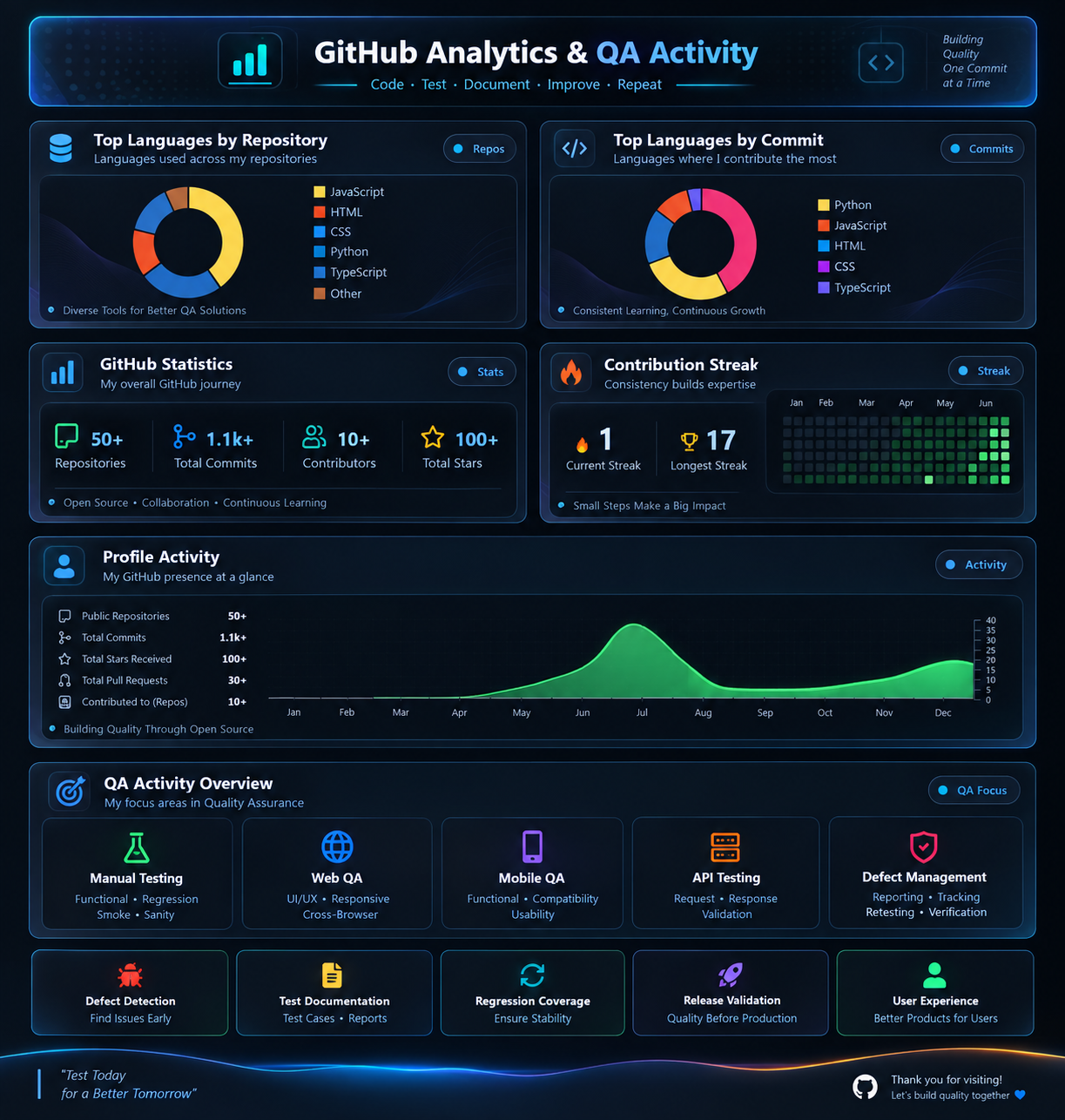
My GitHub contributions and activity are continuously evolving as I work on QA projects and testing documentation.
Software Testing • QA Collaboration • Testing Opportunities • Quality Engineering