
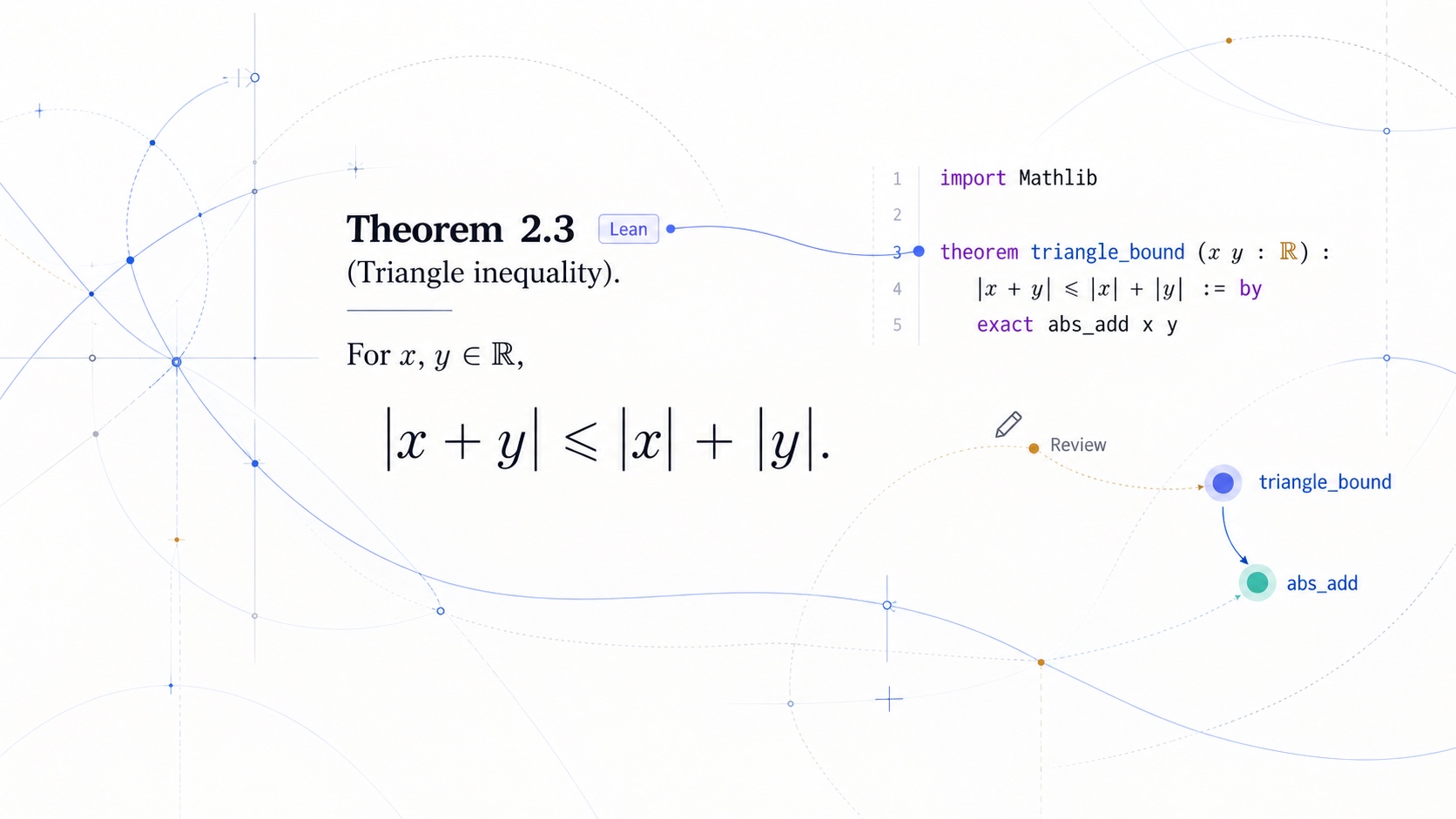
Math Workspace 是面向长篇数学书稿的本地写作与审阅工作区。用 Markdown 维护原稿,在 Reader 中阅读、查定义与符号,按需核对 Lean,再把选定章节编成一版 PDF。
通过 Codex 安装时,使用插件自带的 CLI、Reader 和通用 skills;脱离 Codex 时,使用独立 CLI/npm。项目保留正文、配置和审阅记录,明确使用同一个工具来源。正文、前言、后记和未完待续声明都保留在书稿中,日常阅读与出版引用同一份内容。
Lean 为可选功能;日常数学写作、阅读和稳定引用无需配置 Lean 工程。
开发预览。 命令、配置和生成数据格式仍在调整;建议在版本控制下使用。
从公开 marketplace 安装:
codex plugin marketplace add glenzli/marketplace --ref main
codex plugin add math-workspace@glenzli-marketplace
插件自带 CLI、Reader 和通用 skills,无需在写作项目中再安装 npm 包、复制 tools/math-workspace/ 或保存通用规则副本。安装或更新后新建 Codex 任务,请它初始化并打开你的写作项目;需要 CLI 时复用当前插件的实际入口。项目只维护自己的配置、源稿、审阅记录和特化规则。完整步骤见安装与项目适配指南。
不使用 Codex,或明确需要独立的终端、自动化与 CI 环境时,可以使用 Math Workspace 自己的 npm/CLI,不依赖 Codex:
npm install -D math-workspace
npx math-workspace init
npx math-workspace open
npm 安装的是 registry 已发布版本,更新进度可能与 marketplace 不同;本页介绍当前仓库能力。同一流程应明确使用插件或独立安装中的一份,避免脚本与界面调用不同版本。
init 创建或补全 .math-workspace/config.json 并生成初始索引。open 从当前目录向上发现项目根,再启动只监听 127.0.0.1 的本地 Reader。编辑后运行:
npx math-workspace finish path/to/chapter.mdfinish 固化目标范围内的临时标识并执行校验。verify 用作整项目门禁,doctor 检查项目发现、Reader 产物与可选工具链。
Reader 提供书、卷、章节导航,当前页目录,定义与符号查询,以及从引用回到原文的定位。正文中的编号由当前结构生成,稳定标识负责让文件重排后的引用仍然指向原对象。
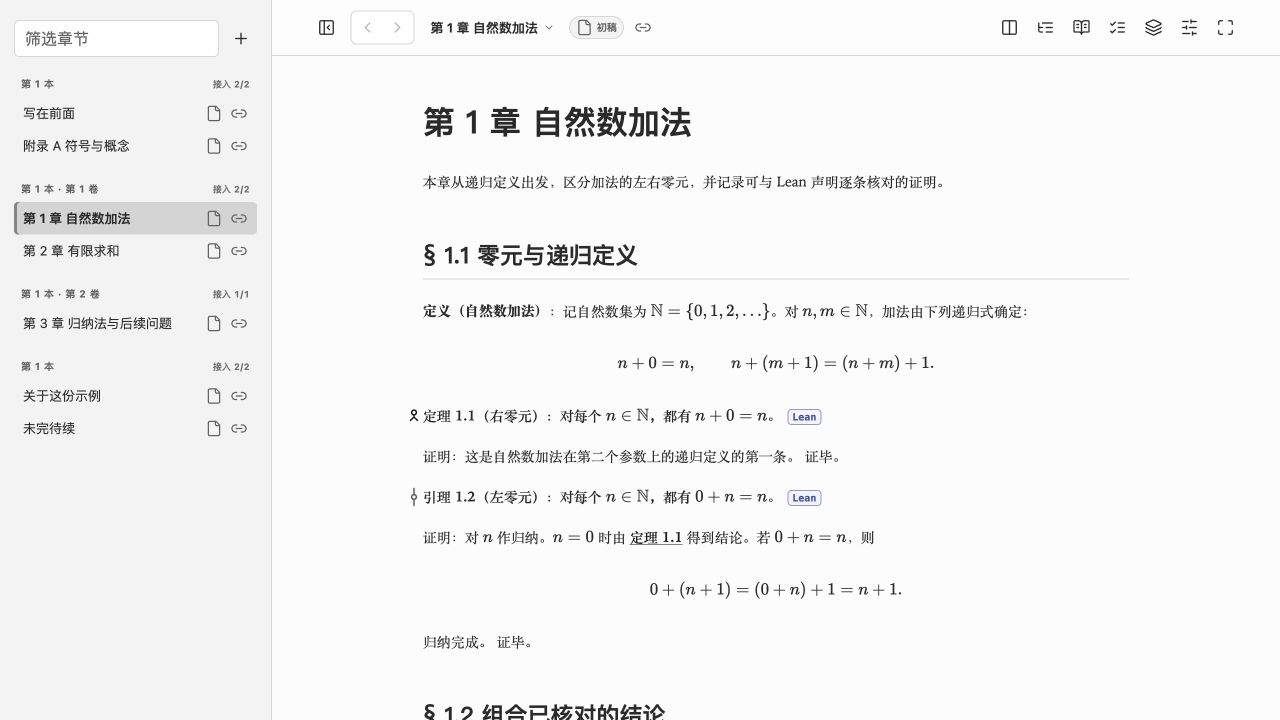
“显示”菜单可选择中文、英文界面和浅色、深色外观,也可自动跟随 Codex 或浏览器。界面语言与书稿语言独立,不改变书稿编号或 PDF 的语言。
命题关系图根据正文明确声明的依赖展示上下游关系。符号审计由用户显式启动,检查符号的作用域与含义,结果作为建议报告展示。结构校验、符号建议与数学正确性分别处理。
- 稳定引用:章节、小节、命题类对象、公式、图和表可使用稳定标识;
finish固化临时标识,verify检查断裂引用和结构问题。 - 数学排版:窄窗口中的长公式在安全边界折行;复杂公式可显式适配,仍保留原始 LaTeX、编号与源码定位。
- 习题与解答:习题按章独立编号,提示与解答默认折叠;题目和跨文件解答支持双向跳转,导出保留完整内容。语法见习题与解答。
- 交互图:Reader 可在原位显示项目内的自包含 HTML 图,保留静态图切换与加载失败回退;Markdown 和 PDF 导出使用配套静态图片。
- 创作阶段:初稿、修订中、稳定稿使用统一图标;可记录里程碑和其后的内容变化。
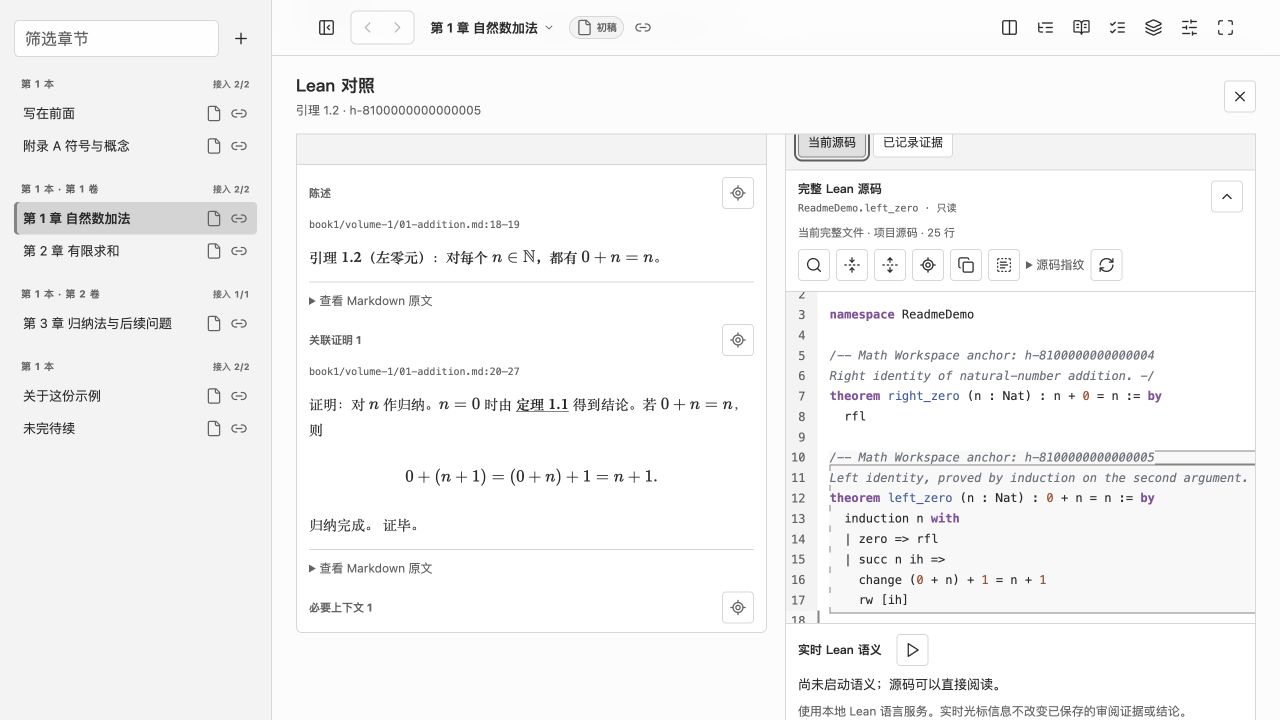
在同一工作台中并排阅读命题、证明和对应 Lean 声明,按当前页或章节逐项审阅。可打开完整 Lean 文件,使用语法高亮、搜索、折叠、行号和源码差异检查。macOS 上满足本地工具链与依赖条件时,还可显式启动只读、断网隔离的 Lean 语义会话,查询类型、定义和证明目标。
“刷新证据”使用已有本地工具链离线构建并查询声明的完整类型、直接依赖与递归公理依赖,保留显示 sorryAx。打开面板只读取已有证据,缺失、失败或过期状态分别显示。
人工结论、子论断映射、原文与源码范围关联、未解决问题单独保存;材料变化后,旧结论会标记为需要复核。项目总览可筛选待审阅对象与未解决问题,并导出审阅报告。构建成功不自动等于正文与形式化已对齐。
从 Reader 选中文字或公式,可以把原始 Markdown / LaTeX、文件位置与行号加入当前 Codex 输入框,再补充问题并发送。Lean 审阅任务也可以交给 Codex,返回的 AI 候选逐条进入待核对草稿,人工结论仍需审阅者明确保存。
侧栏的 + 用于添加章节、前文、后文或未完待续页:填写标题,确认所属书卷与文件位置,再把创建请求加入 Codex 输入框。发送后,AI 调用 CLI 创建带稳定页标识的文件,接着写正文并完成校验;创建命令拒绝覆盖已有文件。普通浏览器可复制同一请求。
Codex 返回的 Markdown 文件与行号链接也可通过文件处理器定位到 Reader。面板之间分别保存项目和阅读位置,讨论和审批留在原生会话中。
在“版本与出版 → 版本记录”中查看历史原稿、文件差异与签名核验结果。学术留档保存在项目的 .math-archive/,保留当时的原始文件与版本关系;它与可重建的阅读索引和文档阶段标签分别保存。
可用 Cosign / Sigstore 签署版本,并保留分卷与整部作品的版本关系。签署需主动发起并完成身份认证;签名、原稿完整性、内容变化与 Lean 证明状态分别显示。配置与签署步骤见使用指南。
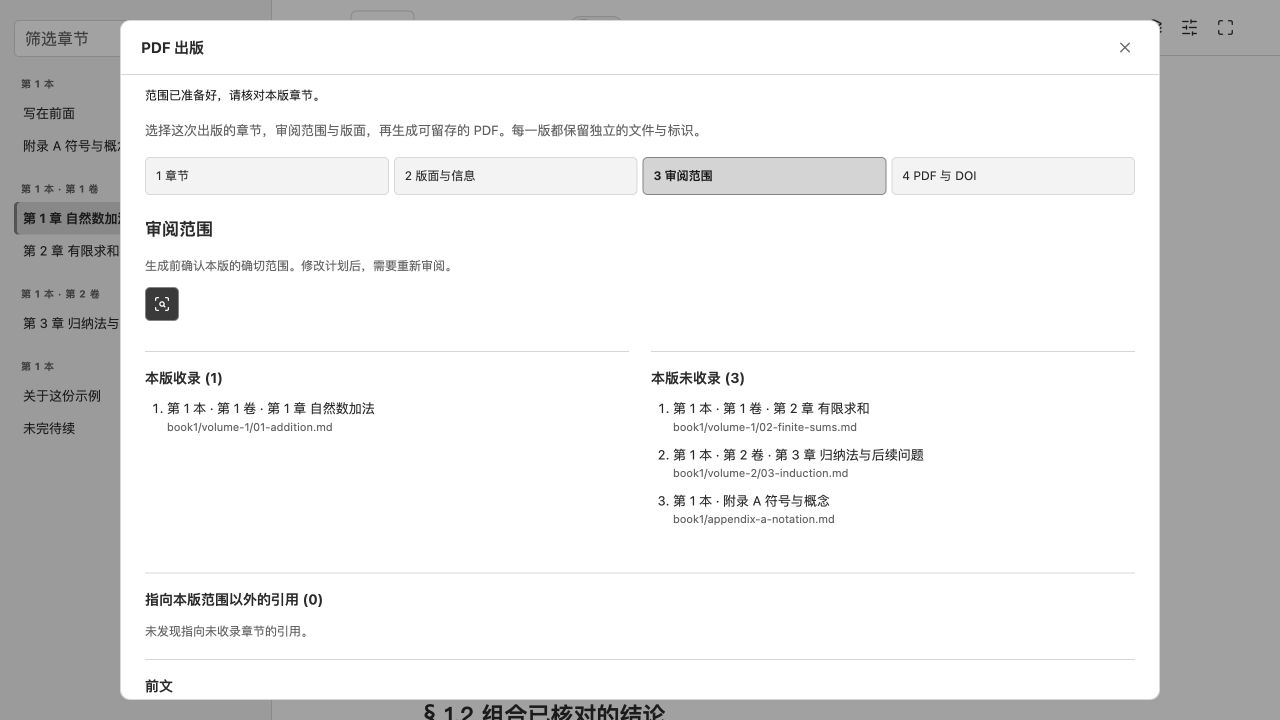
在 Reader 的“版本与出版 → PDF 出版”中选择本版的卷和章节,组合封面、前文、目录、正文、后文与未完待续页。正文保留整本书的原编号,范围外引用列出供核对;生成后可预览、下载 PDF,以及查看版次清单与引用信息。
前后文可包含多篇文章,标题和文体由作者决定。出版方案直接引用原稿文件,日常阅读与 PDF 使用同一份正文。
支持手填作品与本版 DOI,也可通过 Zenodo 预留 DOI 并发布,持续增补时保留历史版次。本地构建不会自动发布;DOI 与版次操作见使用指南。
以上截图来自专门创建的公开演示书稿。Lean 示例使用本机已安装的工具链;截图不代表其他项目的证明覆盖或人工审核结论。
新建页面可以使用 Reader 的 + 或 create-page。正文内容使用普通 Markdown;需要稳定引用的结构先写临时标识:
# #tmp-1 自然数加法

## #tmp-2 零元

定理 #tmp-3(右零元):对每个自然数 $n$,都有 $n+0=n$。

证明:由自然数加法在第二个参数上的递归定义可得。
证毕。

由 @tmp-3,可以消去加法右边的零。
运行 finish 后,临时标识转换为稳定的 h-*。正文引用使用 @h-...、@h-....title 或 @h-....full;定义和符号不参与命题编号。
前后文与正文共同保存在项目中,例如:
book/
  front-matter/01-preface.md
  01-addition.md
  02-finite-sums.md
  appendix-a-notation.md
  back-matter/01-afterword.md
  to-be-continued.md
前后文文件序号控制先后,不作为章号。旧 intro.md、introduction.md 与 summary.md 仍受支持。完整语法、建稿、Lean 审阅及出版配置见使用指南。
verify检查可机械判断的结构一致性;数学正确性、证明完整性和正文与 Lean 的语义对应仍需审阅。- Reader 不直接改写 Markdown 原稿。明确操作可以保存文档阶段、审阅记录、发布方案与其他工作区状态;创建请求交给原生会话中的 CLI 执行。
- Lean 证据刷新需要已有工具链、Lake manifest 和本地依赖;不会安装或下载这些材料。实时语义会话当前仅在 macOS 启用,其他平台仍可阅读完整 Lean 源码。
- 符号审计与 AI 辅助审阅需要用户显式启动,结果保持为建议。
- PDF 生成依赖本机 Pandoc 和 LaTeX 引擎。原稿签署使用 Cosign / Sigstore;Zenodo DOI 预留、上传和正式发布分别启动,需要服务进程环境中的令牌。PDF 构建与原稿签署不会代为登记 DOI。
- 早期 VS Code 扩展已冻结在
legacy/vscode-extension/,不参与当前构建和支持。
git clone git@github.com:glenzli/math-workspace.git
cd math-workspace
npm install
npm run build
npm test
公开文档的维护源位于 docs-src/**/*.vasm.md,修改后运行 npm run content:build。npm run release:prepare 生成并检查待审阅的产物和 marketplace 快照;提交、推送和 npm 发布分别执行。插件分发与独立 npm 包有各自入口,发布流程见发布说明。
MIT License。
Math Workspace is a local writing and review workspace for long mathematical manuscripts. Keep the source in Markdown, read it in the Reader, look up definitions and symbols, compare Lean declarations when needed, and compile selected chapters into a PDF edition.
When installed through Codex, use the plugin’s bundled CLI, Reader, and generic skills. Outside Codex, use the standalone CLI/npm. Keep manuscripts, configuration, and review records in the project, and use one explicit tool provider per workflow. Chapters, prefaces, afterwords, and continuing-work notices remain in the manuscript, so everyday reading and publication use the same source.
Lean is optional. Everyday mathematical writing, reading, and stable references do not require a configured Lean project.
Development preview. Commands, configuration, and generated-data formats are still changing. Use Math Workspace in a version-controlled project.
Install from the public marketplace:
codex plugin marketplace add glenzli/marketplace --ref main
codex plugin add math-workspace@glenzli-marketplace
The plugin includes its CLI, Reader, and generic skills. Writing projects do not need a second npm dependency, a copied tools/math-workspace/ runtime, or generic rule copies. After installing or updating, start a new Codex task and ask it to initialize and open the project. Reuse the current plugin’s actual CLI entry when needed. Keep project configuration, source, review records, and project-specific rules in the project. See the Installation and Project Adaptation Guide.
For use without Codex, or for an explicitly independent terminal, automation, or CI environment, use Math Workspace’s own npm/CLI:
npm install -D math-workspace
npx math-workspace init
npx math-workspace open
npm installs a version already published to the registry, which may follow a different update schedule from the marketplace. This page describes the current repository's capabilities. Select one installation per workflow so scripts and the Reader do not use different versions.
init creates or completes .math-workspace/config.json and generates the initial index. open discovers the project root from the current directory and starts a local Reader bound only to 127.0.0.1. After editing, run:
npx math-workspace finish path/to/chapter.mdfinish finalizes temporary identifiers in the target scope and runs validation. Use verify as the project-wide gate and doctor to inspect project discovery, Reader artifacts, and optional tools.
The Reader provides book, volume, and chapter navigation, a page outline, definition and symbol lookup, and links back to referenced source. Reader-facing numbers follow the current structure; stable identifiers keep references attached to their objects when files move.
The Display menu offers Chinese or English interface text and light or dark appearance, with an automatic option that follows Codex or the browser. Interface and manuscript languages are independent; changing the interface does not change manuscript numbering or the PDF language.
Proposition relationship graphs show upstream and downstream relationships from explicitly declared dependencies. Users start symbol audits to check symbol scopes and meanings; the results remain advisory. Structural validation, symbol suggestions, and mathematical correctness are separate concerns.
- Stable references: chapters, sections, theorem-like objects, equations, figures, and tables can have stable identifiers.
finishfinalizes temporary identifiers;verifychecks broken references and structural problems. - Math layout: long formulas wrap at safe boundaries in narrow windows. Complex formulas can be adapted explicitly while retaining their original LaTeX, numbers, and source locations.
- Exercises and solutions: exercises have their own per-chapter numbering. Hints and solutions are collapsed by default; questions and cross-file solutions link in both directions. Exports retain the full content. See Exercises and Solutions.
- Interactive figures: the Reader displays self-contained local HTML figures in place, with a static-image switch and fallback if loading fails. Markdown and PDF exports use the accompanying static images.
- Document stages: Initial Draft, Revising, and Stable Draft use shared icons. Record milestones and see when content has changed since a checkpoint.
Read a statement, its proof, and the anchored Lean declarations side by side, working through a page or chapter review queue. Open complete Lean files with syntax highlighting, search, folding, line numbers, and source differences. On macOS, with the required local toolchain and dependencies, explicitly start a read-only, offline Lean session to query types, definitions, and proof goals.
Refresh evidence uses the existing local toolchain to build offline and query complete declaration types, direct dependencies, and recursive axiom dependencies, including sorryAx. Opening the panel reads saved evidence; missing, failed, and stale evidence are labelled separately.
Human verdicts, subclaim mappings, associations between exact prose and source ranges, and unresolved issues are saved separately. Material changes mark earlier decisions for review. A project overview filters objects awaiting review and unresolved issues, and exports a review report. A successful build does not automatically establish alignment between prose and formalization.
Select prose or a formula in the Reader to add its original Markdown or LaTeX, file location, and line range to the current Codex input. Add your question, then send. Lean review tasks can also go to Codex; returned AI candidates can be added individually to an undecided draft, while reviewers explicitly save human conclusions.
Use the sidebar + to add a chapter, front matter, back matter, or continuing-work page. Enter a title, review its book or volume and destination, then add the creation request to the Codex input. After you send it, the AI uses the CLI to create a file with a stable page ID, writes the body, and runs validation. The creation command refuses to overwrite existing files. Ordinary browsers can copy the same request.
Codex Markdown file-and-line links can also locate the Reader through its file handler. Panels retain independent projects and reading positions; discussion and approvals stay in the native conversation.
Open Versions & publication → Version history to inspect historical manuscripts, file differences, and signature verification results. Academic archives live in the project's .math-archive/, preserving original file bytes and version relationships separately from rebuildable reading indexes and document-stage labels.
Use Cosign / Sigstore to sign versions and retain volume and whole-work version relationships. Signing requires an explicit action and identity authentication. Signature verification, source completeness, content changes, and Lean proof status remain separate. See the Usage Guide for setup and signing steps.
In Versions & publication → PDF publication, select this edition's volumes and chapters and combine its cover, front matter, contents, body, back matter, and continuing-work page. Chapters retain their original numbers, and references outside the edition are listed for review. Preview and download the built PDF, edition manifest, and citation data.
Front and back matter can contain multiple pieces with titles and genres chosen by the author. Publication profiles reference manuscript files directly, so everyday reading and PDF editions use the same prose.
Enter work and edition DOIs manually, or use Zenodo to reserve a DOI and publish editions as the work grows. Earlier editions remain available. Local builds never publish remotely; see the Usage Guide for DOI and edition workflows.
These screenshots use a dedicated public demo manuscript. The Lean example uses an already installed local toolchain. The screenshots do not assert proof coverage or human review conclusions for other projects.
Start a page with the Reader's + or create-page. Write the body in ordinary Markdown, using temporary identifiers for new structures that need stable references:
# #tmp-1 Natural-number addition

## #tmp-2 Zero

Theorem #tmp-3 (Right identity): For every natural number $n$, $n+0=n$.

Proof: This follows from the recursive definition of addition on its second argument.
QED.

By @tmp-3, a zero on the right can be removed.
finish converts temporary identifiers into stable h-* identifiers. Prose references use @h-..., @h-....title, or @h-....full. Definitions and symbols do not participate in theorem numbering.
Front and back matter live beside the chapters, for example:
book/
  front-matter/01-preface.md
  01-addition.md
  02-finite-sums.md
  appendix-a-notation.md
  back-matter/01-afterword.md
  to-be-continued.md
Numeric prefixes inside front and back matter control order, not chapter numbers. Legacy intro.md, introduction.md, and summary.md files remain supported. See the Usage Guide for syntax, page creation, Lean review, and publication configuration.
verifychecks mechanically decidable structural consistency. Mathematical correctness, proof completeness, and semantic correspondence between prose and Lean still require review.- The Reader does not directly rewrite Markdown manuscripts. Explicit actions can save document stages, review records, publication profiles, and other workspace state; creation requests are performed through the CLI in the native conversation.
- Refreshing Lean evidence requires an existing toolchain, Lake manifest, and local dependencies; it does not install or download them. Live semantic sessions currently require macOS. Full Lean source remains readable on other platforms.
- Users explicitly start symbol audits and AI assistance. Their results remain advisory.
- PDF generation requires local Pandoc and LaTeX tools. Source signing uses Cosign / Sigstore. Zenodo DOI reservation, upload, and publication are separate explicit actions and require a token in the server process environment. Building a PDF or signing source does not register a DOI.
- The early VS Code extension is frozen under
legacy/vscode-extension/and excluded from current builds and support.
git clone git@github.com:glenzli/math-workspace.git
cd math-workspace
npm install
npm run build
npm test
Maintained public documentation sources live under docs-src/**/*.vasm.md; regenerate them with npm run content:build. npm run release:prepare generates and checks artifacts and the marketplace snapshot for review. Commits, pushes, and npm publication are separate actions. Plugin distribution and the standalone npm package have separate entrypoints; see the Release Guide.
- Installation and project adaptation
- Usage guide
- Release guide
- Primary GitHub repository
- GitLab mirror
MIT License.