



ESPHome external component that exposes Oclean BLE electric toothbrushes to Home Assistant: the X Pro Elite and the X Ultra 20, both verified on hardware, and other models of the family on untested profiles (see Hardware). One component instance ("hub") per brush; several hubs run on a single ESP32 with their first polls staggered so the radio is not contended.
The X Ultra 20 is fully supported without the Oclean app and without the Oclean cloud. The ESP32 node takes the place of both: it joins the brush to your Wi-Fi over BluFi, points the brush's uploads at itself and receives every session with its score, the seconds brushed in each of the 12 zones and the pressure log, none of which BLE carries. It also keeps the brush clock right, sets the birthday greeting and fills the weather page from Home Assistant. No Oclean account and no phone app are involved; block the brush's internet access on the router and nothing it sends leaves your network (see In-node session receiver and Values kept on the brush).
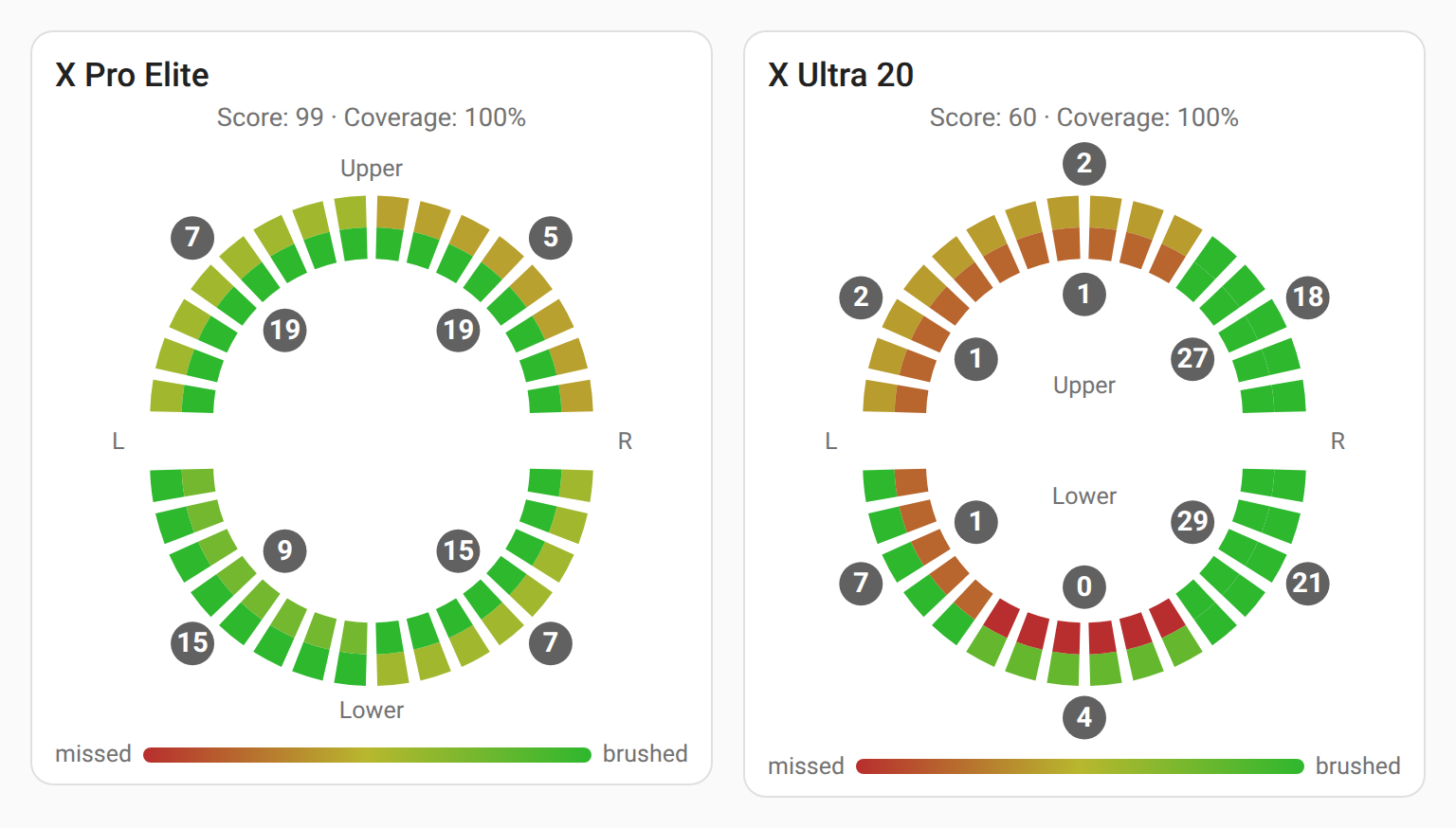
The component reads battery, dock/charge state, device settings and the brushing sessions, and writes back the brush's controls: brushing mode (including custom programs), area reminder, raise-to-wake, display language and clock on both brushes, plus the over-pressure alert, brush pause, brush mode, brush-head time limit and counter reset on the X Pro Elite, and the voice prompts, auto mode, holiday reminder and voice teaching on the X Ultra 20.
It connects only to poll and then disconnects (connect-poll-disconnect), so it does not hold the brush's BLE radio open and keeps brush battery drain low. The brush buffers sessions internally and never streams while brushing; the component reads the records after the fact, over BLE or, on the X Ultra 20, from the brush's upload.
This README covers installing the component, wiring a brush into an ESPHome device and the entities you get. How it talks to the brushes, the wire formats and how to extend it are in PROTOCOL.md.
This repository ships three pieces that install by different mechanisms.
Not a HACS item: ESPHome pulls external components straight from GitHub. Add to your ESPHome device YAML:
external_components:
  - source: github://dzikus/esphome-oclean
    components: [oclean]
Add ref: with a release tag to pin a version; without it the build follows
main (optionally with refresh: 1d).
Manual alternative: copy components/oclean/ next to your device YAML and use
source: components. Configuration (YAML) below covers the YAML in full.
HACS -> top-right menu -> Custom repositories -> URL
https://github.com/dzikus/esphome-oclean, category Dashboard -> Add.
Open the new entry, Download. On storage-mode dashboards HACS registers the
resource automatically; add a card of type custom:oclean-coverage-card. If the
card does not resolve (YAML-mode dashboards), add the resource by hand: Settings
-> Dashboards -> menu -> Resources -> Add, URL
/hacsfiles/esphome-oclean/oclean-coverage-card.js, type JavaScript module.
Manual alternative: copy dist/oclean-coverage-card.js to config/www/ and add
the resource /local/oclean-coverage-card.js.
Backfills brushing history into long-term statistics under real past timestamps.
HACS -> Custom repositories -> the same URL, category Integration ->
Add -> open -> Download -> restart Home Assistant. Then map your brushes
in configuration.yaml (see Session history).
Manual alternative: copy custom_components/oclean_stats/ to
config/custom_components/ and restart.
The card and the bridge are added as two separate custom repositories with the same URL because HACS keys a repository by (URL, category).
The protocol profile is selected at runtime from the device model string (DIS
characteristic 0x2A24), so one build serves the whole family rather than
being hardcoded to a single model. The entity set cannot wait for that read,
because ESPHome creates entities at build time, so it comes from the hub's
model: option instead.
| Line | Model id (DIS 0x2A24) | Profile | Status |
|---|---|---|---|
| X / X Pro / Pro Elite | OCLEANY3, OCLEANY3M*, OCLEANY3P* |
TYPE1 | X Pro Elite verified on hardware with OCLEANY3P firmware 1.0.0.30 and OCLEANY3PD firmware 1.0.0.31; other models and firmware versions untested |
| X Ultra 20 | OCLEANV20* |
TYPE_V20 | fully supported without the Oclean app or cloud; verified on hardware with firmware 0.0.2.1: status, settings, the clock, the setting, program and voice-teaching writes, the session receiver (score, 12 zone times, pressure), Wi-Fi over BluFi, the cloud host, the weather page and the birthday greeting. Over BLE the brush never streams its sessions: each poll reads the oldest stored one, without score or zones (see Session stream and record). The retail-mode write is acked, but the mode did not come on with the brush docked |
| X Pro 20, X Ultra (first generation) | OCLEANX20, OCLEANV1* |
TYPE_V20_FAMILY | untested; captures from both show the X Ultra 20 reply shapes. Use model: x_ultra_20. The store is never cleared, so only its oldest session shows up |
| Z1 | OCLEANY5 |
TYPE_Z1 | untested (needs a capture to freeze the record layout) |
| other / new firmware | unmatched | UNKNOWN fallback | battery + status only |
Everything below was verified empirically on two X Pro Elite brushes unless noted. For untested models the session-record layout is not considered frozen; battery and status are the safe baseline. Reports and PRs welcome.
ESP32 side: any board capable of ble_client. The default esp-idf BLE host
limit is 3 concurrent connections; raise max_connections only when the node
hosts more BLE clients than that.
The entity set follows the hub's model: option, so each brush gets only the
entities it has data or an opcode for. A row whose only source is a hub option
is built only with that option (on the X Ultra 20: cloud_receiver for the
score, the zones, the pressure readings, the cloud host and cloud host written, birthday for user
info written, wifi_provisioning for Wi-Fi written); naming it in yaml without
the option fails validation. Several entities are created with
disabled_by_default: true, so they stay hidden in HA until enabled per entity.
X Pro Elite (model: x_pro_elite, the default):
- 23 sensors: battery, battery voltage, last-session score / duration / valid duration / coverage, 8 per-zone gesture values, 4 per-quadrant shares, brush-head used days / sessions / used time, device theme, clock drift (the quadrants, device theme, head used time and clock drift hidden).
- 3 binary sensors: charging, docked, BLE connected (hidden).
- 9 text sensors: last session, last session mode, device clock, hardware revision, software version, last seen, timezone, MAC address, model (the last six hidden).
- 6 switches: area reminder, brush pause, brush mode, over-pressure alert, raise to wake, bluetooth (BLE link master switch).
- 9 numbers: brush head time limit plus 8 custom-program step parameters.
- 2 selects: brushing mode, display language.
- 4 buttons: reset brush head, sync clock (needs
time_id), poll now and capture sessions (both hidden).
X Ultra 20 (model: x_ultra_20):
- 9 sensors: battery, battery voltage, last-session duration / valid duration
/ coverage, device mode, mode number, running state, clock drift (mode
number, running state and clock drift hidden). With
cloud_receiver: truealso the last-session score, the seconds brushed in each of the 12 zones, the over-pressure time and the max pressure, which reach the node only in the brush's cloud upload. No quadrant sensors: the record has none. No brush-head counters: firmware 0.0.1.6 never counts head use. - 5 binary sensors: charging, docked, BLE connected (hidden), Wi-Fi
provisioned, zone guidance; hidden, one per write the hub keeps on the brush:
user info written (
birthday), Wi-Fi written (wifi_provisioning), cloud host written (cloud_receiver). - 9 text sensors, as above; with
cloud_receiver: truealso cloud host (hidden). - 10 switches: raise to wake, voice on zone change (the
area_reminderkey), auto mode, holiday reminder, voice teaching, retail display mode, voice prompts, voice on fast brushing, voice on over-pressure, bluetooth. No over-pressure alert: firmware 0.0.1.6 stores its flag (02 12) and reads it nowhere else; the pressure prompt is the voice switch. - 8 numbers: custom-program step parameters.
- 2 selects: brushing mode, language (the
device_languagekey, which also sets the voice prompt language). - 1 button: sync clock (needs
time_id). No capture or poll button: BLE never hands over the stored sessions. A clock write stamps the sessions until the brush next asks the cloud for the time (UploadingMacWiFi, not after every brushing; the session receiver answers it with the node's time).
On the X Ultra 20 the brushing-mode select shows the mode picked on the screen
("Screen mode 1" .. "Screen mode 5") or "Voice teaching", and writes only
programs: "Custom" and the named custom_modes. A program write turns auto mode
off and moves the brush to its program slot; nothing over BLE moves it back to a
screen mode, which is picked on the brush again. The voice-teaching switch has
the same catch: on selects the teaching program, off selects screen mode 5.
This component uses the ESPHome sub-device API and current entity APIs, so it
needs ESPHome 2026.6.0 or newer. Pin it with
esphome: { min_version: 2026.6.0 } so an older install fails fast instead of
erroring deep in code generation.
Replace the MAC with the brush's MAC (any BLE scanner shows it while the brush
is awake). Append @<tag> to the source to pin a release.
external_components:
  - source: github://dzikus/esphome-oclean
    components: [oclean]

time:
  - platform: homeassistant
    id: ha_time

ble_client:
  - id: ble_brush
    mac_address: AA:BB:CC:DD:EE:FF

oclean:
  - id: brush_hub
    ble_client_id: ble_brush
    time_id: ha_time

sensor:
  - platform: oclean
    oclean_id: brush_hub

binary_sensor:
  - platform: oclean
    oclean_id: brush_hub

text_sensor:
  - platform: oclean
    oclean_id: brush_hub

switch:
  - platform: oclean
    oclean_id: brush_hub

number:
  - platform: oclean
    oclean_id: brush_hub

select:
  - platform: oclean
    oclean_id: brush_hub

button:
  - platform: oclean
    oclean_id: brush_hub
For an X Ultra 20 add model: x_ultra_20 under oclean:; without it the hub
builds the X Pro Elite entity set.
That creates every default entity, named in English, with default icons and
categories. Each platform auto-creates its entities; nothing has to be listed
key by key. Every individual entity can still be customised; see Override
per-entity below. A complete single-brush config is in
example.yaml.
Auto-creation is a deliberate departure from the usual ESPHome style, where
every entity is spelled out in YAML. One brush exposes around fifty of them, and
listing each by hand would be pages of boilerplate for a device whose entity set
is fixed by the protocol. The escape hatches are per-entity overrides and
false to drop one.
The four control platforms are optional. Leave switch, number, select or
button out and their code is not compiled into the firmware at all.
That alone does not make the node read-only: auto_sync_time writes the brush
clock (0201) on its own, and a poll that downloads new sessions confirms them
with 0202. For a hub that never writes anything, set read_only: true.
Set on the oclean: entry, not on the platforms. The X Pro Elite and X Ultra 20
columns mark the hubs an option applies to: model: x_pro_elite and
model: x_ultra_20, which also serve the other models of each family (see
model). An option marked - for the hub's model fails validation.
| Option | Type | Default | X Pro Elite | X Ultra 20 | Effect |
|---|---|---|---|---|---|
ble_client_id |
id | - | yes | yes | Required. Points to the ble_client entry with this brush's MAC. |
model |
x_pro_elite or x_ultra_20 |
x_pro_elite |
yes | yes | The brush on this hub, which picks the entity set at build time (see What it exposes per brush). The X / X Pro and the Z1 use x_pro_elite; the X Pro 20 and the first X Ultra use x_ultra_20. The protocol is still chosen from the model id the brush reports, so a wrong value costs entities, never data; the log names the right value after the first poll. An entity listed in yaml that the model does not have fails validation. |
update_interval |
time | 3600s (min 60s) |
yes | yes | Off-dock cadence: gap between connect-poll-disconnect cycles while the brush runs on battery. |
charging_interval |
time | 600s (min 60s) |
yes | yes | Docked cadence: faster polls while the brush sits on the dock (charging or fully charged). Clamped down to update_interval if set larger; set both equal for fixed-interval polling. |
hold_connection_while_docked |
bool | true |
yes | yes | Keep the BLE link open while the brush is docked instead of disconnecting after each poll; re-queries on the live link every charging_interval. The link drops when the brush leaves the dock. Docked means charging, so this costs no brush battery. Set false for plain connect-poll-disconnect. |
time_id |
id | none | yes | yes | A time: platform id (local time source). Enables the sync-clock button, auto clock-sync and the wall-clock stamps (last seen, session timestamps). |
tzindex |
int 1-33 | 16 |
yes | yes | 1-based index into the brush's 33-entry GMT-offset table, written together with the clock. 16 = CEST (UTC+2), 15 = CET (UTC+1). |
auto_sync_time |
bool | on when time_id is set, off otherwise |
yes | yes | Resync the brush clock during a poll when it has drifted past sync_drift_threshold. Explicit true without time_id fails validation. |
sync_drift_threshold |
time | 120s |
yes | yes | Drift that triggers an auto resync. 0s resyncs whenever the clocks differ by at least one second. |
read_only |
bool | false |
yes | yes | The brush only receives the profile's 03 read queries; the X Ultra 20's Wi-Fi check 02 34 is held back too. Every write is refused and logged: controls, clock sync, 0202. |
name_prefix |
string, max 48 chars | unset | yes | yes | Prepended to every default entity name on this hub, so two brushes do not both call a sensor Battery. Opt-in: nothing is prefixed unless you write it here. Names you write yourself are never touched. "" keeps the bare names and silences the multi-hub warning. See Two brushes on one ESP32. |
cloud_receiver |
bool | false |
- | yes | Receives the brush's cloud session uploads and publishes them as the session entities (routing by the MAC in each upload). This is the only way to the brushing score and full record on X Ultra 20 firmware, which BLE does not expose. It does not start its own server: it registers a handler on the shared ESPHome web server, so a web_server: must be configured (validation requires it) and the uploads arrive on the web server's port. The code is not compiled in unless this is true. The hub points the brush's cloud host at this node itself (see Values kept on the brush); the brush has to be able to reach the node over the network. See In-node session receiver. |
cloud_drop_future |
bool | true |
- | yes | What the receiver does with an upload dated implausibly far in the future, which comes from a brush whose clock was not corrected yet. true acks it, so the brush erases it instead of re-uploading it on every connect; false leaves it on the brush. Never published either way. Only matters with cloud_receiver: true. |
weather |
weather.* entity id |
unset | - | yes | Answers the brush's weather request from this Home Assistant weather entity, so its clock page shows an icon, Today/Tomorrow and the day's low and high. Needs cloud_receiver: true, time_id and an api: block; one hub per node. The forecast needs the device to be allowed to perform Home Assistant actions; without that it shows the current condition and temperature. See Weather on the brush. |
birthday |
MM-DD |
unset | - | yes | Birthday greeting date the hub keeps on the brush (see Values kept on the brush): on every wake that day the brush shows its birthday screen with the date, whether or not the holiday greetings are on. A yaml option baked into the firmware, never an entity, so the date stays out of the Home Assistant recorder; use !secret. |
gender |
unknown, male, female |
unknown |
- | yes | Goes in the same frame as the date. Baked in like birthday, never an entity; use !secret. The brush stores it and shows nothing of it. |
age |
int 3-18 | 18 |
- | yes | Goes in the same frame. 3-18 is the app's range, where any adult is 18. Baked in, never an entity; use !secret. The brush stores it and shows nothing of it. |
retry_unconfirmed |
bool | true |
- | yes | A value the hub keeps on the brush (birthday greeting, cloud host, Wi-Fi) that the brush has not confirmed goes out once per boot; with this on, again once a day while it stays unconfirmed. See Values kept on the brush. |
wifi_provisioning |
bool | false |
- | yes | The hub keeps the brush on the Wi-Fi below over BluFi (see Values kept on the brush). The BluFi code is not compiled in unless this is true. With it true the hub needs an SSID (below, or a wifi: network), or validation fails. |
wifi_ssid |
string | the node's wifi: SSID |
- | yes | The network the hub joins the brush to. Needs wifi_provisioning: true. Required on a node with no wifi: to fall back on (e.g. an Ethernet node). |
wifi_password |
string | the node's wifi: password |
- | yes | Passphrase for wifi_ssid. Needs wifi_provisioning: true. Baked into the firmware, not an entity, so it never reaches the recorder; use !secret. |
The brushing-mode select additionally accepts custom_modes (a list of named
programs); that option lives under the select: platform, not the hub. See
Entities (select).
Dock-aware adaptive polling is always on: the hub polls at charging_interval
while the brush is docked and at update_interval while it is off the dock.
The hub checks every charging_interval, so the off-dock gap is
update_interval rounded to the nearest multiple of it.
Dock presence (not the charge phase) selects the cadence, so a fully charged
brush still on the dock keeps the fast cadence. With several hubs on one node
the first poll of hub N is deferred by N * 90 s after boot so the cycles do not
race for the single scanner.
All auto-created. "Hidden" means disabled_by_default: true in HA (enable per
entity). The X Pro Elite and X Ultra 20 columns mark the entity sets of
model: x_pro_elite and model: x_ultra_20; "with" names the hub option an
entity is built only with.
| Key | Default name | X Pro Elite | X Ultra 20 | Source | Notes |
|---|---|---|---|---|---|
battery |
Battery | yes | yes | battery characteristic / STATUS | percent, diagnostic |
battery_voltage |
Battery voltage | yes | yes | STATUS bytes 3-4 BE | volts from the millivolt reading, diagnostic; a reading outside 2-5 V is not published |
last_session_score |
Score | yes | with cloud_receiver |
session record byte 33 | 0-100; the no-score sentinel (0xFF) and the score 1 the firmware gives a void session (14 s or less of brushing, or 85% or more of it without motion) read as unknown. On the X Ultra 20 only the cloud record carries it |
last_session_duration |
Duration | yes | yes | session record bytes 7-8 BE | seconds |
last_session_valid_duration |
Valid duration | yes | yes | session record bytes 9-10 BE | seconds counted as effective |
last_session_coverage |
Coverage | yes | yes | derived | valid / duration, percent |
gesture_zone_1 .. gesture_zone_8 |
Zone 1 .. Zone 8 | yes | - | session record bytes 23-30 | share of the session per region, left 1-4 then right 5-8, each side upper outer / upper inner / lower outer / lower inner |
zone_time_1 .. zone_time_12 |
Zone 1 .. Zone 12 | - | with cloud_receiver |
X Ultra 20 record bytes 20-27 and 32-35 | seconds brushed per zone: 1-8 the back teeth in the gesture_zone order, 9-10 the upper front teeth (canine to canine), 11-12 the lower ones, each pair outer surface first, as the brush's own screen draws them. The brush scores 84 points for every zone brushed 5 s or more and less pro rata, and the sum over 10 is the session score. Only the full cloud record carries them, not the inline BLE record |
last_session_over_pressure_time |
Over-pressure time | - | with cloud_receiver |
X Ultra 20 record bytes 51 on | seconds of the session the force stayed over 400, where the brush halves the motor, counted from its log of one sample per 2 s |
last_session_max_pressure |
Max pressure | - | with cloud_receiver |
X Ultra 20 record bytes 51 on | highest force sample of the session in the brush's own unit (it treats 50 as contact and 600 as hard pressing); 1000 means 1000 or more |
quadrant_upper_left, quadrant_lower_left, quadrant_upper_right, quadrant_lower_right |
Quadrant upper left .. Quadrant lower right | yes | - | session record bytes 19-22 | hidden; percent of the session per quadrant, summing to 100; each is about the sum of its two zones, rounded on the brush |
head_used_days |
Brush head used days | yes | - | settings buffer 27-28 BE | days with brushing since head reset |
head_used_times |
Brush head sessions | yes | - | settings buffer 29-30 BE | valid sessions since head reset |
head_used_time |
Brush head used time | yes | - | settings buffer 14-15 BE | hidden; minutes of valid brushing since head reset |
device_theme |
Device theme | yes | - | settings buffer 0 | hidden; raw index |
device_mode |
Device mode | - | yes | settings buffer 11 | 1-5 = mode picked on the screen, 6 = voice teaching, otherwise the id of a program written over BLE (0 from the app) |
mode_number |
Mode number | - | yes | settings buffer 5 | hidden; raw, moved with the device mode so far |
running_state |
Running state | - | yes | 03 14 reply |
hidden; raw value, 3 while charged on the dock |
clock_drift |
Clock drift | yes | yes | brush clock vs the node clock | hidden, diagnostic; seconds, positive when the brush runs ahead; read on every poll, also with auto_sync_time off |
The last decoded session survives reboots: the newest record is persisted in NVS per hub and re-published on boot.
| Key | Default name | X Pro Elite | X Ultra 20 | Source | Notes |
|---|---|---|---|---|---|
charging |
Charging | yes | yes | STATUS byte 2 == 0x01 | actively charging on the dock |
docked |
Docked | yes | yes | STATUS byte 2 == 0x01 or 0x03 | on the dock, charging or fully charged |
connected |
BLE connected | yes | yes | link state | hidden; off almost always by design (the link is up only seconds per poll); use Last seen for freshness |
wifi_configured |
Wi-Fi provisioned | - | yes | 02 34 reply |
off means no SSID is stored, and without one the brush never starts Wi-Fi |
user_info_written |
User info written | - | with birthday |
the brush's 02 11 ack |
hidden; on while the brush has acked the 02 11 frame of the yaml birthday, gender and age as they are now (one write), off from a change of any of them until it acks the new frame |
wifi_written |
Wi-Fi written | - | with wifi_provisioning |
the brush's BluFi connected report or its first request after the join | hidden; on while the brush has confirmed the yaml Wi-Fi as it is now; Wi-Fi provisioned shows any stored network, this one ours |
cloud_host_written |
Cloud host written | - | with cloud_receiver |
the Host header of the brush's request |
hidden; on while the brush uploads to this node's current address |
area_guidance |
Zone guidance | - | yes | 03 16 reply |
the zone-change guidance state the brush reports |
The X Pro Elite firmware keeps no setting in settings bytes 3, 4, 8-10 and 13:
constant zero, copies of bytes 0 and 1, a flag nothing writes, and a pause flag
cleared at the start of every session. The keys that read them (fill_brush,
auto_mode, volume_enabled, calendar_enabled, splash_prevent and the
volume_index sensor) are built on no model, nor is network: nothing in the
X Ultra 20 firmware writes its byte. Nor is auto_update: the X Ultra 20 keeps
the flag of byte 3 (02 32), but no update path in its firmware reads it.
voice_teaching and demo_mode are
switches on the X Ultra 20. A yaml that lists one of these binary sensors fails
validation.
| Key | Default name | X Pro Elite | X Ultra 20 | Source | Notes |
|---|---|---|---|---|---|
last_session_time |
Last session | yes | yes | session record bytes 0-5 | timestamp of the newest buffered session (brush clock) |
last_session_mode |
Last session mode | yes | yes | session record byte 6 | scheme id decoded to the brushing-mode name; unknown ids fall back to the number. On the X Pro Elite id 0 is also any mode picked on the brush itself |
device_clock |
Device clock | yes | yes | settings buffer 16-21 | the brush's own clock |
last_seen |
Last seen | yes | yes | wall clock | hidden; timestamp device class, renders "x ago" in HA; stamped on every successful poll, the freshness signal for the slow cadence |
timezone |
Timezone | yes | yes | settings buffer 24 | hidden; decoded GMT offset, e.g. "GMT+02:00" |
hw_revision |
Hardware revision | yes | yes | DIS 0x2A27 | hidden |
sw_version |
Software version | yes | yes | DIS 0x2A28 | hidden |
mac_address |
MAC address | yes | yes | BLE | hidden |
model |
Model | yes | yes | DIS 0x2A24 | hidden; the raw model id that drives profile selection |
cloud_host |
Cloud host | - | with cloud_receiver |
Host header of the brush's requests |
hidden, read-only; the host the brush uploads to, as read from its own requests to the receiver (see Values kept on the brush) |
All device-backed switches publish optimistically and are then corrected by the
settings readback; their restore mode is DISABLED so nothing is written on
boot. The brush acks every accepted write with <opcode> 4F 4B ("OK").
| Key | Default name | X Pro Elite | X Ultra 20 | Write | Notes |
|---|---|---|---|---|---|
over_pressure |
Over-pressure alert | yes | - | 02 12 + 01/00 |
readback at settings buffer 22. The brush checks pressure only at some motor gears: 24-32 on the OCLEANY3P, which senses damped vibration, and 24-32 and 37-40 on the OCLEANY3PD, which senses motor load. Standard Cleaning written over BLE runs at gear 18 and the default Custom program at gear 8, so neither ever alerts |
raise_wake |
Raise to wake | yes | yes | 02 23 + 01/00 |
readback at settings buffer 2 |
bluetooth |
Bluetooth | yes | yes | local only | master switch for the BLE link; OFF drops pending writes and tears the link down; RESTORE_DEFAULT_ON so a reboot never leaves the brush silently unreachable |
area_reminder |
Area reminder | yes | yes | 02 0D + 01/00 |
On the X Pro Elite it turns the zone-change signal every 30 s on or off. On the X Ultra 20 it is named Voice on zone change: it picks the cue at each 30 s zone change, a short motor stutter when off and a spoken prompt when on (only with voice prompts on); readback at settings buffer 23 |
brush_pause |
Brush pause | yes | - | 02 22 + 01/00 |
when on, a button press after the first 10 s of a session pauses it instead of ending it; readback at settings buffer 1 |
brush_mode |
Brush mode | yes | - | 02 09 + 01/EC |
when off, the press that wakes the brush also starts brushing, when on that press only wakes it; off byte is the 0xEC sentinel, not 0x00; readback at settings buffer 12 |
auto_mode |
Auto mode | - | yes | 02 25 + 01/00 |
readback at settings buffer 4. On also moves the brush to mode 1 (03:01-12:00) or 2 (the rest of the day) whenever it is idle on the main screen; off does not bring the earlier mode back |
festival_reminder |
Holiday reminder | - | yes | 02 28 + 01/00 |
readback at settings buffer 10 |
voice_teaching |
Voice teaching | - | yes | 02 30 + 01/00 |
readback at settings buffer 6. On selects the firmware's single-step teaching program (gear 16, 180 s), off selects screen mode 5; neither returns to the mode picked on the screen |
demo_mode |
Retail display mode | - | yes | 02 A0 + 01/00 |
readback from the 03 A0 reply. A shop mode in which the brush never sleeps on battery; turning it on during a session ends the session |
voice_prompts |
Voice prompts | - | yes | 02 31 + 4B |
readback at settings buffer 7 |
voice_fast_brushing |
Voice on fast brushing | - | yes | 02 31 + 4B |
the prompt that warns of brushing too fast; readback at settings buffer 8. Takes only while Voice prompts is on, so the hub refuses it otherwise |
voice_pressure |
Voice on over-pressure | - | yes | 02 31 + 4B |
readback at settings buffer 9; same rule as the fast-brushing prompt. The frame carries all three voice flags, so each switch resends the other two as last read |
| Key | Default name | X Pro Elite | X Ultra 20 | Range | Notes |
|---|---|---|---|---|---|
head_max_minutes |
Brush head time limit | yes | - | 1-65535 min | minutes of valid brushing on one head before the brush shows its replacement reminder, once; 240 out of the box, about 120 two-minute sessions. Writes 02 17 + 2B BE, readback at settings buffer 25-26; box input (a slider would fire a write per step). Replaces head_max_days, which fails validation with a pointer here |
custom_step1_gear .. custom_step4_gear |
Custom step N gear | yes | yes | 1-41 (1-54 on the X Ultra 20), default 8 | parameters of the runtime Custom program; stored on the node (flash-persisted), written to the brush only when Custom is selected |
custom_step1_duration .. custom_step4_duration |
Custom step N duration | yes | yes | 5-120 s, step 5, default 30 | changing a parameter while Custom is active re-programs the brush (debounced) |
| Key | Default name | X Pro Elite | X Ultra 20 | Options | Notes |
|---|---|---|---|---|---|
brush_scheme |
Brushing mode | yes | yes | X Pro Elite: 19 presets + named custom_modes + "Custom"; X Ultra 20: "Screen mode 1" .. "Screen mode 5" and "Voice teaching" + named custom_modes + "Custom" |
writes the full per-step program (02 06 / 02 0B); current option read back from settings buffer 11. On the X Pro Elite a mode picked on the brush itself also reads back as 0, so Standard Cleaning stands for those modes too. The X Ultra 20's screen modes and voice teaching only show the brush's state: picking one is refused |
device_language |
Display language | yes | yes | 17 languages | writes 02 16 + language id; readback from settings buffer 31. An id past the brush firmware's last language would show English, so it is refused and logged: OCLEANY3P stops at 14 (Korean), OCLEANY3PD at 13 (Arabic). On the X Ultra 20 it is named Language: the same write also switches the voice prompts |
Preset options are labelled "name (duration)", e.g. "Quick cleaning (1m20s)". Named custom modes are declared under the select:
select:
  - platform: oclean
    oclean_id: brush_hub
    brush_scheme:
      custom_modes:
        - name: "Evening strong"
          program:
            - { gear: 16, duration: 30 }
            - { gear: 16, duration: 30 }
            - { gear: 24, duration: 30 }
            - { gear: 16, duration: 30 }
        - name: "Morning express"
          program:
            - { gear: 8, duration: 20 }
            - { gear: 8, duration: 20 }
            - { gear: 8, duration: 20 }
            - { gear: 8, duration: 20 }
Up to 20 modes, 1-4 steps each, gear 1-41 (1-54 on the X Ultra 20), duration 5-120 s. Modes get ids 121+ in list order (reordering shifts the ids, which only affects how old session records decode). The runtime "Custom" option (id 120) builds its program from the custom-step number entities at selection time. Step boundaries double as the brush's pause signals and summary segments, so a program wants four steps to keep the four-quadrant guidance.
| Key | Default name | X Pro Elite | X Ultra 20 | Effect | Notes |
|---|---|---|---|---|---|
reset_head |
Reset brush head | yes | - | writes 02 0F |
irreversible: zeroes the brush-head usage counters |
sync_time |
Sync clock | with time_id |
with time_id |
writes 02 01 + 8 bytes |
writes on press only |
poll_now |
Poll now | yes | - | immediate poll cycle | hidden by default; read-only on the brush |
capture_sessions |
Capture sessions | yes | - | session download + 30 s hold | hidden; keeps the link open so the raw record stream lands in the log (the X Ultra 20 download never streams) |
On the X Ultra 20 the hub keeps three things on the brush from its yaml, with no
button: the birthday greeting (birthday, gender, age), the cloud host
(with cloud_receiver: true, this node's own address) and the Wi-Fi (with
wifi_provisioning: true). None of them is an entity, so none reaches the Home
Assistant recorder, and the brush cannot report any of them back over BLE. The
hub therefore keeps a fingerprint of what the brush confirmed in the node's
flash (the brush MAC is part of it) and writes again only when it no longer
matches: another yaml value, another node address, another brush. It writes
them only to a brush that reports an X Ultra 20 family model, so a wrong
model: never sends them to an X Pro Elite.
| Value | Written | Confirmed by |
|---|---|---|
| birthday greeting | 02 11 <gender> <age> <month> <day> |
the brush's 02 11 4F 4B |
| cloud host | 02 33 + http://<node IPv4>:<web server port> |
the next request the brush sends to the receiver, whose Host header is the host the brush has stored |
| Wi-Fi | BluFi join over service 0xFFFF |
the brush's BluFi report that it is connected, or its first request to the receiver after the join was sent (a docked brush stores the network and joins on its next wake); a 02 34 reply of 0 (no Wi-Fi stored, e.g. after a factory reset) makes the hub provision again |
A request counts for a brush by the MAC in its record upload; requests that
carry no MAC count only while one X Ultra 20 hub shares the receiver, so two
brushes never confirm each other. A value the brush has not confirmed goes out
on the first link after boot or after it changes, and again once a day while it
stays unconfirmed (retry_unconfirmed, on by default; off: once per boot). A
cloud host is confirmed by the brush's next upload, after a brushing, so it is
written again a day later only if no upload came in between.
read_only: true writes none of them. User info written, Wi-Fi written and
Cloud host written (hidden) show in Home Assistant whether the brush confirmed
each current value, as the node's config log does (never the value). The
Oclean app sends its own account's birthday on every connection and the hub
cannot see that, so after the app has been used the hub keeps its stale
confirmation until the yaml value changes.
The brush takes 02 33 with no pairing, so treat it as a redirect, not a
control: block the brush's internet on the router to keep its uploads off the
vendor cloud. The hub points it at this node's own IPv4; a brush that reaches
the node only through another address (a NAT on a router) is not supported.
On X Ultra 20 firmware the brushing score and the full per-session record never
come over BLE; the brush only uploads them to its cloud host. cloud_receiver: true stands in for that cloud: it takes the brush's UploadBrushRecord, decodes
the record, and publishes it as the session entities (score, durations,
timestamp, the 12 zone times, over-pressure time and max pressure) and the
session event. A record is routed to the hub whose brush MAC matches the
upload, so several hubs on one node share it.
It does not start its own HTTP server. It registers a handler on the shared
ESPHome web server (the one web_server and captive_portal use), so a
web_server: must be configured and the brush uploads to that server's port
(80 by default). Reusing the one server avoids a second listener competing for
the device's limited sockets.
The hub joins the brush to a network (wifi_provisioning) and points its cloud
host at the node by itself (see Values kept on the brush); what is left is a
route that lets the brush reach the node (the brush and the node are often on
different VLANs). The transport is HTTP only; the brush accepts a plain
http:// host, and the node does not serve TLS.
The brush keeps a record until the server answers "ok", then drops it and sends the next. So the receiver answers "ok" only after a record has been published, and answers "keep it" the first time it sees one; the brush re-sends it on its next upload and that copy is acked. A record is thus never dropped before it is in Home Assistant, at the cost of one extra upload per record. The brush's clock is answered from the node's clock, so it also corrects over Wi-Fi. The other requests get a reply that offers nothing: no firmware update and no image for the date page. The brush asks for that image each time it goes to sleep and reboots on an empty reply, so the receiver answers it with an empty slot.
The X Ultra 20 has a clock page (swipe right from a mode page) with a weather
icon, a Today/Tomorrow banner and the day's low and high. The brush fetches it
from its cloud host each time it joins Wi-Fi, so with cloud_receiver the
node answers that request too. Name a weather entity and the hub does the rest;
Home Assistant needs no template sensors:
oclean:
  - id: oclean_x20
    model: x_ultra_20
    cloud_receiver: true
    time_id: ha_time
weather: weather.forecast_home- The condition and the current temperature come from the entity over the native API state subscription, with no setting on the Home Assistant side.
- The daily forecast comes from the
weather.get_forecastsaction. Home Assistant performs actions only for a device allowed to: Settings, Devices & services, ESPHome, the node, Configure, "Allow the device to perform Home Assistant actions". Without it the brush gets the current condition with the current temperature as both numbers, and the log says so once. - Until 18:00 the brush gets today's forecast, from 18:00 tomorrow's (banner "Tomorrow"). Temperatures go in the entity's unit, rounded, two digits at most.
- The brush has seven icons, so Home Assistant conditions map onto the closest:
| Home Assistant condition | Brush icon |
|---|---|
sunny, clear-night |
sun |
partlycloudy, cloudy, fog |
sun behind a cloud |
rainy, pouring |
rain |
lightning, lightning-rainy |
thunderstorm |
snowy, snowy-rainy, hail |
snow |
windy, windy-variant |
wind |
exceptional |
dust |
The brush fetches the weather only when it connects, which on battery is after a brushing, so the page shows what was current then.
Every key on every platform accepts the normal ESPHome entity config. Override the name, icon, category or any other entity field directly under the key:
sensor:
  - platform: oclean
    oclean_id: brush_hub
    battery:
      name: "Brush Battery"
    last_session_score:
      name: "Brushing Score"
      icon: "mdi:star"
Schema defaults are injected before validation, so omitted fields keep their
defaults. If you do not set name, the default in the tables above is used.
Two ble_client entries and two oclean hubs. Use device_id to put each
brush's entities under a separate sub-device in HA:
esphome:
  devices:
    - id: dev_brush_a
      name: "Oclean A"
    - id: dev_brush_b
      name: "Oclean B"

ble_client:
  - id: ble_a
    mac_address: AA:BB:CC:DD:EE:FF
  - id: ble_b
    mac_address: AA:BB:CC:DD:EE:00

oclean:
  - id: hub_a
    ble_client_id: ble_a
    time_id: ha_time
  - id: hub_b
    ble_client_id: ble_b
    time_id: ha_time

sensor:
  - platform: oclean
    oclean_id: hub_a
    device_id: dev_brush_a
  - platform: oclean
    oclean_id: hub_b
    device_id: dev_brush_b

binary_sensor:
  - platform: oclean
    oclean_id: hub_a
    device_id: dev_brush_a
  - platform: oclean
    oclean_id: hub_b
    device_id: dev_brush_b

text_sensor:
  - platform: oclean
    oclean_id: hub_a
    device_id: dev_brush_a
  - platform: oclean
    oclean_id: hub_b
    device_id: dev_brush_b

switch:
  - platform: oclean
    oclean_id: hub_a
    device_id: dev_brush_a
  - platform: oclean
    oclean_id: hub_b
    device_id: dev_brush_b

number:
  - platform: oclean
    oclean_id: hub_a
    device_id: dev_brush_a
  - platform: oclean
    oclean_id: hub_b
    device_id: dev_brush_b

select:
  - platform: oclean
    oclean_id: hub_a
    device_id: dev_brush_a
  - platform: oclean
    oclean_id: hub_b
    device_id: dev_brush_b

button:
  - platform: oclean
    oclean_id: hub_a
    device_id: dev_brush_a
  - platform: oclean
    oclean_id: hub_b
    device_id: dev_brush_b
Boot polls are staggered automatically.
device_id decides which HA device an entity belongs to, but it does not make
the entity's name unique, and on some transports the name is the identity.
MQTT builds its state topic, discovery topic and unique_id from the name
alone, with no device in any of them, so two brushes both exposing Battery
publish over each other. The native API is unaffected: it passes device_id
next to the key and Home Assistant 2025.8+ tracks entities as
(device_id, key).
Nothing is renamed for you. A second hub without name_prefix logs a warning
during validation and leaves the names as they are. Set it per hub to separate
them:
oclean:
  - id: hub_a
    ble_client_id: ble_a
    name_prefix: "Brush A"
  - id: hub_b
    ble_client_id: ble_b
    name_prefix: "Brush B"
Battery on hub_a then reads Brush A Battery. The prefix goes on before
validation, so unlike a rename in code generation it also settles the
duplicate-name check, and esphome config shows the names the firmware
registers.
name_prefix: "" keeps the bare names and silences the warning for that hub.
That is a permanent choice, not a workaround, and it is safe if the native API
is all you use.
Two things to know before adding the option to a brush already in use:
- It renames every entity that still carries a default name, so Home Assistant sees new entity ids and the history, dashboards and automations built on the old ones stop following. Set it on every hub in one edit and flash once.
- Under a sub-device Home Assistant already puts the device name in front of the entity name, so a prefix equal to the device name reads twice in the entity id. Keep it short, or leave it unset.
Names you write yourself are never touched, in either direction.
Each new session from the brush's ring buffer fires an esphome.oclean_session
event (score, duration, valid duration, coverage, scheme, per-zone values,
timestamp; on the X Ultra 20 the 12 zone times plus over_pressure and
max_pressure). A per-brush watermark stored in NVS prevents re-emitting old
sessions across reboots. A session dated after the brush's own clock, as read
in the same poll, is dropped: it was stamped before the clock was set back.
The timestamp is UTC, converted with the time zone the record was made in, so a
session read after a daylight-saving change still lands at its real hour; a
record without one uses the node's offset at the time of reading.
The events need homeassistant_services: true under api: (it is off by
default in ESPHome). Without it the firmware still builds and every entity
works; only the events are compiled out, and validation prints a warning saying
so.
Independently of the event, each new session also fires the on_session
trigger, so a node can act on a session without Home Assistant in the loop. x
is the decoded record (score, duration_s, valid_duration_s, scheme,
zones[12] (the X Pro Elite fills the first 8), quadrants[4], tz_index,
the year..second fields, has_score, and on the X Ultra 20
over_pressure_s and pressure_max). Trigger and event both
fire oldest session first, and both run before the session entities are updated,
so read the session from x rather than from the entity states:
oclean:
  - id: brush
    ble_client_id: brush_ble
    on_session:
      - logger.log:
          format: "brushed %us, score %u"
args: ["(unsigned) x.duration_s", "(unsigned) x.score"]api:
encryption:
key: !secret api_encryption_key
homeassistant_services: trueThe optional oclean_stats integration (Installation, path 3) writes these into
long-term statistics under their real past timestamps, so brushing history charts
even for sessions that happened while Home Assistant was down. Map each brush MAC
to a slug in configuration.yaml:
oclean_stats:
  brushes:
    "AA:BB:CC:DD:EE:FF": alice
    "AA:BB:CC:DD:EE:00": bob
The MAC must match what the component reports (upper-case, colons); the slug
becomes part of the statistic id (oclean:<slug>_score), so keep it to
[a-z0-9_]. The bridge is read-only to the brush and creates no entities; the
statistics show up in a Statistics card pointed at oclean:<slug>_score and in
Settings -> Dashboards -> ... -> Statistics.
custom:oclean-coverage-card draws the per-zone values of the last session as
a colored mouth map: 32 teeth, each split into its outer and inner surface. With
8 zones (X Pro Elite) each zone colors one surface of a whole quadrant; with 12
(X Ultra 20) the back teeth of each side and the front teeth, canine to canine,
are zones of their own. Read-only: it reads the zone / score / coverage entities
and recorder history and never talks to the brush. Install it through HACS
(Installation, path 2) or by hand.
type: custom:oclean-coverage-card
title: Brushing coverage
zone_prefix: sensor.oclean_zone_   # expands to _1 .. _8
score_entity: sensor.oclean_score
coverage_entity: sensor.oclean_coverage
time_entity: sensor.oclean_last_session
The X Ultra 20 counts seconds per zone and scores a zone fully from 5 s on, so color it against that:
type: custom:oclean-coverage-card
zone_prefix: sensor.oclean_x20_zone_
zone_count: 12
normalize: absolute
target: 5
score_entity: sensor.oclean_x20_score
time_entity: sensor.oclean_x20_last_session| Option | Default | Meaning |
|---|---|---|
zones |
- | explicit list of 8 or 12 zone entities in zone order (instead of zone_prefix) |
zone_prefix |
- | entity prefix that 1..zone_count is appended to |
zone_count |
8 |
12 for the X Ultra 20 zone_time entities |
title |
- | card header |
mirror |
false |
swap the on-screen left / right sides |
normalize |
share |
colouring: share (vs an even split of the session), max (vs the best surface), absolute (vs target) |
target |
15 |
per-surface target for normalize: absolute |
score_entity / coverage_entity / time_entity |
- | values shown in the header |
labels |
EN | override the on-card labels |
Clicking a surface opens the more-info dialog for that zone entity. Arrows and a slider step through the sessions found in recorder history.
A control change calls into the hub, which raises the BLE link immediately if idle; the latency is the time until the brush is connectable, not the poll interval. A sleeping brush is not connectable: the queued write flushes on the next successful connect (next poll, or wake the brush by pressing its button).
The brush accepts one BLE central at a time. While the component is connected
or connecting, the official app cannot pair. To use the app, turn the
bluetooth switch OFF on the brush's HA device, do the app work, then turn it
back ON.
| Constraint | Effect / workaround |
|---|---|
| Passive advertisements carry no data | Only name / MAC / RSSI; even battery needs an active GATT connection, hence connect-poll-disconnect. |
| The brush does not stream while brushing | Sessions are buffered and downloaded after the fact; expect them at the next poll, or press Poll now. The X Ultra 20 uploads each session once it joins Wi-Fi after brushing (cloud_receiver). |
| One BLE central at a time | The official app cannot connect while the component holds the link. Use the bluetooth switch to release it. |
| Session timestamps use the brush clock | Drift shifts session times; auto_sync_time (with a time_id) keeps the clock within sync_drift_threshold. |
| Write No Response is dropped | All writes go out as Write With Response. |
| The brush intensity level (display button) has no BLE representation | It can be neither read nor written; no entity exists for it. |
| Holding the link drains the brush | hold_connection_while_docked only ever holds while docked (charging, so no drain); off the dock the component always disconnects after each poll. On by default. |
Report problems at https://github.com/dzikus/esphome-oclean/issues. Include the component version or commit, the ESPHome version, the brush model, the configuration and the node log. Report security issues privately, see SECURITY.md.
Pull requests go against main:
- Run
pre-commit installonce. The hooks format C++ and Python and check that commit messages follow Conventional Commits. - A pull request that adds functionality adds tests for it, see Testing.
- CI runs pre-commit, the unit tests, clang-tidy and the ESP32 builds on every pull request. All of them must pass before merge.
- User-visible changes get an entry in CHANGELOG.md.
GPL-3.0. This component derives from a GPL-3.0 ESPHome component and inherits
that license. See LICENSE.