
The open-source GraphQL & REST backend for your database.
Apito Engine is a self-hosted GraphQL stack. You run it on infrastructure you control. When you want managed hosting, sync the same project to Apito Cloud.
Licensed under AGPL-3.0. You can use, modify and self-host it. If you run a modified version as a network service, you must publish your changes under AGPL-3.0. A commercial license is available from Apito LLC. Releases v1.8.26 to v1.8.30 remain FSL-1.1-ALv2; see LICENSING.md.
The self-hosted binary is github.com/apito-io/open_driver/cmd/oss. It injects the public database, cache, key-value, and in-process realtime factories. go run in this module alone does not inject those factories. Plugins and a networked realtime bus are optional and stay out of the default binary.
Website · Documentation · Discord



- GraphQL APIs - Connect your database and get a GraphQL API. Docs
- Plugins - Extend the engine with Go plugins and process-isolated HashiCorp plugins. Docs
- Databases - SQLite, PostgreSQL, MySQL, MariaDB, and MongoDB. DynamoDB, Oracle, and Cassandra are coming soon. Docs
- Authentication - JWT auth, role-based access control, API keys, and multi-tenant isolation. Docs
- Subscriptions - WebSocket GraphQL subscriptions. Docs
- Functions - Function execution inside GraphQL queries and mutations. Docs
- File Storage - File upload and management. Docs
- Multi-tenant SaaS - Tenant isolation. Docs
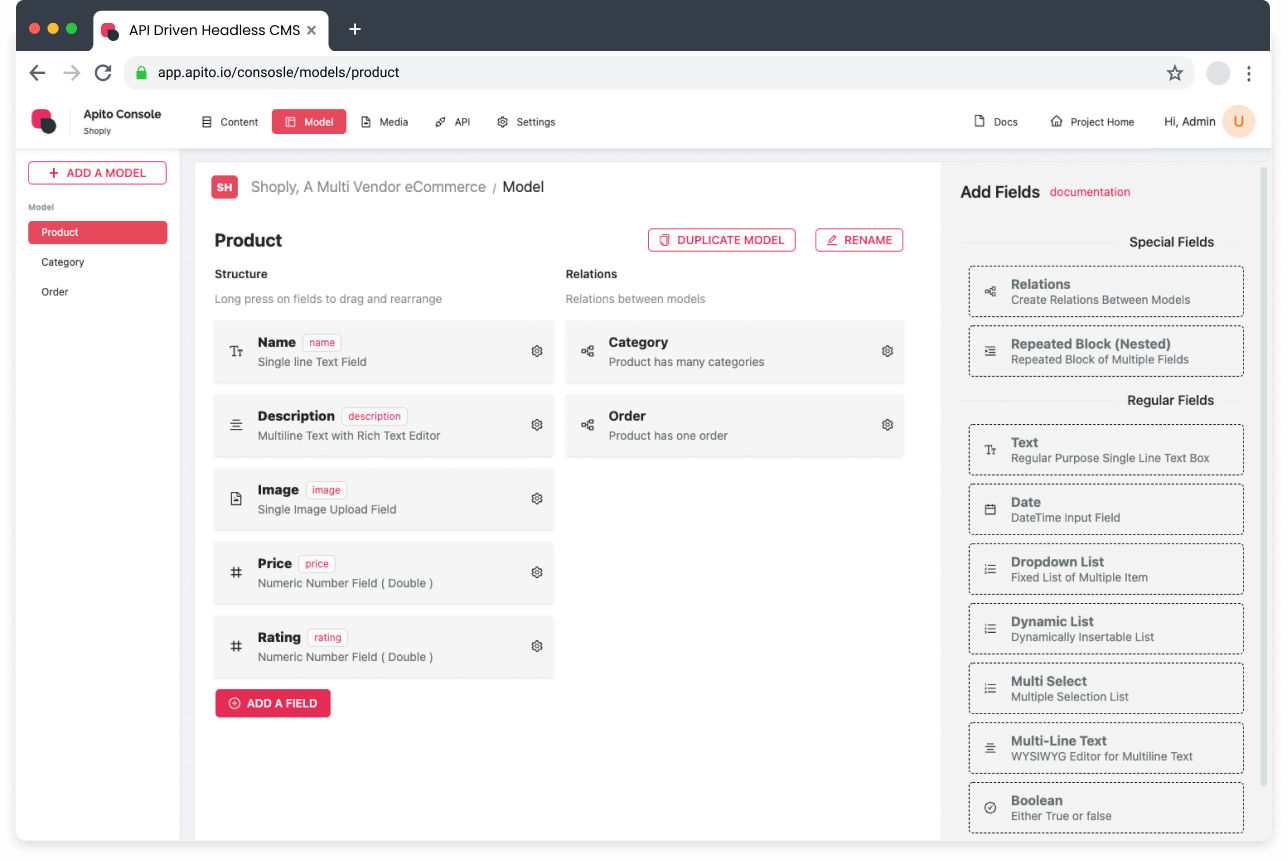
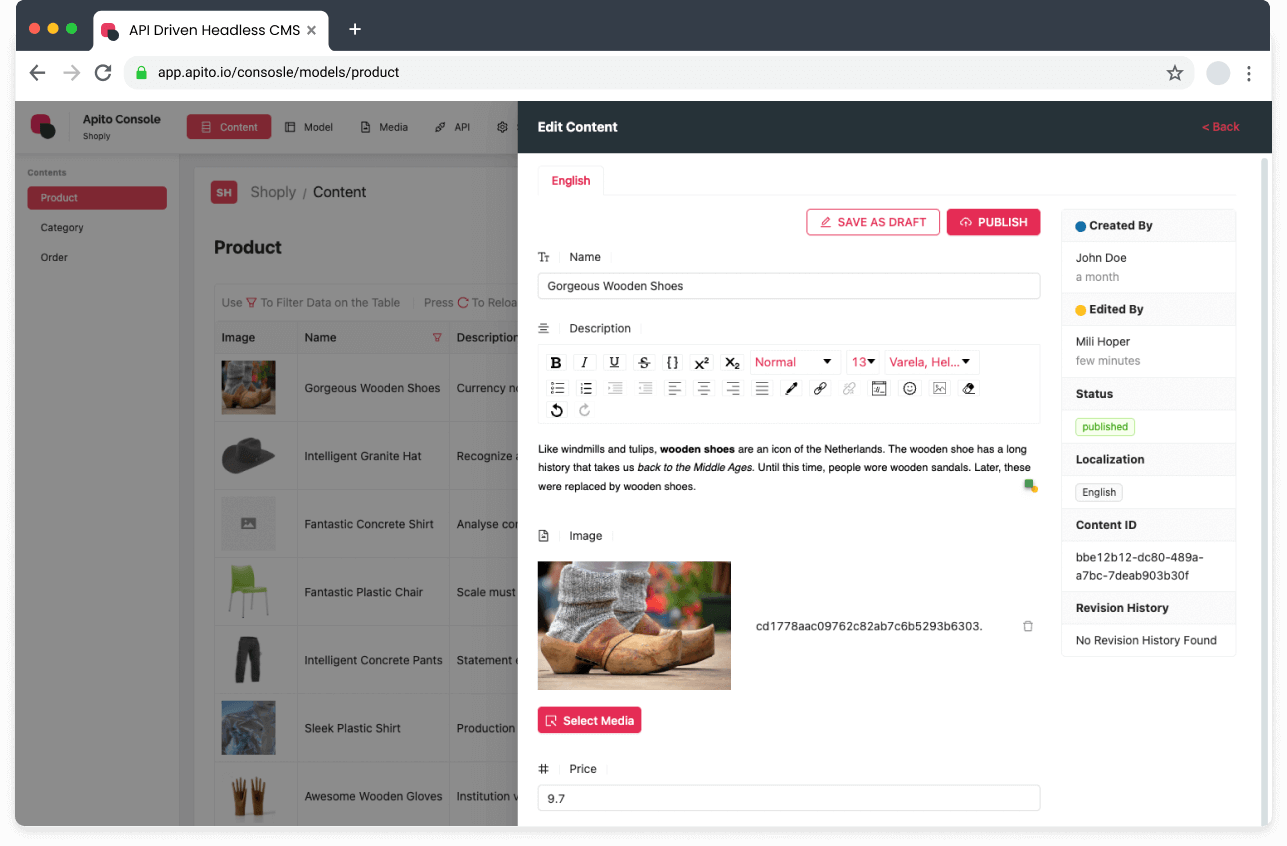
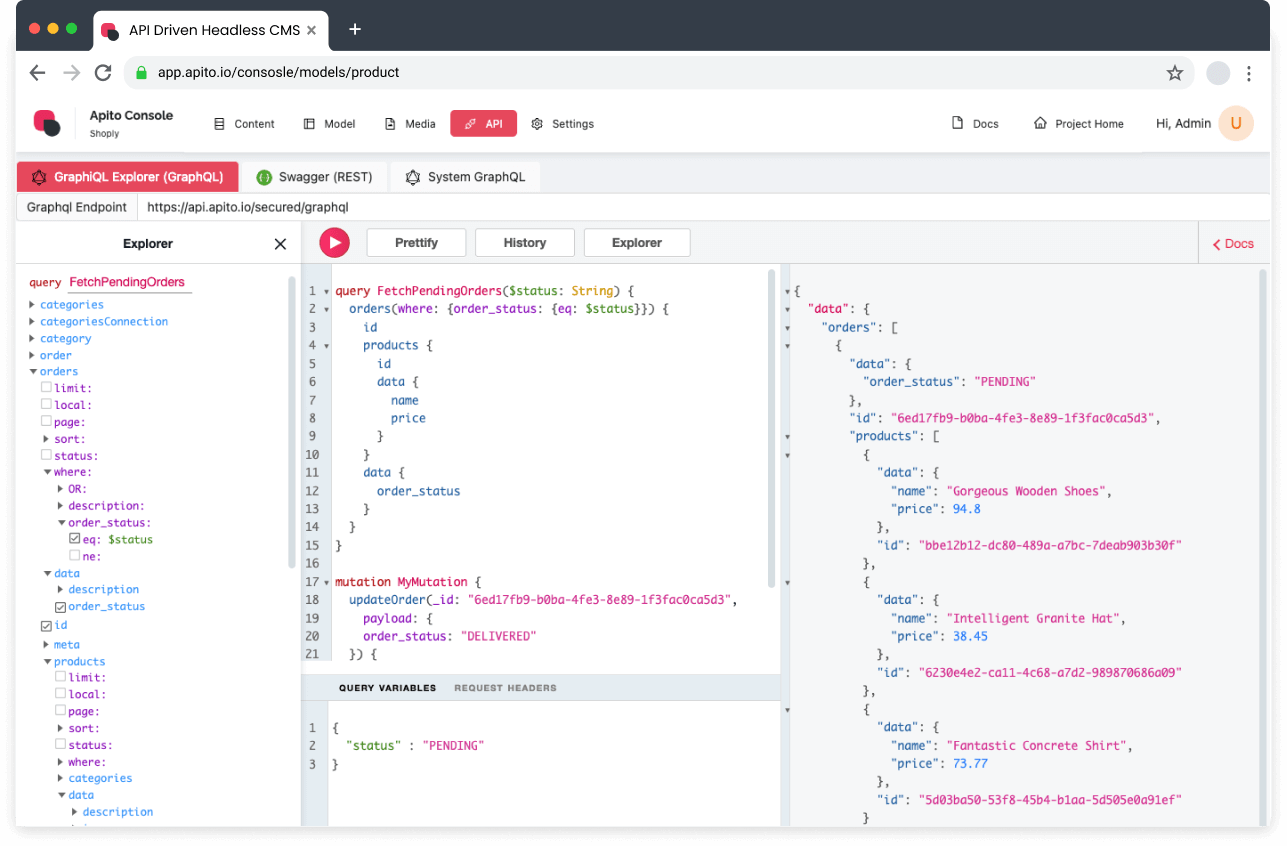
- 📊 Admin Dashboard - Comprehensive dashboard for schema management, data browsing, and analytics.
|
📋 Model Management |
📝 Content Management |
🚀 API Explorer |
Watch "releases" of this repo to get notified of major updates.
curl -fsSL https://get.apito.io/install.sh | bash
apito start
The console is at http://localhost:4055. The engine API is at http://localhost:5055.
apito start pulls ghcr.io/apito-io/studio.
The public binary is github.com/apito-io/open_driver/cmd/oss. go run in this module alone does not inject the database, cache, key-value, and realtime factories.
git clone https://github.com/apito-io/engine
git clone https://github.com/apito-io/open_driver
cd open_driver/cmd/oss
go mod edit -replace github.com/apito-io/engine=/path/to/engine
go mod tidy
go run .Linux release assets are apito-engine-linux-amd64 and apito-engine-linux-arm64 on GitHub Releases.
open-core is a GraphQL-first stack that combines proven open-source technologies with a plugin architecture. It is designed to be extended through plugins while keeping performance and security in focus.
open-core uses a modern, cloud-native layout built for scalability:
graph TB
    Client[🌐 Client Applications<br/>Web, Mobile, Desktop]

    subgraph "🔥 Apito open-core"
        Router[🌐 Echo Router<br/>HTTP/WebSocket Server]
        Auth[🔐 Auth Service<br/>JWT + API Keys]
        GraphQL[🧠 GraphQL layer<br/>Schema + Resolvers]
        Realtime[⚡ Real-time layer<br/>WebSocket Subscriptions]
        Storage[📁 Storage Service<br/>File Management]

        subgraph "🔌 Plugin System"
            GoPlugins[⚡ Go Plugins<br/>High Performance<br/>.so files]
            HCPlugins[🛡️ HashiCorp Plugins<br/>Process Isolated<br/>Cross-language]
        end

        subgraph "🗄️ Database Layer"
            DBDrivers[Database Drivers<br/>Connection Pooling]
            MongoDB[(🟠 MongoDB)]
            PostgreSQL[(🐘 PostgreSQL)]
            MySQL[(🐬 MySQL)]
            MariaDB[(🦭 MariaDB)]
            SQLite[(📄 SQLite)]
        end

        subgraph "💾 Cache Layer"
            Redis[(🔴 Redis<br/>Cache & Sessions)]
            KVStore[Key-Value Store]
        end
    end

    subgraph "🔧 External Services"
        S3[☁️ AWS S3<br/>File Storage]
        Monitoring[📊 Monitoring<br/>Sentry, Metrics]
        CDN[🌍 CDN<br/>Static Assets]
    end

    %% Client to open-core
    Client --> Router

    %% Router routing
    Router --> Auth
    Router --> GraphQL
    Router --> Realtime
    Router --> Storage

    %% Auth flow
    Auth --> Redis

    %% GraphQL to plugins
    GraphQL --> GoPlugins
    GraphQL --> HCPlugins

    %% Database connections
    GoPlugins --> DBDrivers
    HCPlugins --> DBDrivers
    GraphQL --> DBDrivers

    %% Database types
    DBDrivers --> MongoDB
    DBDrivers --> PostgreSQL
    DBDrivers --> MySQL
    DBDrivers --> MariaDB
    DBDrivers --> SQLite
    DBDrivers --> SQLite

    %% Cache connections
    GraphQL --> Redis
    Auth --> KVStore

    %% External services
    Storage --> S3
    Router --> Monitoring
    Storage --> CDN

    %% Styling
    classDef openCoreNode fill:#ff6b6b,stroke:#ffffff,stroke-width:2px,color:#ffffff
    classDef database fill:#4ecdc4,stroke:#ffffff,stroke-width:2px,color:#ffffff
    classDef plugin fill:#ffe66d,stroke:#ffffff,stroke-width:2px,color:#000000
    classDef external fill:#a8e6cf,stroke:#ffffff,stroke-width:2px,color:#000000

    class Router,Auth,GraphQL,Realtime,Storage openCoreNode
    class MongoDB,PostgreSQL,MySQL,MariaDB,SQLite database
    class GoPlugins,HCPlugins plugin
    class S3,Monitoring,CDN external
Core Components:
- 🧠 GraphQL layer - Built with
graphql-go/graphqlfor dynamic schema generation and high-performance query execution - 🌐 Echo Router - High-performance HTTP router with middleware for REST endpoints and GraphQL over HTTP
- 🔌 Plugin System - Dual architecture supporting both Go built-in plugins (
.sofiles) and HashiCorp process-isolated plugins - Database drivers - SQLite, PostgreSQL, MySQL, MariaDB, and MongoDB, with connection pooling and transactions
- 🔐 Auth Service - JWT-based authentication with RSA signing, API keys, and session management
- ⚡ Real-time layer - WebSocket-based subscriptions for live data updates
- 📁 Storage Service - File upload and management with multiple backend support
The dual plugin system combines:
- Shared Memory - Direct memory access for maximum performance
- Type Safety - Compile-time type checking and Go's strong typing
- Fast Execution - No serialization overhead for critical operations
// Example Go plugin
package main

import "github.com/apito-io/engine/interfaces"

var MyPlugin interfaces.NormalPluginInterface = &UploadPlugin{}

type UploadPlugin struct{}

func (p *UploadPlugin) ExecuteFunction(params map[string]interface{}) (interface{}, error) {
    // High-performance plugin logic
    return result, nil
}- Process Isolation - Plugins run in separate processes for security
- Crash Recovery - Automatic restart on plugin failures
- Language Agnostic - Support for Go, JavaScript, Python, and more
// Example HashiCorp plugin
func main() {
    plugin := &MyHashiCorpPlugin{}

    hcplugin.Serve(&hcplugin.ServeConfig{
        HandshakeConfig: plugins.HandshakeConfig,
        Plugins: map[string]hcplugin.Plugin{
            "my_plugin": &plugins.HashiCorpPluginRPC{Impl: plugin},
        },
        GRPCServer: hcplugin.DefaultGRPCServer,
    })
}| Language | Admin SDK | Plugin SDK |
|---|---|---|
| JavaScript | js-admin-sdk | js-plugin-build-sdk |
| Go | go-admin-sdk | go-apito-plugin-sdk |
| Flutter | flutter_admin_sdk |
# Using the Apito CLI
apito create project -n fitnessApp

# Connect your database
apito db connect --engine postgresql --host localhost --port 5432

# Generate GraphQL schema from existing tables
apito schema generate

# Deploy locally
apito dev# Query with real-time subscription
subscription {
users(filter: { status: "active" }) {
id
name
email
posts {
title
createdAt
}
}
}
# Mutation with custom function
mutation {
uploadUserAvatar(userId: "123", file: $file) {
url
thumbnails
metadata
}
}Create custom functionality with minimal code:
// main.go - Simple function plugin
package main

import (
    sdk "github.com/apito-io/go-apito-plugin-sdk"
)

func main() {
    // Initialize plugin
    plugin := sdk.Init("image-processor", "1.0.0", "your-api-key")

    // Register a custom function
    plugin.RegisterFunction("processImage", func(args map[string]interface{}) (interface{}, error) {
        imageUrl := args["url"].(string)
        // Process image logic here
        return map[string]interface{}{
            "processedUrl": processedUrl,
            "thumbnails": thumbnails,
        }, nil
    })

    // Register GraphQL mutation
    plugin.RegisterMutation("uploadImage", map[string]interface{}{
        "type": "ImageUploadResult",
        "args": map[string]interface{}{
            "file": sdk.NonNull(sdk.Upload),
            "size": sdk.StringArg(),
        },
        "resolve": "processImage",
    })

    // Start plugin
    plugin.Serve()
}Apito can be configured via environment variables or .env file:
# Database Configuration (choose one)
DATABASE_ENGINE=sqlite    # sqlite | postgresql | mysql | mariadb | mongodb

# MongoDB Configuration
DATABASE_HOST=localhost     # For Atlas: your-cluster.mongodb.net
DATABASE_PORT=27017         # Leave empty for MongoDB Atlas (uses SRV)
DATABASE_NAME=apito
DATABASE_USERNAME=admin     # Usually 'admin' for MongoDB
DATABASE_PASSWORD=password

# Other Database Ports
# DATABASE_PORT=5432        # PostgreSQL
# DATABASE_PORT=3306        # MySQL/MariaDB

# Server Configuration
PORT=5055
HOST=0.0.0.0
ENV=development

# Authentication
PRIVATE_KEY_PATH=keys/private.key
PUBLIC_KEY_PATH=keys/public.key
JWT_TTL=24h

# Storage
STORAGE_ENGINE=local
STORAGE_PATH=./uploads

# Plugins
PLUGIN_DIR=./plugins
ENABLE_PLUGIN_SYSTEM=true

# Optional Services
REDIS_HOST=localhost
REDIS_PORT=6379
SENTRY_DSN=your-sentry-dsn- Go 1.22 or higher
- Database (MongoDB, PostgreSQL, or MySQL)
- Redis (optional, for caching)
Common Authentication Issues:
If you get auth error: sasl conversation error: unable to authenticate using mechanism "SCRAM-SHA-1", try:
-
Check Username/Password: Ensure credentials are correct
-
Use admin database: Most MongoDB users are created in the
admindatabase -
Create user properly:
// Connect to MongoDB shell
mongo

// Switch to admin database
use admin

// Create user with proper roles
db.createUser({
  user: "admin",
  pwd: "password",
  roles: [
    { role: "userAdminAnyDatabase", db: "admin" },
    { role: "readWriteAnyDatabase", db: "admin" }
  ]
})
-
For MongoDB Atlas: Use the connection string provided in Atlas dashboard
-
For local MongoDB: Ensure authentication is enabled in
mongod.conf:security: authorization: enabled
# Clone the repository
git clone https://github.com/apito-io/engine
cd engine/open-core

# Install dependencies
go mod tidy

# Generate RSA keys for JWT
make keys

# Build the project
make build

# Run tests
make test

# Start development server
make dev# Create a new plugin
mkdir plugins/my-plugin
cd plugins/my-plugin
# Initialize with SDK
go mod init my-plugin
go get github.com/apito-io/go-apito-plugin-sdk
# Build plugin
go build -o my-plugin.so -buildmode=plugin .
# Or build HashiCorp plugin
go build -o my-plugin ./main.goWe welcome contributions! Please see our Contributing Guide for details.
- Fork the repository
- Create a feature branch:
git checkout -b feature/amazing-feature - Make your changes and add tests
- Run the test suite:
make test - Commit your changes:
git commit -m 'Add amazing feature' - Push to the branch:
git push origin feature/amazing-feature - Open a Pull Request
- Discord - Discord
- GitHub Issues - GitHub Issues
- Documentation - apito.io/docs
- Security - Report security issues to security@apito.io
For documentation, visit apito.io/docs.
Licensed under AGPL-3.0. You can use, modify and self-host it. If you run a modified version as a network service, you must publish your changes under AGPL-3.0. A commercial license is available from Apito LLC. Releases v1.8.26 to v1.8.30 remain FSL-1.1-ALv2; see LICENSING.md.
Built with Apito

[](https://apito.io)Powered by Apito

[](https://apito.io)Made with ❤️ by the Apito team and contributors