
Set up a new or existing project for AI coding agents with one command.




aginit gives a repo what agents need to do good work from the first session: an AGENTS.md
that routes each task to the right doc, a curated set of engineering skills, a codebase graph
so agents read less and understand more, a test harness they can actually run, and a way to
see the UI they change. It works for web, native mobile (Flutter, Swift, Kotlin), React Native,
backend and CLI projects, and it wires up upstream tools instead of reimplementing them.
npx @antomanc/aginit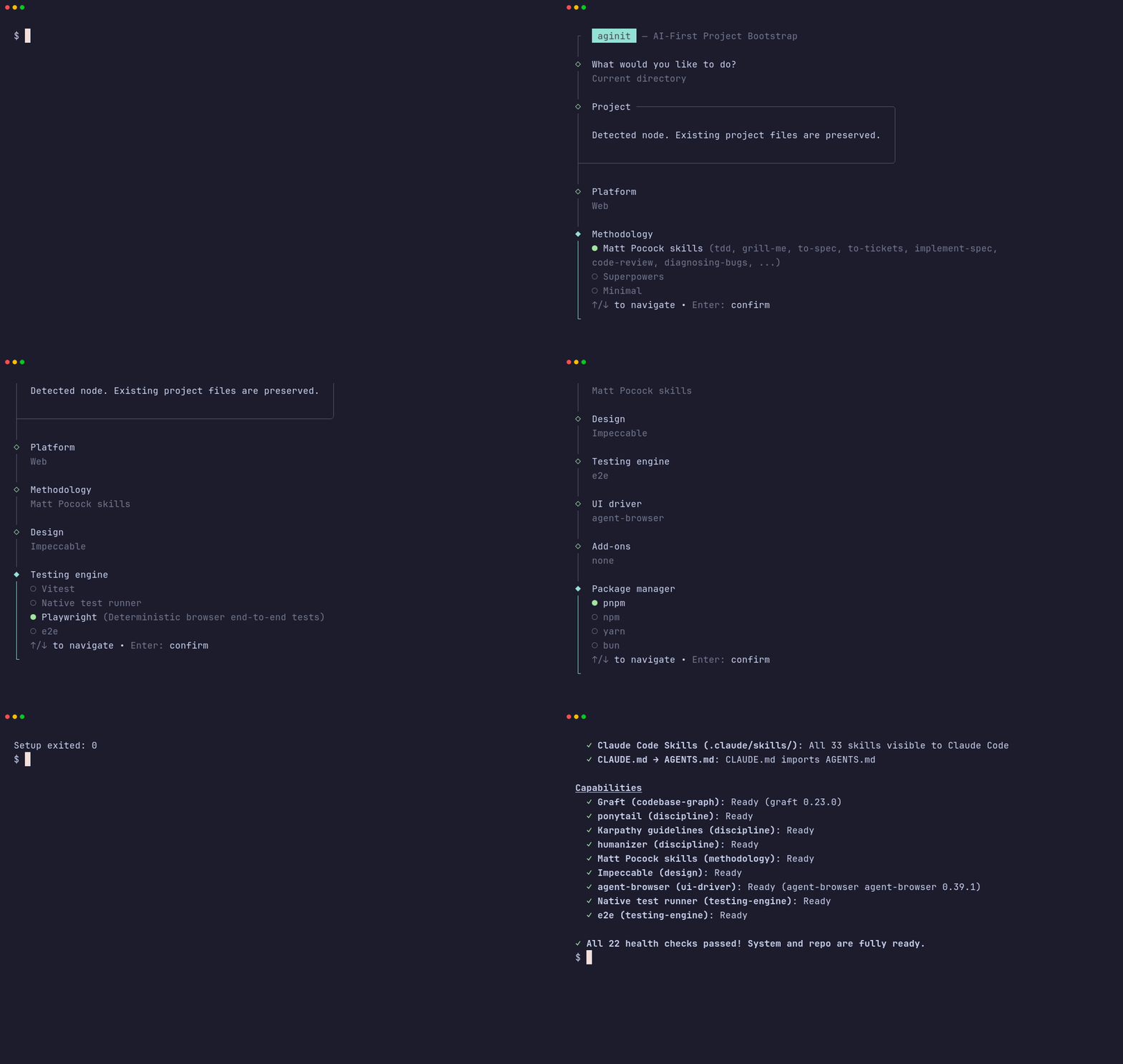
Beta. Expect flags and defaults to change before 1.0.
Agents in a fresh repo usually start out blind:
- no instructions, so they guess at the build, test and package manager commands
- no shared workflow for specs, TDD, code review or bug hunting
- grep-and-read-everything to find their way around the code
- no test runner, so "it works" is never checked
- a different setup in every repo, done by hand
aginit sets all of this up the same way every time, and you can re-run it whenever you want.
| Instructions | A lean AGENTS.md: invariants, the project's real commands, Karpathy guardrails, a Task Routing table and an Anti-Rationalization table. Details live in docs/agents/testing.md, ui-verification.md and workflows.md, which agents load only when the task needs them. A one-line CLAUDE.md (@AGENTS.md) makes Claude Code read it too |
| Skills | One methodology (Matt Pocock skills by default, or Superpowers, or none) plus ponytail, karpathy-guidelines and humanizer. Installed in .agents/skills/ via the Skills CLI, linked into .claude/skills/ |
| Codebase graph | Graft: graft map and graft ask give agents the relevant code spans before they grep |
| Design | Impeccable on web and mobile (/impeccable init, audit, polish). It needs no Node, so it works in Flutter, Swift and Kotlin repos |
| UI verification | agent-browser for web, agent-device for iOS Simulator and Android Emulator. Optional: Chrome DevTools MCP, BrowserSkill |
| Testing | Vitest (+ Playwright with a web framework) for Node projects, the host runner (flutter test, cargo test, ...) otherwise, and optionally e2e, natural-language E2E tests with a zero-cost replay cache |
| Add-ons | context-mode keeps huge logs out of the context window; Worktrunk gives parallel agents their own worktrees |
| Maintenance | aginit list, add and remove change capabilities in place; doctor checks every active one; update refreshes skills and the graph |
Non-JS projects stay non-JS: aginit never adds a root package.json to a Flutter, Swift,
Kotlin, Rust, Go or Python repo. e2e gets its own workspace in .agents/e2e/.
Requires Node.js 22.12+, Git and internet access.
npx @antomanc/aginit          # interactive wizard
pnpm dlx @antomanc/aginit     # same, with pnpm
npm install -g @antomanc/aginit   # or install globally and run `aginit`
The wizard creates a new project or initializes the current directory, auto-detects your stack, and walks you through platform, methodology, design, testing, UI driver, and add-on choices with a setup summary before writing any files. Existing projects keep the package manager they already use.
Graft is installed separately (or skip it with --no-graft):
npm install -g @nanonets/graftaginit [options] Set up or update the current directory (same as aginit init)
aginit new [name] Create a new project
aginit init Add or update agent setup in the current directory
aginit list Show the capability registry and what this project enables
aginit add <id|owner/repo> Enable capabilities (installs skills, refreshes AGENTS.md and docs)
aginit remove <id> Disable capabilities and remove their skills
aginit doctor Check the environment and every active capability
aginit update Update installed skills and rebuild the Graft index
Bare aginit opens the wizard in a terminal and prints help elsewhere. The wizard detects your stack,
then offers platform, methodology, design, testing, UI driver and optional add-on choices with a setup summary.
Initializing an existing directory preserves its stack; Node-only tools are hidden for other stacks. Pass any option, or
--yes, to initialize without prompts.
Setup flags: --preset web|cli|generic, --framework none|vite|next|existing,
--package-manager pnpm|npm|yarn|bun, --dry-run, --yes, --no-skills, --no-graft, --no-git.
Capability flags (the platform is detected; flags override it):
| Flag | Values |
|---|---|
--platform |
auto, web, mobile-native, mobile-rn, backend, cli |
--methodology |
pocock (default), superpowers, minimal |
--design |
impeccable (default for UI platforms), none |
--testing |
e2e, playwright, vitest, native |
--ui-driver |
auto, agent-browser, agent-device, chrome-devtools-mcp, browserskill, none |
--addons |
context-mode, worktrunk, chrome-devtools-mcp, browserskill (comma-separated) |
--add-skill |
any owner/repo skill repository (repeatable) |
--without |
any capability id, e.g. graft or humanizer (repeatable) |
# Web: Vite app with agent-browser, Impeccable and e2e tests
aginit new my-app --preset web --framework vite --testing e2e

# Flutter / Swift / Kotlin: run inside the existing app. Detected as mobile-native, it gets
# agent-device and Impeccable, and e2e is isolated in .agents/e2e/ (no root package.json)
cd my_flutter_app && aginit --testing e2e
cd .agents/e2e && npm install      # then: npx e2e run against a booted simulator

# React Native / Expo: detected as mobile-rn (agent-device, the project's own test script)
cd my-expo-app && aginit --yes

# CLI or library without UI tooling, Superpowers instead of Pocock skills
aginit init --platform cli --design none --methodology superpowers

# Change an existing project
aginit add context-mode worktrunk
aginit add superpowers             # swaps out the current methodology
aginit remove impeccable
aginit list| Preset | Setup |
|---|---|
web |
TypeScript and Vitest, with optional Vite or Next.js scaffolding. Playwright is added when a web framework is selected. |
cli |
Node.js/TypeScript CLI with Commander, Picocolors and Vitest. |
generic |
Git, AGENTS.md, skills and Graft. Leaves an existing package.json untouched. |
The web preset's --framework none (default) creates a TypeScript baseline without a bundler
or browser tests. existing keeps the framework you already have.
Your choices (preset, framework, package manager, platform, stack, capabilities, skill
sources) are saved in aginit.config.json, and a plain rerun applies them as written. The
package manager is also passed to framework scaffolders. On a non-Node stack the preset is
generic, which writes no Node files.
Every tool aginit knows is one entry in src/registry/catalog.ts.
init, list, add, remove, doctor, the AGENTS.md routing table and the docs/agents/
pages all read from it, so a new skill takes one entry and no other code:
{
  id: 'my-skill', name: 'My skill', description: 'What it does',
  category: 'discipline', author: 'Me', repoUrl: 'https://github.com/me/my-skill',
  license: 'MIT', supportedPlatforms: ['all'], requiresNodeInProjectRoot: false,
  install: [{ kind: 'skills-sh', repo: 'me/my-skill', skills: ['my-skill'] }],
  routing: { task: 'When to use it', read: '`my-skill` skill' }
}
Without a release, add a skill repository to one project with aginit add owner/repo (or
--add-skill), or declare it in aginit.config.json:
"customCapabilities": [
  { "id": "acme-review", "repo": "acme/agent-skills", "skills": ["review"],
    "binary": { "bin": "acme", "install": "npm i -g acme-cli" } }
],
"disabledCapabilities": ["humanizer"]
Doctor then checks .agents/skills/review/SKILL.md and the acme CLI, and
docs/agents/workflows.md lists the skill.
aginit init never replaces application code. It keeps your source, custom scripts,
dependency versions and test configs, and only adds what's missing. If you already use a
different test runner, aginit adds a separate test:unit script instead of touching yours.
An existing AGENTS.md is preserved. aginit adds its managed block between
<!-- aginit:start --> and <!-- aginit:end -->, above Graft's block, and refreshes only that
block afterwards. The docs/agents/ pages carry a marker line; delete it and aginit leaves
that page to you. Configs from older versions keep loading unchanged. Their capabilities are
inferred from skills.sources and the codebase/browser switches until you run
aginit add, remove or pass a capability flag.
- Orchestrates, doesn't vendor. Skills, Graft, e2e, Vite, Next.js and Playwright come
from their upstream tools. aginit picks good defaults and runs them. CLIs it does not
install itself (agent-device, context-mode,
wt,bsk) are checked, and the upstream install command is printed. - Idempotent. Re-running the same init is safe; explicit options override saved settings.
- Honest dry-run.
--dry-runlists every planned operation without writing files or downloading tools. (Files produced by upstream scaffolders are only known after they run.) - Fails loudly. Invalid config is reported before any file changes. A failed scaffold
stops the command; missing Graft, a failed skill install or a failed agent-browser setup
exits nonzero and keeps the scaffold, so you can fix it and re-run
aginit init. - Hands off your system. If the Linux kernel blocks Chrome's sandbox (
No usable sandbox!), aginit tells you the sysctl fix and the narrower--no-sandboxoption. It never changes system settings for you.
agbox prepares the machine for AI agents (toolchains,
Docker, Playwright, Tailscale, snapshots). aginit prepares the project. Use them together:
agbox setup, then npx @antomanc/aginit in a new project.
pnpm install --frozen-lockfile
pnpm check                    # typecheck (src + tests), tests, build, dependency audit
pnpm check:skills             # compare the standard skill set with upstream (after pnpm build)
pnpm smoke                    # verify projects generated from the packed tarball
pnpm smoke --frameworks       # also scaffold, test, build and serve Vite and Next.js
pnpm smoke --package-managers # verify pnpm, Yarn and Bun consumer commands
npm publish runs pnpm check and the base smoke test first. See
CHANGELOG.md, CONTRIBUTING.md and
SECURITY.md.
MIT © 2026 Antonio Mancini
Upstream tools and skills keep their own licenses; aginit does not vendor or relicense them. See THIRD_PARTY_NOTICES.md.