
Integrated Universal Monitoring and Telemetry System
Offline-first temperature, humidity and pressure monitoring for the Raspberry Pi Pico W


SIMUT is IoT firmware for the Raspberry Pi Pico W that monitors temperature, humidity and pressure on up to 16 sensors, and keeps working with or without a network. One source tree builds three published devices:
- a touch-panel monitor (320×240 TFT);
- a character-LCD monitor (16×2, the alpha);
- a battery logger that hibernates between readings (the Air, experimental).
They share one core:
- binary on-device history and per-channel alarms;
- 32 user accounts with 13 permission bits;
- an embedded web interface;
- telemetry over HTTP(S) or MQTT(S), with a separate line for alarms;
- Home Assistant MQTT Discovery, a Prometheus
/metricsendpoint and remote syslog (RFC 5424); - over-the-air updates and a serial console.
| Current release | v2.7.2 (2026-09-24). The 2.7 line left beta with v2.7.0, on measurements: an 8.18 h soak with 0 reboots, and 6 of 6 over-the-air updates with nothing lost. v2.7.2 fixes the Air's clock and its long telemetry batches, and two panel screens, and every image is 16 kB smaller. |
| Published images | Three images, each as .uf2 and .bin: release (TFT touch panel), alpha (16×2 LCD with a Bluetooth console) and air (headless battery logger). The pt-BR and es-ES language packs and an OTA manifest ship alongside. |
On main, not yet released |
|
| Maturity |
|
| Tests | Every pull request runs 408 host test cases in 7 suites, 60 s of fuzzing and static analysis, and builds all six firmware images from a cold cache. Behaviour on real hardware is verified on a bench — see Verification. |
Known limitations. Each one is documented where it applies.
- Updates. An update over the air reformats the filesystem:
- Wi-Fi, accounts and sensor slots are carried across. History, calibration files and language packs are not, so the web page downloads a backup before it starts, and restoring it brings them back.
- There is one firmware slot and no rollback. A bad flash is recovered with BOOTSEL and a USB cable.
- Unexplained resets. A watchdog reset with an empty trace (
ctx=209/ctx=455) appeared three times on the bench image on 20–21 September and not since. Both cores are now instrumented to explain the next one. - Idle connections. During the v2.7.0 soak, 7.1 % of responses on an idle keep-alive connection arrived cut short. The device drops a stream it cannot send for 4 s.
- User list. Every save of the user list reboots the device, about 25 s each time.
- Telemetry cursor. The cursor is a single timestamp, so a record stamped out of order on flash is skipped: 6 of 75,778 records in one measurement.
- Not a certified instrument. SIMUT is not a certified metrological instrument. Validate it against your own reference before relying on it for regulated storage.
| Need | DIY Arduino sketch | ESPHome / Tasmota | SIMUT |
|---|---|---|---|
| Standalone with display | Manual coding | No TFT support | Built-in touch UI, or a 16×2 LCD |
| Regulated environments | No audit trail | No user RBAC | 32 accounts, per-account panel PIN, signed audit trail |
| Cold chain (probes down to −50 °C) | Basic readings | Basic monitoring | Calibrated multi-sensor, maintenance windows |
| Offline operation | Yes | Often cloud-dependent | Full local web + display |
| OTA updates | Manual reflash | OTA | OTA + backup/restore |
| Security | None | Basic | HMAC-SHA256, 13-bit RBAC, lockouts, optional HTTPS |
| Home Assistant | Manual setup | Native | MQTT Discovery (opt-in) |
| Prometheus metrics | None | Built-in | /metrics endpoint |
| Remote audit log | None | Add-on | Syslog (RFC 5424 / UDP) |
SIMUT is for you if: you need a standalone, secure, auditable temperature monitoring system that works with or without internet — typical in laboratories, pharmacies, blood banks, vaccine storage, and food cold chains.
ESPHome/Tasmota may be better if: you don't need a local display and prefer YAML configuration over a built-in web UI. (If what kept you there was Home Assistant: SIMUT speaks MQTT Discovery.)
┌──────────────────────────────────────────────────────────┐
│                    Raspberry Pi Pico W                   │
│  ┌──────────────────────┐  ┌────────────────────────────┐│
│  │      Core 0          │  │        Core 1              ││
│  │  (Main Loop)         │  │  (Display Loop)            ││
│  │                      │  │                            ││
│  │  ◆ AppManager ───────┼──┼─ state/snapshots ──────┐   ││
│  │  ◆ SensorManager     │  │  ◆ DisplayManager ◄────┘   ││
│  │  ◆ WebManager        │  │  ◆ TouchPriority           ││
│  │  ◆ TelemetryManager  │  │  ◆ DMA canvas renderer     ││
│  │  ◆ CommandManager    │  │  ◆ Themes                  ││
│  │  ◆ StorageManager    │  │  ◆ i18n (EN/PT/ES packs)   ││
│  │  ◆ NetworkManager    │  │                            ││
│  └──────────┬───────────┘  └────────────────────────────┘│
│             │                                            │
│  ┌──────────┴──────────────────────────────────────────┐ │
│  │  Hardware Interfaces                                │ │
│  │  ◆ SPI → ILI9341 TFT 320×240 + XPT2046 Touch        │ │
│  │    (alpha: HD44780 16×2 LCD · Air: no display)      │ │
│  │  ◆ GP0–GP15 → 16 universal sensor slots:            │ │
│  │      DS18B20 (1-Wire) · DHT22 · BMP280/BME280 (I2C) │ │
│  │  ◆ USB CDC → serial console (+ Bluetooth: alpha/Air)│ │
│  │  ◆ WiFi (CYW43439) → HTTP(S) server + telemetry     │ │
│  └─────────────────────────────────────────────────────┘ │
└──────────────────────────────────────────────────────────┘
         │                   │                   │
    ┌────┴────┐          ┌───┴────┐         ┌────┴───────┐
    │ Sensors │          │ Web UI │         │  Telemetry │
    │ DS18B20 │          │ Browser│         │ HTTP(S) /  │
    │  DHT22  │          │ (RBAC) │         │  MQTT(S)   │
    │ BMx280  │          └────────┘         └────────────┘
    └─────────┘
| TFT dashboard | TFT history graph | Web dashboard | Early alpha |
|---|---|---|---|
 |
 |
 |
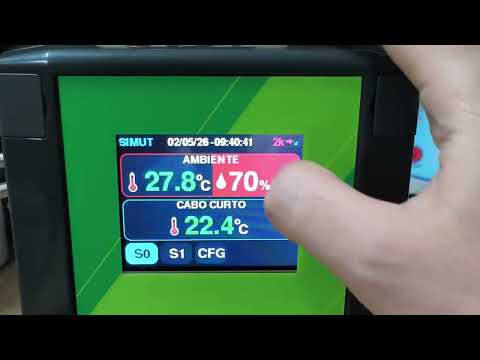 |
Every display screen, captured off the real panel framebuffer: docs/images/screens/screens.md.
The early alpha video shows the first TFT + touch prototype — the UI has been redesigned since.
| Component | Specification |
|---|---|
| MCU | Raspberry Pi Pico W (RP2040, dual-core) |
| Display | release: ILI9341 320×240 TFT (SPI, DMA-driven) · alpha: HD44780 16×2 character LCD (4-bit) · air: none |
| Touch | XPT2046 resistive touchscreen (release) |
| Sensors | 16 universal slots on GP0–GP15 — any mix of DS18B20 (1-Wire), DHT22 and BMP280/BME280. A BMx280 is I²C and takes two pins; two of them can share a pair (0x76/0x77) |
| Buzzer | Passive piezo (PIO-driven) — not on the Air |
| Storage | 2 MB internal flash (1 MB firmware slot + 1 MB LittleFS) |
See the wiring guide for the complete pinout and connection diagrams.
SIMUT PCB — layout available for download — the KiCad board design (
.kicad_pcb,.kicad_sch) lives inPCB_test/, and the ready-to-fab package (Gerbers + PTH/NPTH drills, no paste layers) is published as a public release: simut-pcb-v1.1 —simut_pcb_fabrication.zip.
- 16 universal sensor slots — GP0–GP15. Each slot takes a DS18B20, a DHT22 or a BMP280/BME280; a BMx280 is retyped automatically from its chip ID. Type and pins are assigned at runtime, with no recompile.
- Temperature, humidity and pressure as first-class channels.
- Calibration — per-sensor offsets and curves of up to 5 points per channel, linear or smooth.
- Zero-trust sensor pipeline:
- DS18B20 ROM verification, with a swapped probe quarantined until the right one returns;
- error hysteresis: 3 failures to enter, 5 successes to leave;
- out-of-range readings rejected.
- Alarms on every channel:
- low and high limits per channel;
- a fault alarm that fires even when a sensor's limits are off;
- a 120 s silence and a global mute;
- buzzer melodies and visual feedback on the display.
- Maintenance windows — per sensor, up to 30 days, set from the panel or by a server. While one is open, alarms are suppressed, and the window's start and end are reported as
maint_on/maint_off.
- 320×240 ILI9341 touch panel — dashboard, history graphs with a min/max band, statistics, calendar, settings.
- Identity at the panel — the operator picks an account, then types that account's PIN:
- 32 accounts, each with its own PIN;
- a configurable PIN policy: minimum length, 1–3 glyphs per key, digits or 0-9A-Z;
- a keypad that is re-dealt after every tap;
- a lockout per account: the sixth failure locks the account, and 20 failures in total lock the panel.
- Administration on the glass:
- a Users item creates accounts and sets their permission bits and PINs;
- the 12 settings rows are filtered by what the account may do;
- Settings → 12 starts the setup access point.
- Top-panel gestures — a tap toggles min/max, a 3 s hold pins the selection.
- DMA rendering fast path — canvas compositing over 62.5 MHz SPI.
- 4 px safe area everywhere — the screen-alignment offset (±4 px per axis) can never crop content.
- Themes — up to 8 loaded from LittleFS (11 ship in
data/themes/); the editor intools/theme-editor/previews on a live device. - Sound system — Touch, Confirmation, Error, Alarm and Attention classes, 6 melodies each, with separate system and alarm volumes.
- Readings — cycles every active slot and channel every 3 s, with big digits for temperature and humidity and an
S<n>tag naming the slot. - Setup access point — shows the address, the SSID and the key, scrolling long values.
- Bluetooth console — see the security note under Environments.
- On
main, not yet released — with a single sensor, the bottom-left corner shows the pending telemetry count (N, orNkfrom a thousand up), and the Wi-Fi icon fills left to right.
-
11 pages — gzip-compressed (zopfli) in flash, with light and dark themes that follow the system preference, a file manager, and multi-user sessions that expire after 15 minutes idle.
-
Live panel mirror (
release) — the panel's current frame in the browser, 213 ms per frame. A click on it is a touch on the glass. -
Changes say what they cost — three buttons:
- Test: applied, not saved;
- Apply now: saved, no reboot;
- Save and restart.
The device classifies each change with a dry run before the page offers them.
-
Wi-Fi scan — pick the network from a list, even from inside the setup access point.
-
History graphs and CSV export in the browser — the page downloads the raw binary day files, then decodes, buckets (min/max/mean) and exports them itself. The recent, unsealed hour comes from
/api/history/open. The chart renderer is embedded — no CDN. -
HTTP API — 62 routes. Each one is either gated by a permission or public by design, and CI checks it.
- Four transports — HTTP, HTTPS, MQTT and MQTTS:
- payloads in JSON, CSV or a custom template;
- TLS 1.2 (ECDHE with AES-GCM), with the server certificate checked against an uploaded
/cert.pem.
- Batching by quantity:
t_intis the minimum batch: the radio stays off until that many records wait (0 = off);t_batis the maximum per request, a ceiling that free memory can lower;- the batch size adapts to successes and failures, and the server's response time paces the next one.
- A second line for alarms:
- alarm, fault and maintenance events travel in their own queue (32 by default, up to 64);
- each event leaves the queue only when the server acknowledges it (HTTP 2xx or an MQTT ack);
- each carries the name of the account that acted.
- Integrations — Home Assistant MQTT Discovery (opt-in), Prometheus
/metrics(session or HTTP Basic), and remote syslog (RFC 5424 over UDP). - Fleet hooks:
X-SIMUT-*identity headers on uploads;- on the
releaseimage, an mDNS_simut._tcpservice with id, version, image and TLS in its TXT record; - Bearer tokens and a configurable CORS origin.
-
Wi-Fi that reconnects itself:
- a retry ladder: 5 s, doubling to 120 s, then dormancy and a new round;
- hidden SSIDs and signal-quality checks;
- static IP, two DNS servers, a custom NTP server or a manual clock, and a configurable web port.
-
Setup access point:
- named
<device name>_SETUP—simut_SETUPfrom the factory; - WPA2, with a per-device key shown on the USB console and the TFT boot screen;
- a captive portal at
http://192.168.4.1.
Five ways in:
- a unit with no network configured opens it by itself (not the Air);
- an automatic fallback opens it when the network is lost (not the Air);
- Settings → 12 on the panel;
- the
apconsole command (USB, or Bluetooth on the alpha and the Air); - a 3 s hold on the panel during boot.
- named
-
NTP — the retry backoff grows from 20 s to 15 min, with a fallback to
pool.ntp.org. Until NTP syncs, a provisional clock is seeded from the newest stored record.
- Compact binary history (V5) — delta + anchor encoding at 5.38 bytes/record, about 116 days in the 1 MB filesystem (11 channels at a 1-minute cadence, measured on bench files on 2026-07-31):
- blocks of 60 records, each with its own CRC;
- the open block is saved after every record;
- past 86 % full, the oldest day is deleted.
- Configuration — CRC32-checked, written to a temporary file and renamed, with a
.bakfallback. Secrets are obfuscated at rest. - Event log — 2 × 800 records and 155 event codes:
- routine events are persisted on state changes, with an hourly heartbeat and a count of what was suppressed;
- security, configuration and fatal records are never filtered.
- Accounts and permissions:
- 32 accounts, 13 permission bits;
- nobody can grant a bit they do not hold;
- backup, restore, OTA and certificate install require the full-admin mask.
- Passwords:
- HMAC-SHA256, 5000 rounds, an 8-byte hardware-random salt per user and a board-bound pepper;
- a factory-fresh unit generates a random 8-character admin password, prints it once on the USB console and forces a change at the first login.
- Brute-force limits:
- login lockout from 2 s to 300 s per client, with
429once every lockout slot is taken; - per-IP throttling on the heavy routes;
- the Bluetooth console has its own exponential lockout and stops advertising 5 minutes after boot.
- login lockout from 2 s to 300 s per client, with
- Sessions — an
HttpOnly; SameSite=Strictcookie (Secureover HTTPS), or a Bearer token. - Uploads — path traversal, percent-encoding, control bytes and reserved names are refused, and
/configis out of the file manager's reach. - Optional HTTPS (
release) — install the certificate pair withPOST /api/tls. TLS 1.2, ECDHE with AES-GCM. - Audits — the audits of 2026-08-16, of v2.3.6-beta and of 2026-09-07 are closed. The last finding, V-09 (a restricted account could create one with more bits than it held), was fixed in v2.7.0, and both it and the 2026-09-07 fixes were verified on hardware. See SECURITY.md.
- Crash autopsy on every boot — the watchdog scratch registers name the stalled module on each core. Since v2.7.0, three more records also persist Core 1's module, the free heap and the uptime at the stall.
- Dual-core flash discipline — Core 1 is paused around every flash write (measured, not assumed).
- Watchdog discipline — the watchdog is fed around every filesystem operation, so slow HTTP clients cannot starve the loop.
- OTA from the web page:
- admin only;
- the image is checked before it is committed (size, boot2 CRC, image variant) and again on the next boot;
- Wi-Fi, accounts and sensor slots are carried across, and the rest of the filesystem is reformatted, so the page downloads a backup first;
- the device is back in under a minute: 52–56 s in the v2.7.0 campaign.
- Backup & restore — the whole filesystem in one file, CRC32-checked and bound to the chip.
- Recovery guide — BOOTSEL, picotool and 1200 bps paths for every failure mode.
- Two modes, no display, no buzzer:
- M0 is awake: web, console, Bluetooth and sensors;
- M1 is the cycle: sleep on the RTC alarm, wake, read, write history, and sleep again.
- The radio only when it pays — it comes up only when
t_intrecords are waiting. A reading wake takes 9.31 s with a DS18B20, and with a 60 s interval the device is awake about 13 % of the time. - Charger pin — a charger-detect pin (GP17 by default) keeps it awake while powered.
- Full console — the only published image with the full console.
- 3 interface languages — English built in; Portuguese (pt-BR) and Spanish (es-ES) come as
.lngpacks on the filesystem. A device runs English plus the one pack installed.
- PlatformIO (Core 6.x or later)
pip install zopfli— optional; the web pages compress 2,888 B smaller with it, and the flash budgets are measured with it- Raspberry Pi Pico W
- No local toolchain?
docker compose run buildbuilds in a container — the path CONTRIBUTING.md recommends for new contributors
# Clone the repository
git clone https://github.com/angeloINTJ/simut.git
cd simut

# Build firmware
pio run -e pico_w_release

# Flash to Pico W (auto-reset via 1200 bps touch; BOOTSEL works too)
pio run -e pico_w_release -t upload

# First flash only: upload LittleFS data (language packs, themes, favicon).
# Warning: uploadfs reformats the LittleFS partition — on a device already in
# service it destroys history, config and calibration. Never run it again
# after the device has data; language packs can be uploaded later from the
# web file manager instead. It copies both language packs, and the device
# loads the first alphabetically (es-ES): delete the one you do not want.
pio run -e pico_w_release -t uploadfs
Prefer not to build? Every release ships simut_vX.Y.Z_release.uf2, _alpha.uf2 and _air.uf2 (drag-and-drop with BOOTSEL held), the matching .bin for over-the-air updates, and the pt-BR and es-ES language packs.
-
Capture the admin password. A factory-fresh unit prints a random 8-character admin password once on the USB serial console (115200 baud). It is never stored in plain text. If you miss it,
system admin reset confirmover USB prints a new one. -
Join it to your network. A unit with no network configured opens its setup access point by itself. The Air does not: type
apon its console instead.- Join
<name>_SETUP(simut_SETUPfrom the factory). It is WPA2, and its per-device key is printed on the USB console and on the TFT's boot terminal — at boot, and since v2.7.2 also when the AP opens during operation. On an alpha, read it from the USB console or from theapcommand's reply: by the v2.7.2 code, the LCD does not reach its AP pages. - The portal opens at
http://192.168.4.1. - While the setup access point is up, the device does not measure: in v2.7.2 it reads no sensors, checks no alarms and records no history until it joins a network.
Without a screen, you can use the console instead:
system ssid <name>,system pass <secret>, thenreload confirm. The console stops at the first space, so a network name or password with a space has to go through the web page. - Join
-
Open the web interface at the address the device got — on the
releaseimage alsohttp://simut.local— and log in asadminwith the password from step 1. You will be asked to choose a new one. -
Add sensors in Config → Sensors & GPIO, or let Scan for probes find them.
-
On the touch panel, Settings asks for an account and its PIN. The factory admin PIN is
1234, and it must be changed on first use.
simut/
├── src/                    # Firmware source (C++17)
│   ├── main.cpp            # Entry point
│   ├── AppManager*         # Application state machine, boot, alarms, Air cycle
│   ├── DisplayManager*     # TFT panel and alpha LCD (Core 1), touch, themes
│   ├── WebManager*         # Web server, HTTP API, sessions, OTA, TLS
│   ├── StorageManager*     # LittleFS, config, accounts, history files
│   ├── SensorManager*      # DS18B20 / DHT22 / BMx280 drivers
│   ├── NetworkManager*     # Wi-Fi, reconnect ladder, setup AP, mDNS, NTP
│   ├── TelemetryManager*   # HTTP(S)/MQTT(S) telemetry and the alarm line
│   ├── CommandManager*     # Serial and Bluetooth console
│   ├── LogManager*         # Event log and crash forensics
│   ├── HistoryV5.*         # V5 history codec
│   ├── air/                # SIMUT Air configuration
│   ├── display/            # Keypads, fonts and labels shared by the displays
│   ├── sensors/            # Channel table, calibration curves
│   ├── ota/                # Update staging, validation and applier
│   └── SystemDefs*.h       # System constants and limits
├── data/                   # LittleFS assets (language packs, themes, favicon)
├── PCB_test/               # KiCad PCB design + Gerber/DRL fabrication files
├── test/                   # Native unit tests (Unity), seven suites
├── tools/                  # Build gates, bench suites, PicoHand, release scripts, theme editor
├── docs/                   # Documentation + GitHub Pages site
├── WebUI.h                 # Web UI source (gzipped into src/WebUI_GZ.h at build)
├── AGENTS.md               # Bench manual: flashing, the Air, measuring (Portuguese)
└── platformio.ini          # Build configuration
| Environment | Purpose | Published |
|---|---|---|
pico_w_release |
Production image for the TFT panel: emergency console, HTTPS server, mDNS | …_release |
pico_w_alpha |
16×2 character LCD (HD44780), no touch; emergency console + Bluetooth console | …_alpha |
pico_w_air |
Experimental — SIMUT Air: headless, no buzzer, hibernation cycle (M0 awake / M1 wake-read-send-sleep); full console + Bluetooth. See §17 of the user manual | …_air |
pico_w_test |
Bench image: the full console for the test suites; no HTTPS, no mDNS | — |
pico_w_test_https |
pico_w_test plus the HTTPS server, for TLS validation; three of its pages are served from LittleFS to fit |
— |
pico_w_asserts |
Release + concurrency assertions | — |
seven native* envs |
Host-side unit tests — see Testing | — |
Security note for
pico_w_alphaandpico_w_air: both compile the Bluetooth SPP console in (SIMUT_BLUETOOTH=1), so on those two images it is live attack surface. It is authenticated by the admin web password, with an exponential lockout that survives a reconnect, and a discovery window that closes 5 minutes after boot. Recovery commands are restricted to USB.The setup access point is WPA2 on every image, with a per-device key shown on the console and, where there is one, on the display. See SECURITY.md §2 and §8.
There is no debug environment.
pico_w_debugwas removed in v2.4.1 after never once linking: at-Ogthe image overflowed the 1020 KB app slot by ~100 KB. Flash is tight. The release image uses 97.2 % of the 1,044,480 B program slot, and its.binsits 13,196 B under the 1,040,384 B over-the-air ceiling. A GDB target would have to be built by cutting features. For the concurrency tripwire on hardware, usepico_w_asserts.
-Os— optimize for size-Wall -Wextra, and-Werroronsrc/(third-party libraries are not held to it)-specs=nano.specs— newlib-nano for smaller binary-DNDEBUGon every image- LTO is disabled (toolchain limitation with earlephilhower Arduino-Pico)
- The framework is pinned to arduino-pico 5.6.1 and patched by
tools/arduino_pico_overrides/patch.sh
A serial console is available over USB (115200 baud), and over Bluetooth SPP on the alpha and the Air.
-
The emergency console runs on the
releaseandalphaimages. Its 14 commands:show net status,show system info,show system logdebug on|offsystem admin reset,system format,system factory,system https offsystem ssid <name>,system pass <secret>,system cors <origin|off>ap,reload,help
Destructive commands ask for
confirm, and the four recoveries (system factory,system format,system admin reset,system https off) are refused over Bluetooth. -
The full Cisco-style console (
enable/configure terminal) runs on theairimage and thepico_w_testbench images — see the CLI manual (in Portuguese). The Air addsair status | hibernate | stop | idle <sec> | charger <gpio|off>.
Where configuration happens:
- The web interface is the day-to-day tool.
- The touch panel covers what an operator needs at the device: themes, alarms, sounds, language, their own PIN, users, the PIN policy, touch calibration, display offset, status and the setup access point.
The device exposes a REST API at http://<device-ip>/api/:
- 62 routes — 52 gated by a permission, 10 public by design, 0 ungated, checked by
tools/check_authz.pyin CI; - the route table is in the user manual;
- docs/AUTHORIZATION.md maps each route to its permission;
- docs/API_POST.md documents the POST bodies.
pio test -e native             # validators, telemetry cursor, labels, parsers (185 cases)
pio test -e native_history_v5  # V5 history codec (63)
pio test -e native_cli         # CLI parser (31)
pio test -e native_logpolicy   # edge-triggered log persistence (45)
pio test -e native_alarmqueue  # alarm telemetry queue (39)
pio test -e native_network     # Wi-Fi reconnect state machine (29)
pio test -e native_air         # SIMUT Air persistent config (16)

# V5 codec reference checks (Python vs C++, 20k random cases)
python3 tools/check_history_v5_parity.py --cases 20000
python3 tools/history_v5.py --selftest --trials 200000Every push and pull request to main runs four jobs:
- gates — the host suites plus these checks:
- secret scan, log-code tables, authorization matrix;
- licence consistency, filesystem guard, Air consistency;
- history day-merge tests.
- firmware — all six images, built from a cold cache:
- each is checked against its flash budget and the over-the-air ceiling;
- the build itself enforces
-Werrorand the web UI, CLI help, log-code, channel-table and language-pack gates.
- fuzz — 60 s of libFuzzer against the web-API validators, with contract oracles.
- static analysis — cppcheck, at a pinned version.
main is protected: eight of these checks must pass before anything merges.
The bench:
- a Pico W with the TFT panel and touch;
- a second Pico, the PicoHand, which works the target's RESET and BOOTSEL lines, times its awake/asleep line and fakes a charger (see AGENTS.md, in Portuguese);
- bench suites in
tools/for the web API, the panel, telemetry, OTA, Wi-Fi outages and the Air cycle.
What has been measured on real hardware, latest first:
| Date | What | Result |
|---|---|---|
| 2026-09-24 | Panel: PIN security and setup mode (v2.7.2) | The footer arrows stay on the screen (v2.7.1 closed it); an unsaved tap no longer changes the stored policy; Confirm shows the network, the key and 192.168.4.1 (v2.7.1 stayed on the confirmation, AP already up) |
| 2026-09-23 | Air clock across the sleep (v2.7.2) | Stamps within −0.085 … +0.030 s over 10 wakes (v2.7.1 lost 0.8 s per wake); the NTP correction fell from 9–10 s to 0.08 s |
| 2026-09-23 | Long telemetry queues on the Air (v2.7.2) | 0 invalid bodies; 13,681 of 13,682 records delivered awake, 13,670 of 13,671 hibernating (v2.7.1: 68 of 69 bodies were invalid JSON) |
| 2026-09-22 | v2.7.0 soak | 8.18 h, 0 reboots; the largest free heap block moved −42 B |
| 2026-09-22 | v2.7.0 over-the-air updates | 6 of 6 applied; 57 files restored, 0 records missing |
| 2026-09-22 | Setup access point (v2.7.1) | A client joins in 4.1 s, on release and on alpha with Bluetooth live, also with a randomised MAC. The automatic fallback opens after 6–7 min without a network |
| 2026-09-22 | V-09 fix | 10 of 10 verdicts, with positive controls |
| 2026-09-21 | Collector down for 3 h 58 min | 237 records queued, 0 reboots; drained in one round with 0 missing, plus 25 alarm-line records |
| 2026-09-21 | Web suites | 67/67 as admin, 87/87 as a restricted account; 500 flash-writing commits, 0 reboots |
| 2026-09-21 | Wi-Fi scan | 18 of 18, 0.94 s per sweep, also from inside the access point |
| 2026-09-20 | Panel accounts, PINs and policy | 32/32 |
| 2026-09-19 | Panel mirror | 613 → 213 ms per frame; pixel-exact against the framebuffer (0 of 76,800 differ) |
| 2026-09-11 | Power cut during an update | Only the ~25 s apply window leaves the device needing BOOTSEL |
| 2026-08-10 | History across resets | 10 of 10 hardware resets and 10 of 10 reboots lost 0 records |
The 16×2 LCD is the one output not validated on glass. The bench has no HD44780, so host tests check what it is handed.
| Document | Description |
|---|---|
| User manual | Hardware setup, display/web/console guide, OTA, API reference, troubleshooting — kept current |
| Manual do usuário (pt-BR) | The same manual, in Portuguese |
| Complete manual (pt-BR) | The full product manual in Portuguese, updated for v2.7.2: 31 chapters on installation, configuration, daily use and server integration. Screenshots are being recaptured; each missing one is marked where it belongs |
| Wiring guide | Complete pinout and connection diagrams |
| Over-the-air updates | Updating from the web page, and what survives it |
| Recovery guide | Brick recovery — BOOTSEL, picotool, 1200 bps reset |
| CLI manual | Full console reference, the Air's included (in Portuguese) |
| Authorization matrix | Every HTTP route and the permission it requires |
| Security policy | Threat model, credential handling, incident response |
| Documentation index | Which documents are kept current and which are snapshots |
| Changelog | Version history and feature changes |
Contributions are welcome. Read CONTRIBUTING.md for the development setup, the code conventions and the pull request process.
All contributors must follow the Code of Conduct.
- Bug reports: GitHub Issues
- Feature requests: GitHub Issues
- Security vulnerabilities: See SECURITY.md — do not open a public issue
- Questions: Open a discussion or issue
Thanks to everyone who has contributed:
 Ângelo Moisés Alves 💻 📖 🎨 🔌 🛡️ 🚧 |
 Lorenzo Longaretto 🧪 💻 |
 John Martin 🚇 💻 |
 f p 📖 |
 Mike 💻 🧪 📖 |
This project follows the all-contributors specification.
Is your product or project using SIMUT? Add this badge to your README, documentation, or product page:
[](https://github.com/angeloINTJ/simut)
Large version (for presentations, posters, or product packaging):
[](https://github.com/angeloINTJ/simut)
MIT License — see LICENSE for details.
Copyright © 2026 Ângelo Moisés Alves