
Flexible lightweight finite state machine (FSM) for .NET, supporting shared context for passing parameters, composite (sub) states, command states, lazy-loading and thread safe. The library is AOT friendly, cross-platform and optimized for speed for use in enterprise, robotic/industrial systems, and even tiny (mobile) applications.
The Lite State Machine is designed for vertical scaling. Meaning, it can be used for the most basic (tiny) system and beyond medical-grade robotics systems.
| Copyright 2021-2026 Xeno Innovations, Inc. (DBA: Suess Labs) |
| Created by: Damian Suess |
| Date: 2021-06-07 (inception 2016) |
| Package | Stable | Preview |
|---|---|---|
| Lite.StateMachine |  |
 |
Not only is Lite.StateMachine smaller, easier to read, manage, and maintain, it faster too!
The following table is an output of local benchmark results using state-transition operations across multiple states:
| Method | Version | Mean | Allocated |
|---|---|---|---|
| Lite.StateMachine | v2.3.0 | 10.17 us | 8.02 KB |
| Stateless | v5.20.1 | 10.72 us | 10.62 KB |
Lite.StateMachine is the fastest and lowest allocation
Thread safe and most customizations can be set on-the-fly!
- AOT Friendly - Ahead-of-Time compilation, No Reflection, no Linq, etc.
- Passing parameters between state transitions via
Context - Dependency Injection (DI) friendly
- Asynchronous states
- Types of States:
- Basic Linear State (
BaseState) - Composite States (
CompositeState)- Hieratical / Nested Sub-states
- Similar to Actor/Director model
- Command States with optional Timeout (
CommandState)- Uses internal Event Aggregator for sending/receiving messages
- Allows users to hook to external messaging services (TCP/IP, RabbitMQ, DBus, etc.)
- Basic Linear State (
- State Transition Triggers:
- Transitions are triggered by setting the context's next state result:
- On Success:
context.NextState(Result.Success); - On Error:
context.NextState(Result.Error); - On Failure: :
context.NextState(Result.Failure);
- State Handlers:
OnEntering- Initial entry of the stateOnEnter- Resting (idle) place for state.OnExit- (Optional) Thrown during transitioning. Used for housekeeping or exiting activity.OnMessage(Optional)- Must ensure that code has exited
OnMessagebefore going to the next state.
- Must ensure that code has exited
OnTimeout- (Optional) Thrown when the state is auto-transitioning due to timeout exceeded
- Transition has knowledge of the
PreviousState,CurrentStateId, andNextState - Shared Context:
Parameters- For passing data between states.Errors- For passing error information between states.CurrentStateIdNextStatesEventAggregatorLastChildResult,LastChildStateId(for composite states)
- Customizable (on-the-fly):
- State Timeout (per state or default for all states)
- Overridable Next States!
OnSuccess,OnError, orOnFailure
Create a state machine by defining the states, transitions, and shared context.
You can define the state machine using either the fluent design pattern or standard line-by-line. Each state is represented by a enum StateId in the following example.

The basic state exapmle transitions from State1 -> State2 -> State3.
// That's it! Just create the state machine, register states, and run it.
var machine = await new StateMachine<StateId>()
  .RegisterState<BasicState1>(StateId.State1, StateId.State2)
  .RegisterState<BasicState2>(StateId.State2, StateId.State3)
  .RegisterState<BasicState3>(StateId.State3)
  .RunAsync(StateId.State1);

// To avoid hung states, you can pass in a timeout value (in milliseconds)
// Useful for robotic systems; fail fast and recover!
var machine = new StateMachine<BasicStateId>();
machine.DefaultStateTimeoutMs = 3000;
Define States:
// Optional Wrapper
public class BaseState : IState<StateId>
{
  public virtual Task OnEntering(Context<StateId> context) => Task.CompletedTask;
  public virtual Task OnEnter(Context<StateId> context) => Task.CompletedTask;
  public virtual Task OnExit(Context<StateId> context) => Task.CompletedTask;
}

public class BasicState1() : BaseState
{
  public async Task OnEnter(Context<BasicStateId> context)
  {
    await Task.Yield(); // Your async work here...
    context.NextState(Result.Success);
  }
}

public class BasicState2() : BaseState
{
  public Task OnEnter(Context<StateId> context)
  {
    // Notice, we did not async/await this method
    context.NextState(Result.Success);
    return Task.CompletedTask;
  }
}

public class BasicState3() : BaseState
{
  public Task OnEnter(Context<StateId> context)
  {
    context.NextState(Result.Success);
    return Task.CompletedTask;
  }
}var uml = machine.ExportUml();To generate SVG or PNG files from DOT, use the optional Lite.StateMachine.DotGraph package:
using Lite.StateMachine.DotGraph;

var renderer = new GraphvizRenderer();
await renderer.RenderAsync(machine.ExportUml(), "machine.svg");
await renderer.RenderFileAsync("machine.dot", "machine.png", DotGraphFormat.Png);
The renderer requires an installed or application-supplied Graphviz executable. It is independent of the core library and uses portable .NET process APIs for Windows, Linux, and macOS. See the package README for deployment requirements.
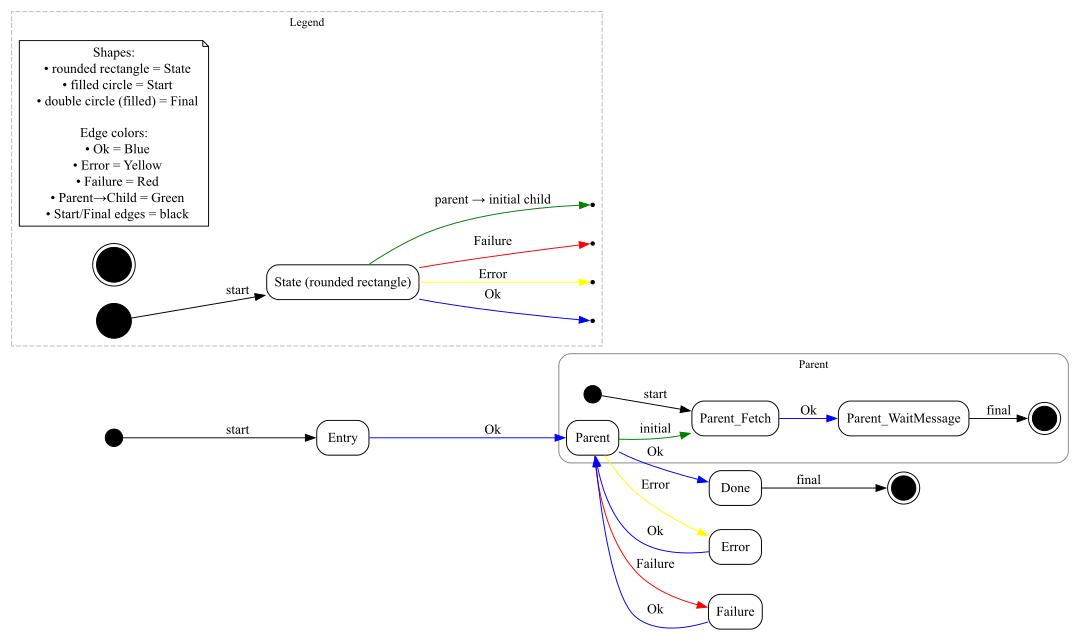
The following uses the fluent design pattern style, stacking the .RegisterXXX(...) methonds ontop of each other with the RunAsync(...) method occurring at the end.
using Lite.StateMachine;

// Note the use of generics '<TStateClass>' to strongly-type the state machine
var machine = new StateMachine<CompositeL1StateId>()
  .AddContext(new() { { ParameterType.Counter, 999 } });
  .RegisterState<Composite_State1>(CompositeL1StateId.State1, CompositeL1StateId.State2)

  .RegisterComposite<Composite_State2>(
    stateId: CompositeL1StateId.State2,
    initialChildStateId: CompositeL1StateId.State2_Sub1,
    onSuccess: CompositeL1StateId.State3)

  .RegisterSubState<Composite_State2_Sub1>(
    stateId: CompositeL1StateId.State2_Sub1,
    parentStateId: CompositeL1StateId.State2,
    onSuccess: CompositeL1StateId.State2_Sub2)

  .RegisterSubState<Composite_State2_Sub2>(
    stateId: CompositeL1StateId.State2_Sub2,
    parentStateId: CompositeL1StateId.State2,
    onSuccess: null) // NULL denotes returning to parent state on success

  .RegisterState<Composite_State3>(CompositeL1StateId.State3);

// Optional, pass in starting Context Property
await machine.RunAsync(CompositeL1StateId.State1, ctxProperties);
States are represented by classes that implement the IState interface.
public class Composite_State1() : BaseState
{
  public override Task OnEnter(Context<CompositeL1StateId> context)
  {
    var cnt = context.ParameterAsInt(ParameterType.Counter);
    var blank = context.ParameterAsBool(ParameterType.DummyBool);

    context.NextState(Result.Success);
    return Task.CompletedTask;
  }
}

public class Composite_State2() : BaseState
{
  public override Task OnEnter(Context<CompositeL1StateId> context)
  {
    // Signify we're ready to go to sub-states
    context.NextState(Result.Success);
    return Task.CompletedTask;
  }

  public override Task OnExit(Context<CompositeL1StateId> context)
  {
    // Signify we're ready to go to next state after composite
    context.NextState(Result.Success);
    return Task.CompletedTask;
  }
}

public class Composite_State2_Sub1() : BaseState
{
  public override Task OnEnter(Context<CompositeL1StateId> context)
  {
    // Safely add/update key-value in Context
    context.Parameters.SafeAdd("StringBasedParamKey", SUCCESS);

    context.NextState(Result.Success);
    return Task.CompletedTask;
  }
}

public class Composite_State2_Sub2() : BaseState
{
  public override Task OnEnter(Context<CompositeL1StateId> context)
  {
    context.NextState(Result.Success);
    return Task.CompletedTask;
  }
}

public class Composite_State3() : BaseState
{
  public override Task OnEnter(Context<CompositeL1StateId> context)
  {
    context.NextState(Result.Success);
    return Task.CompletedTask;
  }
}