


QuickQR is a Chrome Sidepanel Extension with a distinctive retro magazine aesthetic. Designed as a "digital Swiss Army knife" for QR code processing, it combines a vintage editorial UI with powerful utility features and a built-in intelligent security scanning system to protect users from malicious QR codes.
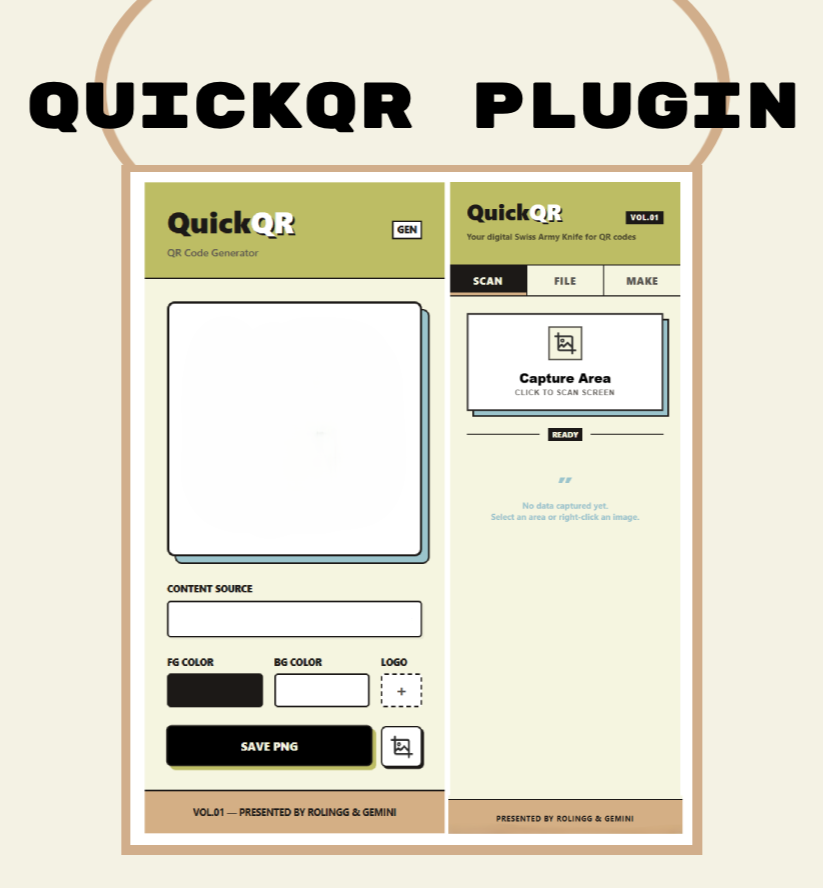
QuickQR provides an all-in-one QR code toolkit through its browser sidepanel, organized into three core modules:
- Interactive Screenshot: Click the button and freely select any area on the current webpage to capture.
- Auto Recognition: Automatically extracts and decodes QR codes from the captured region.
- Right-Click Integration: Right-click any image on a webpage →
QuickQR: Decode QR from Image→ results appear instantly in the sidepanel. - Smart Security Check: Automatically scans decoded URLs for potential risks.
- Optional Auto-Navigate: When enabled, safely opens decoded URLs in a new tab (after passing security checks).
- Drag & Drop: Drag QR code images from your local file manager directly into the sidepanel.
- Click to Upload: Click the upload zone to browse and select files for quick decoding.
- Independent Security Control: The FILE tab has its own auto-navigate toggle, separate from SCAN.
- Text to Code: Enter any text or URL to generate a high-quality QR code in real time.
- Right-Click Generate: Select text on any webpage → right-click →
QuickQR: Generate QR for Selected Text→ instantly generates the QR code.
QuickQR comes with 12 security check rules that comprehensively protect users from malicious QR code threats:
- HTTP/HTTPS Detection: Flags unsecured HTTP connections.
- IP Address Detection: Identifies suspicious URLs using raw IPs instead of domain names.
- Oversized URL Detection: Flags abnormally long URLs commonly used in phishing attacks.
- High-Risk TLD Detection: Identifies free high-risk domains (.tk, .ml, .ga, etc.).
- Non-Standard Port Detection: Flags URLs using ports other than 80/443.
- Homoglyph Attack Detection: Identifies character confusion patterns (O/0, 1/l/I, 5/S) like
goo0le.com. - Brand Phishing Detection: Detects phishing sites impersonating well-known brands (PayPal, Amazon, Apple, etc.).
- Short Link Detection: Flags URL shorteners (bit.ly, tinyurl.com, etc.) that may hide malicious destinations.
- Phishing Keyword Detection: Identifies suspicious URLs containing words like login, verify, secure, etc.
- Multi-@ Symbol Detection: Detects URL obfuscation techniques using multiple
@characters. - Malicious Encoded Character Detection: Recognizes suspicious percent-encoded characters (%00, %0d, %0a, etc.).
- Excessive Subdomain Detection: Flags URLs with an unusually deep subdomain structure.
- Low Risk: Safe URLs — no warnings displayed.
- Medium Risk: Suspicious characteristics — warning displayed with user confirmation required.
- High Risk: Severe threats — auto-navigate is blocked immediately.
- Manual Open Button: Open URLs manually even when auto-navigate is disabled.
- Visual Warnings: Color-coded warning cards clearly display all risk factors.
- Independent Toggles: SCAN and FILE tabs each have their own auto-navigate control.
Built on the Plasmo Framework:
- Core: Plasmo (Chrome Extension Manifest V3)
- UI Framework: Vue 3 (Script Setup + Composition API)
- Styling: Custom CSS (Retro Magazine aesthetic)
- Libraries:
jsqr— QR code decodingqrcode.vue— QR code generation
- Architecture: Component-based design with high code reusability
Make sure you have Node.js and a package manager installed (pnpm recommended).
pnpm install
# or
npm installRun the dev command — Plasmo will watch for file changes and rebuild automatically.
pnpm dev
# or
npm run dev
If you encounter a
math-intrinsicsrelated error, locate the package innode_modules, open itspackage.json, and remove or correct the"main": falseentry.
- Open Chrome and navigate to
chrome://extensions/. - Enable Developer mode (top-right toggle).
- Click Load unpacked (top-left).
- Select the
build/chrome-mv3-devfolder in this project.
Tip: After modifying
background.tsor manifest configuration, reload the extension from the extensions management page. UI changes (sidepanel.vue) usually hot-reload automatically.
When you're ready to publish, run:
pnpm build
# or
npm run build
After building, the contents of build/chrome-mv3-prod are ready for the Chrome Web Store (typically packaged as a .zip file).
quick-qr/
├── assets/                          # Static assets (icons, etc.)
├── components/                      # Vue components
│   └── sidepanel-result-section.vue # Reusable result display component
├── contents/                        # Content scripts
│   └── content-overlay.vue          # Screenshot selection overlay
├── lib/                             # Utility libraries
│   └── generator.ts                 # QR code generation logic
├── sidepanel.vue                    # Core UI (SCAN / FILE / MAKE)
├── popup.vue                        # Popup window
├── background.ts                    # Background service worker (context menus, etc.)
├── readme/                          # Multi-language docs
│   ├── README_zh.md                # Simplified Chinese
│   └── README_zh-TW.md             # Traditional Chinese
└── README.md                        # Project documentation (English)
sidepanel.vue: Main interface containing all three tabs, security check system, and auto-navigate controls.components/sidepanel-result-section.vue: Reusable result panel with security warning display.background.ts: Service worker handling right-click context menu events.contents/content-overlay.vue: Screenshot selection overlay injected into the current page.
- Scan QR Code → 2. Parse URL → 3. 12 Security Checks → 4. Risk Rating → 5. User Decision
Scenario 1: Safe Website
https://www.google.com
→ ✅ No warning — auto-navigates when toggle is on
Scenario 2: Suspicious Website
https://login-verify.suspicious-site.tk
→ ⚠️ Warning displayed: High-risk TLD + Phishing keywords
→ Confirmation dialog shown when auto-navigate is on
Scenario 3: Dangerous Website
https://paypal-secure.com
→ 🚨 Brand phishing detection triggered
→ Auto-navigate blocked, red warning displayed
QuickQR features a Retro Magazine UI, inspired by mid-20th century print publications:
- Thick borders + shadows: Creates a tactile, paper-print feel.
- High-contrast palette: Yellow theme with bold black strokes.
- Typography: Uppercase headings with dense, compact layout.
- Interaction feedback: Button press animations simulate physical key presses.
Presented by RoLingG & Gemini.
MIT License — free to use and contribute.