Manage your Bambu Lab printers, one or a whole farm, from any device.
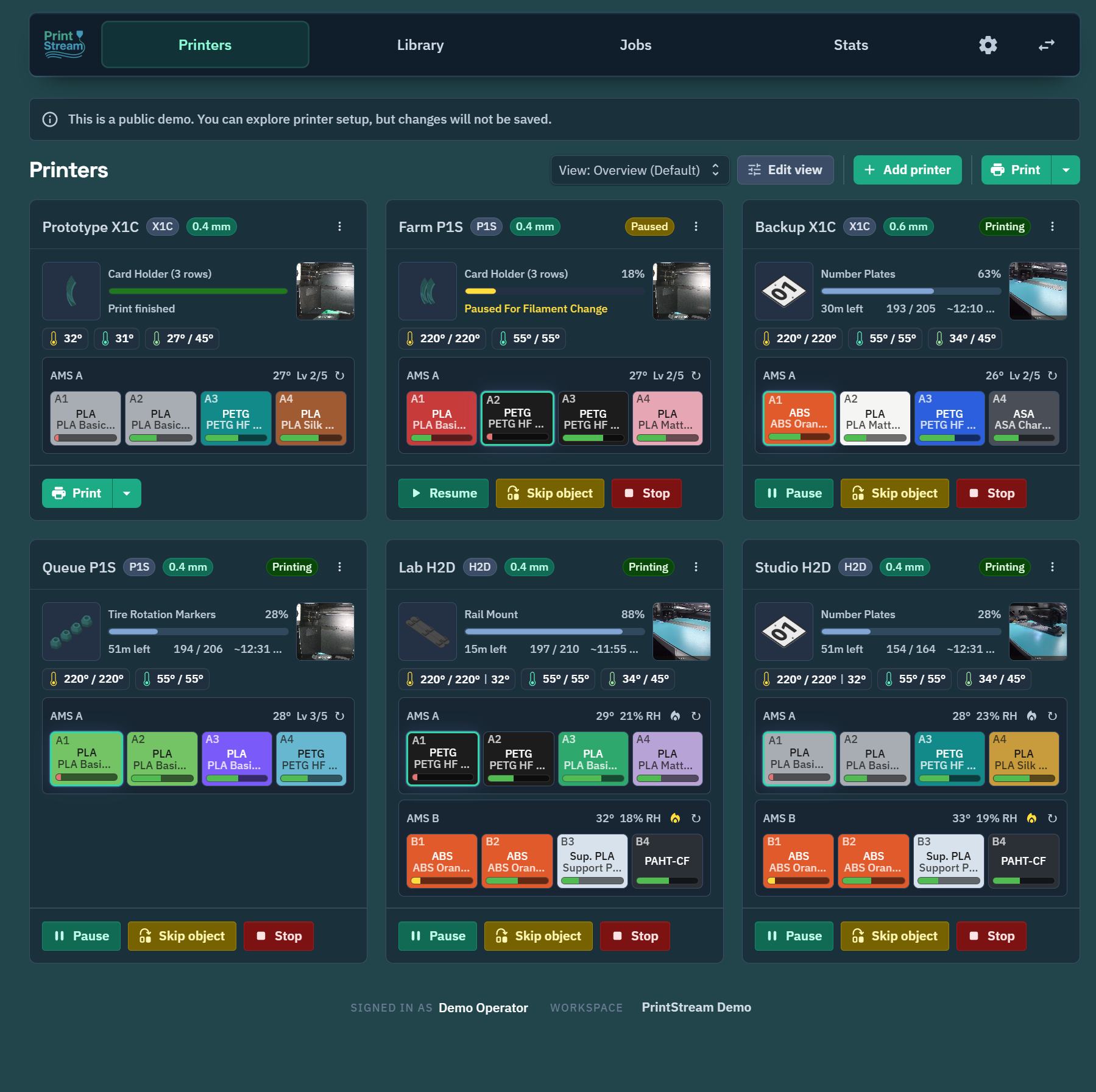
PrintStream is a web app for monitoring and controlling Bambu Lab printers. Open it on your phone, tablet, or desktop, see every printer live, and send prints from a shared file library. It's fully responsive (first-class on desktop and completely supported on mobile, with no surface treated as secondary) and installs like an app (PWA).


Smaller, simpler, and more touch-friendly than the alternatives. Plugin-extensible, with nothing to run at the printer site but a small bridge.
The public repository contains the self-hosted community edition. The main PrintStream product is the hosted version at printstream.app: the same software, run for you in the cloud, so the only thing you install is the small bridge that talks to your printers. The community edition is for people who prefer to run the whole stack on their own hardware. The website has the full feature tour and screenshots. PrintStream is a product of Dynamic Solutions.
Printer support. PrintStream supports all Bambu Lab printer models. See Safety & liability before connecting printers.
- Live dashboard: every printer at a glance, with progress, temperatures, ETA, layer count, AMS contents, camera view, and error alerts.
- Full control: pause, resume, stop, lights, calibration, skip objects mid-print, AMS and spool management.
- Shared print library: upload 3MF / G-code / STL / STEP / OBJ / glTF / AMF / FBX files into folders, browse plates and previews, keep version history, and restore from a recycle bin. With Model Studio enabled, choose Add to new 3MF on a model file to open a new project with that model already imported.
- Send prints anywhere: pick a file, map filaments to AMS slots, and queue it to one or many printers, with automatic compatibility checks (printer model, plate type, nozzle).
- Slice in your browser (optional): a slicer service runs real Bambu Studio / OrcaSlicer versions server-side, so you can go from plain 3MF to printable file without leaving the app. Repeating an unchanged Model Studio slice reopens its result immediately, with a durable server cache as the fallback.
- 3D editor (optional): arrange models, edit supports and materials, paint colors, and save multi-plate projects right in the browser.
- Tags: organize printers, library files, and inventory spools with independent tag catalogs, bulk assignment, and all-tag filtering. Job history preserves the tags captured for each job. See Tags.
- Jobs & stats: print history with snapshots, success rates, print hours, and filament usage per printer and per workspace. Choose a date range for Stats, compare reliability by printer, model, and recorded material, and re-dispatch finished prints as-is or slice them again from their source project.
- Production orders (optional): define what needs printing and track completion across many prints.
- Notifications: browser push, Discord, or ntfy, with camera snapshots attached.
- Firmware updates: check release notes and install printer firmware over your LAN.
- Home Assistant: a companion integration exposes printers, AMS units, cameras, and dashboard cards (PrintStreamApp/printstream-home-assistant).
- Multi-user (optional): passkey or SSO sign-in with roles and permissions, or run it wide open on a trusted LAN.
PrintStream has two parts:
- The server: the web app, API, and database. Run it anywhere: a home server, NAS, Raspberry Pi, or a VPS in the cloud.
- The bridge: a small agent that runs on the same network as your printers. It discovers printers automatically, talks to them over LAN (MQTT/FTPS/camera), and connects outbound to your server, so there are no ports to open at the printer site.
If your server runs on the same LAN as your printers, both pieces can run on one machine with one command.
You need Docker and about five minutes.
No clone required: download the two example files (or copy their contents), then start:
curl -fsSL https://raw.githubusercontent.com/PrintStreamApp/printstream/main/compose.server.example.yml -o compose.yml
curl -fsSL https://raw.githubusercontent.com/PrintStreamApp/printstream/main/.env.server.example -o .env   # defaults work for a LAN install
docker compose up -d
This pulls the combined app and slicer images from the current release on GHCR. The example follows latest so docker compose pull updates normally; every GitHub release also lists matching SemVer image tags for installations that require an explicit version pin.
On arm64 hosts (Raspberry Pi, ARM NAS): all three images (app, bridge, and the optional slicer) are multi-arch and run natively. The slicer bundles the x86 Bambu Studio CLI and runs it under qemu-user emulation on arm64, so server-side slicing works there too (slower than on x86, but functional). If you would rather not pay the emulation cost, start the stack without the slicer (docker compose up -d --scale slicer=0) and point SLICER_SERVICE_URL at a remote x86 slicer, or leave it unset to disable server-side slicing.
git clone https://github.com/PrintStreamApp/printstream.git
cd printstream
cp .env.server.example .env
cp compose.server.example.yml compose.yml
If the build: blocks in compose.yml are commented out, uncomment them first; then docker compose up -d --build.
Then open http://<your-server>:8080. A default workspace is created automatically on first start, and the bundled bridge comes online and pairs itself. There's no secret to set and no pairing step. Add your printers and go.
- Printers must have LAN mode enabled with their access code handy (Bambu printer screen → Settings → LAN Only Mode / access code). Newer Bambu firmware also requires Developer Mode (in the LAN Only Mode settings) before local apps such as PrintStream may connect.
- Full details, reverse-proxy notes, the optional slicer service, and running the bridge on a separate machine: docs/deployment.md. All settings: docs/configuration.md.
Serving over plain HTTP? Everything printer-related works, but browsers reserve some features for HTTPS origins: browser push notifications, installing PrintStream as an app (PWA), offline use, and passkey sign-in all need HTTPS (
http://localhostcounts as secure, so a same-machine install is unaffected). To get the full experience on a network address, put a TLS reverse proxy in front; see Reverse proxy and HTTPS.
Optional features ship as plugins you can switch on per workspace: sign-in providers (passkeys/email codes, OAuth/OIDC), the 3D model studio (project editor + previews), server-side slicing helpers, filament calibration (pressure-advance towers and flow-ratio plates), production orders, notifications (browser push, Discord, ntfy), firmware updates, printer maintenance reminders (when each model is next due for lubrication and other servicing Bambu recommends), plate-clearing confirmation, importing models from a URL (paste a MakerWorld link or a direct file link), and the Home Assistant bridge. Any valid key can use the shared Suggestions board through the optional PrintStream Cloud connection; commercial keys with current or grandfathered support can also use in-app Help. The connection sends nothing until someone uses one of those surfaces, emails unread support replies to the licence owner, and can be disabled from the plugin manager. Third-party plugins can be uploaded from the plugin manager.
- This edition needs a license key. Self-hosting for personal, non-commercial use is free: request a community key and paste it under Settings → License. New installs get a 30-day grace period, after which adding printers and starting prints pause until a key is entered. Nothing else is affected, existing printers keep working, and your data is never locked away. A community key is perpetual; cloud contact occurs only when someone uses an optional cloud feature. Business use needs a Pro subscription (which covers self-hosting at no extra cost) or a one-time Lifetime license.
- Cloud features are optional. Any valid key can open the shared Suggestions board. A commercial key with current or grandfathered support can also send two-way Help conversations with attachments. Help & Feedback explains its payload inline, and the plugin settings describe both surfaces. The connection does not upload printer, library, print-history, or camera data, and disabling the plugin restores the email support fallback.
- Direct printing is limited to
.gcodeand.gcode.3mffiles; plain.3mfprojects stay browsable (and sliceable) but are never dispatched raw. - The print dialog blocks hard mismatches (wrong printer model, wrong nozzle) and asks before overriding softer ones.
- Printer file transfers are serialized and retried carefully so flaky LAN connections don't wedge a printer.
- Destructive actions (deleting files, folders, logs) require confirmation, and deleted library files go to a recycle bin first.
PrintStream is a TypeScript monorepo: Express + Prisma + MQTT/WebSockets on the back, Vite + React + Joy UI on the front, shared Zod contracts in between, and a plugin system on both sides.
Day-to-day development happens in PrintStream's private source repository, which contains both the open core and the closed-source cloud surface of the hosted product. The public repository is a snapshot of the open core, exported at development milestones rather than commit-by-commit, so it can sit a little behind the hosted version and its history is regenerated with each snapshot.
Forks, issues, and pull requests in the public repository are welcome. Accepted pull requests are merged into the primary repository and arrive back in the public repository with the next snapshot, so a change may land as part of a larger export rather than as a direct merge of its branch.
- ARCHITECTURE.md: how the pieces fit together
- docs/development.md: Devkit setup and testing
- docs/deployment.md: production deployment reference
- docs/configuration.md: every environment variable
PrintStream controls physical hardware that involves heat, motion, electrical components, and materials. It is a tool to help you coordinate and monitor your printers. It does not replace local supervision, manufacturer guidance, machine maintenance, material safety practices, or your own judgment. Always confirm that the printer, plate, toolhead, material, file, and surroundings are safe before starting a print, and monitor your printers and respond to errors, alarms, or unsafe conditions.
The software is provided "as is", without warranty of any kind. To the fullest extent permitted by law, the authors and contributors accept no responsibility or liability for any damage, injury, loss, failed prints, material waste, equipment damage, or business interruption arising from its use, whether you run it yourself or use the hosted version. See LICENSE for the full disclaimer and limitation of liability, and the Terms of Service for the hosted product.
PrintStream's source is licensed under the PolyForm Noncommercial License 1.0.0 (see LICENSE). You may use, modify, and share it for any noncommercial purpose; all commercial rights are reserved. For a commercial license, contact the copyright holder. This is a source-available license, not an OSI-approved open-source license.
The in-app license key is the runtime side of the same terms: a free community key covers the noncommercial use this license already grants, and a commercial key (Pro subscription or Lifetime) covers the business use it reserves. See Good to know for what happens without one.
PrintStream bundles and depends on third-party open-source software under its own separate licenses:
- npm dependencies: attribution and full license text for each bundled package are generated per distributable into
apps/web/public/THIRD-PARTY-NOTICES.txt(served at/THIRD-PARTY-NOTICES.txt),apps/api/THIRD-PARTY-NOTICES.txt,apps/slicer/THIRD-PARTY-NOTICES.txt, andapps/bridge/THIRD-PARTY-NOTICES.txt. Regenerate them withnpm run noticesafter changing production dependencies. These are mostly permissive (MIT/ISC/BSD/Apache-2.0); notable weak-copyleft deps areocct-import-js(LGPL-2.1, bundling OpenCASCADE) andweb-push(MPL-2.0). - Slicer engines: the slicer sidecar invokes Bambu Studio (and optionally OrcaSlicer), which are licensed under AGPL-3.0. They are separate programs run at arm's length, so PrintStream's own code is not a derivative of them. The required attribution and corresponding-source offer are in
apps/slicer/THIRD-PARTY-SLICERS.md, and that file ships inside the slicer Docker image under/app/licenses.