





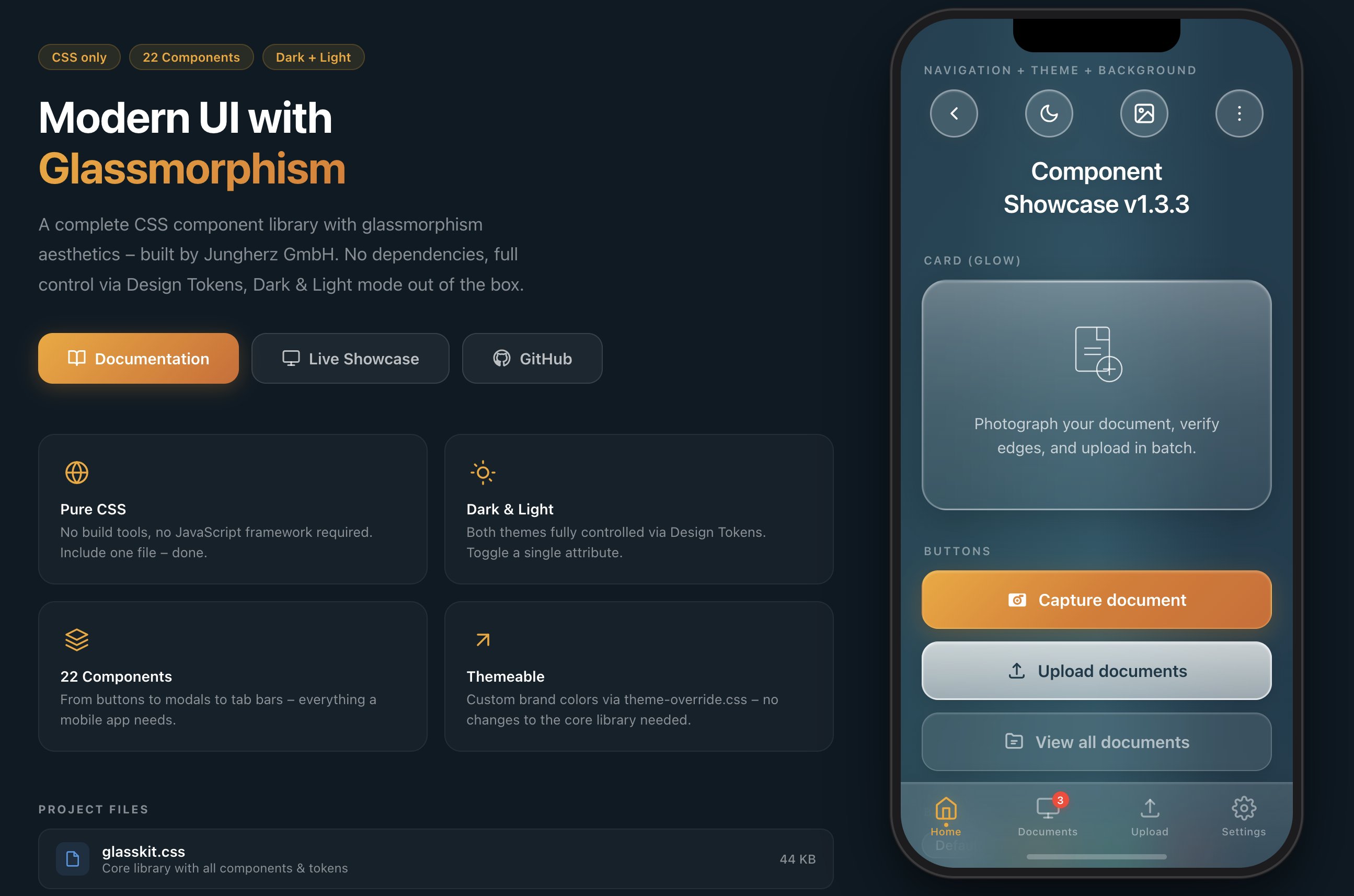
A modern glassmorphism CSS component library.
38 Components · Dark & Light Mode · No Dependencies · Design Tokens
Installation · Quick Start · Components · Theming · Web Components · Docs · Changelog · License
Part of the GlassKit family: GlassKit Elements (web components for app UIs) · GlassKit Web (Astro website template)
GlassKit is a complete CSS component library with glassmorphism aesthetics – inspired by iOS 26 Liquid Glass and visionOS. Apple fundamentally redefined glass design with iOS 26: deeper blur effects, luminous borders, and dynamic light reflections on surfaces. GlassKit brings exactly this look to the web – for apps and UIs that feel modern and native.
One CSS file. No build tools. No dependencies.
GlassKit is the CSS foundation of a three-layer family: GlassKit Elements builds web components for application UIs on top of it, and GlassKit Web is the official Astro template for complete websites – three layers, one design language.
- 🎨 Pure CSS – no JavaScript framework required
- 🌗 Dark & Light Mode – toggle with a single attribute
- 🎛️ Design Tokens – all values controlled via CSS Custom Properties
- 📱 Mobile-first – optimized for touch devices and
safe-area-inset - 🔌 Framework-agnostic – works with React, Vue, Svelte, plain HTML, or any other stack
- 🧩 Shadow DOM ready – Constructable Stylesheet for Web Components included
- 💧 Fluid selection – an optional drop of glass that glides between the items of a tab bar or a segmented control (since 1.27.0)
- 🧭 Navigation at every edge – one tab bar as bottom bar, top bar, sidebar or icon rail, or docked at a side where the thumb rests on a phone held open (since 1.32.0)
- 🪶 Lightweight – 186 KB raw / 115 KB minified / 16.7 KB gzipped, no external dependencies
- 🎯 BEM-like naming convention –
glass-*prefix, no conflicts with existing CSS - 🤖 AI-ready – ships with
SKILL.md, a structured reference for LLMs & AI copilots
GlassKit can be included in several ways – choose the one that best fits your project:
No download, no build tool – just include and go:
<!-- jsDelivr – Minified -->
<link rel="stylesheet" href="https://cdn.jsdelivr.net/npm/@jungherz-de/glasskit@1.34/glasskit.min.css">

<!-- jsDelivr – Unminified (for reading/debugging) -->
<link rel="stylesheet" href="https://cdn.jsdelivr.net/npm/@jungherz-de/glasskit@1.34/glasskit.css">

<!-- unpkg – Alternative -->
<link rel="stylesheet" href="https://unpkg.com/@jungherz-de/glasskit@1.34/glasskit.min.css">
Tip: Replace
@1.34with@latestfor the newest version – or pin to a specific version for maximum stability.
The droplet takes one optional module next to the stylesheet:
<script type="module">
  import { attachDroplets } from 'https://cdn.jsdelivr.net/npm/@jungherz-de/glasskit@1.34/glasskit-droplet.js';
  attachDroplets();
</script>For projects with a build pipeline:
# npm
npm install @jungherz-de/glasskit

# yarn
yarn add @jungherz-de/glasskit

# pnpm
pnpm add @jungherz-de/glasskit
Then import in your CSS or build tool:
/* In your CSS file */
@import '@jungherz-de/glasskit/glasskit.css';
// Or in JS (Webpack, Vite, etc.)
import '@jungherz-de/glasskit/glasskit.css';Download the files directly from the GitHub Release:
<!-- Include locally -->
<link rel="stylesheet" href="glasskit.min.css">

<!-- Optional: custom theme -->
<link rel="stylesheet" href="theme-override.css"><!-- Dark Mode (default) -->
<html data-theme="dark">
<!-- Light Mode -->
<html data-theme="light"><div class="glass-bg">
<nav class="glass-nav">
<button class="glass-pill">
<svg viewBox="0 0 24 24"><polyline points="15 18 9 12 15 6"/></svg>
</button>
</nav>
<h1 class="glass-title">Hello World</h1>
<div class="glass-card glass-card--glow">
<p class="glass-card__text">This is GlassKit.</p>
</div>
<button class="glass-btn glass-btn--primary">
Get Started
</button>
</div>| Component | Class | Description |
|---|---|---|
| Background | .glass-bg |
Aurora gradient with light effects |
| Nav Bar | .glass-nav |
Transparent navigation |
| Pill Button | .glass-pill |
Round glass icon button (46×46) |
| Tab Bar | .glass-tab-bar |
Fixed bottom navigation; any icon — SVG, icon font, image — follows its states. The same bar as a sidebar (--vertical), fixed to a side edge (--start / --end), an icon rail (--rail, with --labels the label under the icon) or a top bar (--top); places before and after the items (__leading, __trailing) |
| Tab Bar – Floating | .glass-tab-bar--floating + .glass-tab-bar-dock |
Pill-shaped Liquid-Glass tab bar with optional .glass-tab-bar__accessory capsule, upright at a side with .glass-tab-bar-dock--vertical, a rail of its own glass with --vertical --rail (fixed at a side with --start / --end); --droplet for a gliding selection |
| Breadcrumbs | .glass-breadcrumbs |
The path through nested levels: CSS separators, a "…" for folded levels, crumbs as drop targets |
| Accordion | .glass-accordion |
Collapsible content sections |
| Divider | .glass-divider |
Fading separator line |
| Component | Class | Description |
|---|---|---|
| Title | .glass-title |
Page title with text shadow |
| Card | .glass-card |
Glass container for content |
| Card (Glow) | .glass-card--glow |
Card with light-to-milky gradient |
| Badge | .glass-badge |
Tags, labels & filter chips; --md for 36px choice chips with a 44px tap target |
| Avatar | .glass-avatar |
Glass circle (sm/md/lg) |
| Status | .glass-status |
Notice card with icon |
| List | .glass-list |
iOS-style grouped settings list with auto dividers |
| Tree | .glass-tree |
Levels that open and close: twisty, icon, label and a trailing slot per row; children loading or failed to load; a flash for a changed item |
| Sorting | .is-sort-* + .glass-sort__ghost |
The states of a drag that reorders a list, a tree or tiles: source, drop line (upright between tiles), inside, refused, a grip |
| Skeleton | .glass-skeleton |
Shimmer lines while content loads |
| Table | .glass-table |
Plain <table> on glass — hairline rows, tabular numbers; sort buttons, a sticky header, a row action column, an empty row, cards for narrow places |
| Prose | .glass-prose |
Rendered Markdown / running text with one class |
| Segmented | .glass-segmented |
Small exclusive choice as one control, with tone dots, icons or counts, icons alone with --icons; scrolls or wraps when crowded; --droplet for a gliding selection |
| Steps | .glass-steps |
Progress through a short flow; container-query aware |
| Sheet | .glass-sheet |
Bottom sheet — the mobile sibling of the modal |
| Empty state | .glass-empty |
Icon, title, text and one action for empty lists |
| Component | Class | Description |
|---|---|---|
| Button (Primary) | .glass-btn--primary |
Colored gradient – primary action |
| Button (Secondary) | .glass-btn--secondary |
Milky white – secondary action |
| Button (Tertiary) | .glass-btn--tertiary |
Subtle glass – tertiary action |
| Modal | .glass-modal |
Centered dialog with blur overlay |
| Toast | .glass-toast |
Temporary notification, optionally with one action and a close button |
| Popover | .glass-popover |
Anchored dropdown / menu with fade & scale animation; in the top layer with the popover attribute |
| Tooltip | .glass-tooltip |
A short name or hint for a control, on hover and focus, in the top layer |
| Menu | .glass-menu |
Actions behind a button: icons, shortcuts, check marks, separators, a destructive item |
| Component | Class | Description |
|---|---|---|
| Input | .glass-input |
Text field with glass background; a link at the end of the label row with .glass-input-group--label-end |
| Textarea | .glass-textarea |
Multi-line input |
| Select | .glass-select |
Dropdown with custom chevron |
| Search | .glass-search |
Input with search icon |
| Toggle | .glass-toggle |
iOS-style switch |
| Checkbox | .glass-checkbox |
Animated checkmark |
| Radio | .glass-radio |
Animated dot |
| Range Slider | .glass-range |
Slider with gradient thumb |
| Progress Bar | .glass-progress |
Progress bar with shimmer |
| Date strip | .glass-date-strip |
Scrolling row of day chips with tone dots |
| Calendar | .glass-calendar |
One month of day buttons, up to three dots each |
| Image picker | .glass-image-picker |
Preview plate, label, hint and actions for choosing one image |
Since 1.27.0 the tab bar and the segmented control can make their selection fluid, as iOS 26 does. Add --droplet and the chosen item sits on a drop of glass that floats a little above the row. A tap sends it to the new item like water on a pane: the leading edge goes first, the trailing one follows, it runs flatter on the way and settles with a small wobble, and what it passes grows or lights up as under a lens. A finger can drag it along the row; let go, and the item below it is chosen. In a segmented row that scrolls, a swipe still scrolls: only the drop itself is dragged, and the row scrolls along at its edges.
<nav class="glass-tab-bar glass-tab-bar--floating glass-tab-bar--droplet">…</nav>
<div class="glass-segmented glass-segmented--droplet" role="group">…</div>

<script type="module">
  import { attachDroplets } from '@jungherz-de/glasskit/glasskit-droplet.js';
  attachDroplets();   // every --droplet row in the page; attachDroplet(row) for one
</script>
The stylesheet draws the drop; glasskit-droplet.js is an optional module in the package, without dependencies, about 4 KB minified. It follows .is-active and aria-pressed="true", which the page keeps setting its own way, and clicks the item a drag ends on, so the page's own click handler makes the choice. Where the script does not run, the row keeps its usual look. data-surface="solid" and "tint" make the drop opaque, and with prefers-reduced-motion it moves without travelling. Since 1.28.0 a transform on an ancestor — a zoom on start, a popover that opens from scale(0.96) — no longer moves the drop beside its item.
Already on GlassKit? This is the upgrade to take: one class per row and one import, the markup stays. In GlassKit Elements it is an attribute: <glk-tab-bar floating droplet>, <glk-segmented droplet>.
The tab bar's active item can also stand on a capsule of its own, without the drop (since 1.27.0): --gl-tab-bar-active-bg and --gl-tab-bar-active-shadow draw it, --gl-tab-bar-spotlight-opacity: 0 turns the spotlight off, --gl-tab-bar-active-glow: none the glow on the icon. Where they are set, the drop takes the same surface. The chosen segmented option has the same hooks since 1.28.0: --gl-segmented-active-bg, --gl-segmented-active-shadow and --gl-segmented-active-color, for the option and its drop alike.
Icons of any kind (since 1.28.0). Tab bar, accessory and segmented control colour their icon box, and an SVG strokes in currentColor: an icon font such as Material Icons, an <img> mask or a custom element in .glass-tab-bar__icon or .glass-segmented__icon follows every state, the lens of the drop and the drag. .glass-segmented--icons makes a row of icons alone, a light / dark / auto switch for instance.
Timing and direction (since 1.32.0). The drop's motion is tokens, unset today's values and read by the stylesheet and the module alike: --gl-droplet-duration and -easing for the leading edge, -trail-duration, -trail-delay and -trail-easing for the trailing one, -lift (0.86; 1 runs it without squashing) and -lift-duration, -settle-duration and -settle-easing for the spring back, -lens-duration and -lens-easing for the item below the drop. A product whose UI motion stays within about 240ms ease-out:
:root {
  --gl-droplet-duration: 240ms;       --gl-droplet-easing: ease-out;
  --gl-droplet-trail-duration: 240ms; --gl-droplet-trail-delay: 0ms; --gl-droplet-trail-easing: ease-out;
  --gl-droplet-lift: 1;               --gl-droplet-lift-duration: 0ms; --gl-droplet-settle-duration: 0ms;
  --gl-droplet-lens-duration: 240ms;  --gl-droplet-lens-easing: ease-out;
}
Every edge then stops after about 250ms. Keep --gl-droplet-lift-duration: 0ms in it: without it the lift's deeper shadow still fades back until about 600ms.
In a column — a sidebar, see below — the drop runs along y: the module takes the axis from the row's flex-direction or aria-orientation="vertical", and a finger drags it up and down.
Since 1.32.0 the tab bar is not bound to the bottom edge. The items stay the same — icon, label, badge, the active item, the drop — and modifiers on the bar choose the layout, so a page switches between them without rendering the items again:
<nav class="glass-tab-bar glass-tab-bar--vertical" aria-label="Main">…</nav>                      <!-- sidebar in a grid column -->
<nav class="glass-tab-bar glass-tab-bar--vertical glass-tab-bar--end" aria-label="Main">…</nav>   <!-- fixed to the end edge -->
<nav class="glass-tab-bar glass-tab-bar--vertical glass-tab-bar--rail" aria-label="Main">…</nav>  <!-- icons alone -->
<nav class="glass-tab-bar glass-tab-bar--top" aria-label="Main">…</nav>                           <!-- top of a page -->

<div class="glass-tab-bar-dock glass-tab-bar-dock--vertical glass-tab-bar-dock--start">           <!-- floating, upright -->
  <nav class="glass-tab-bar glass-tab-bar--floating glass-tab-bar--vertical glass-tab-bar--droplet">…</nav>
  <button class="glass-tab-bar__accessory glass-tab-bar__accessory--accent" aria-label="Compose">…</button>
</div>
--vertical is a column as high as its container, the icon before the label, the badge at the row's end — a long label ends --gl-tab-bar-badge-room (32px) before it. --start and --end fix it to that edge of the viewport, clear of the edge's safe area — where the thumb rests when a phone is held open, or a foldable has moved its own controls to a side; start and end follow the writing direction. --rail shows the icons alone, --gl-tab-bar-rail-width (72px) wide, the labels hidden from view but still the items' names. --top lays the bar out for a sticky header, with the icon beside the label from 640px, clear of the badge. Every bar shows a focus ring for the keyboard now, the active item under the drop too, and an item may be a link. In GlassKit Elements: <glk-tab-bar orientation="vertical" dock="end" rail>, placement="top".
Since 1.33.0 a rail can name its items and stand as a pane of its own glass. --labels next to --rail keeps the label under the icon; with --floating the rail is a pane of its own glass, as high as its container with the corners of a card, and with --start or --end as well it stands at that edge, full height less --gl-tab-bar-floating-inset (16px) at both ends and that far from the edge, clear of the safe areas. __leading and __trailing hold a mark, the accessory (__accessory-item, its name under it) and a foot such as the account inside the bar:
<nav class="glass-tab-bar glass-tab-bar--floating glass-tab-bar--vertical glass-tab-bar--start
            glass-tab-bar--rail glass-tab-bar--labels glass-tab-bar--droplet"
     aria-label="Main" style="--gl-tab-bar-rail-width: 96px">
  <div class="glass-tab-bar__leading">
    <img src="mark.svg" alt="" width="40" height="40">
    <div class="glass-tab-bar__accessory-item">
      <button class="glass-tab-bar__accessory glass-tab-bar__accessory--accent" aria-label="Assistant">…</button>
      <span class="glass-tab-bar__accessory-label" aria-hidden="true">Assistant</span>
    </div>
  </div>
  <a class="glass-tab-bar__item is-active" href="/">…</a>
  <div class="glass-tab-bar__trailing">…</div>
</nav>
Three tokens shape the items without touching global ones: --gl-tab-bar-icon-size (24px), --gl-tab-bar-item-radius (the drop and the floating items, a capsule unless set; 16px in a rail with labels) and --gl-tab-bar-active-weight — a compact top bar like a segmented control takes 18px, 12px and semibold. The items transition only colour, surface, shadow, opacity and the press, so a bar that changes its layout takes its new size at once.
GlassKit supports two themes out of the box. Toggle via the data-theme attribute:
// Toggle
function toggleTheme() {
  const html = document.documentElement;
  const current = html.getAttribute('data-theme');
  html.setAttribute('data-theme', current === 'dark' ? 'light' : 'dark');
}
There's also a ready-made Theme Toggle component:
<button class="glass-theme-toggle" onclick="toggleTheme()">
  <svg class="icon-moon" viewBox="0 0 24 24">
    <path d="M21 12.79A9 9 0 1 1 11.21 3 7 7 0 0 0 21 12.79z"/>
  </svg>
  <svg class="icon-sun" viewBox="0 0 24 24">
    <circle cx="12" cy="12" r="5"/>
    <!-- ... rays ... -->
  </svg>
</button>Create a theme-override.css and load it after the base library:
/* theme-override.css */
:root {
  --gl-color-primary:      #007AFF;
  --gl-color-primary-dark: #0055CC;
}
Since 1.11.0 that is the whole job. The gradient midpoint, the warm rim, the focus
ring, the glow under the primary button and the range slider thumb are all mixed from
those two — before 1.11.0 they were fixed amber, so a re-branded button came with an
orange halo and an amber focus ring. Declare the brand on :root: a custom property is
substituted where it is declared, so a brand set on a subtree does not re-derive the
tokens inherited from :root. Every derived token is still a plain default and loses to
a later declaration if you want to bend one.
Primary as text (since 1.26.0). Links in .glass-prose, the icon and label of the active tab, the primary modal action, accent list rows, the value of a range and the accordion draw text in --gl-color-primary-text, which is the primary unless you set it. A brand that darkens its primary for white button text lightens the text in the dark theme instead, and the buttons keep their colour:
:root, [data-theme="dark"] {
  --gl-color-primary-text: color-mix(in srgb, var(--gl-color-primary) 18%, #ffffff);
}
/* after the dark rule: :root matches a page in the light theme too */
[data-theme="light"] {
  --gl-color-primary-text: var(--gl-color-primary);
}
--gl-tab-bar-active-color colours the icon and label of the active tab alone, for a spotlight that needs a lighter tone still; unset, they take --gl-color-primary-text.
Contrast (since 1.31.0). Muted text, card text and icons reach WCAG AA by default in both themes — text 4.5:1, icons with a meaning 3:1, on the page and on glass. The primary as text keeps the primary: GlassKit's light orange reads 2.43:1 as text, but a fixed mix would darken every brand alike, so a light theme that keeps the orange sets [data-theme="light"] { --gl-color-primary-text: var(--gl-color-primary-on-surface); } (5.8:1). White on the primary button stays part of the look; --gl-color-on-primary: color-mix(in srgb, var(--gl-color-primary) 17%, #000) switches it to a dark ink with 4.6:1 or more.
Accent fills with white text (since 1.32.0). To keep white on the primary button, the chosen day and the current step, darken the fills alone — not --gl-color-primary, which also draws focus rings, borders and the accent as text. --gl-btn-primary-bg replaces the button's background, --gl-color-primary-fill colours the flat fills; both are unset. On GlassKit's orange white reaches 4.5:1 from 75 % of the primary mixed with black in the light theme and from 65 % in the dark one:
:root, [data-theme="dark"] { --gl-color-primary-fill: color-mix(in srgb, var(--gl-color-primary) 65%, #000); }
[data-theme="light"]       { --gl-color-primary-fill: color-mix(in srgb, var(--gl-color-primary) 75%, #000); }
:root, [data-theme="dark"], [data-theme="light"] {
  --gl-btn-primary-bg: linear-gradient(135deg, var(--gl-color-primary-fill), color-mix(in srgb, var(--gl-color-primary-dark) 80%, #000));
}
White reads 4.53:1 on the fill and at least that along the gradient, and on the chosen day of the date strip the weekday is now as strong as the number. The radio's dot follows --gl-color-on-primary now, like the checkbox tick, so the dark ink reaches it as well. Where the brand colour is set at run time, contrast-color(var(--gl-color-primary)) behind @supports (color: contrast-color(red)) picks black or white by itself — black on GlassKit's orange, 5.5:1 or more on every stop of the button.
The theme-override.css template comes with 4 example themes:
- 🔵 Ocean Blue
- 🟢 Emerald Green
- 🌹 Rose
- 🎨 Custom (empty, ready to fill)
Admin screens, desktop layouts and narrow forms want denser controls. Set data-density="compact" on <html>, next to data-theme:
<html data-theme="dark" data-density="compact">// Switch at runtime
document.documentElement.setAttribute('data-density', 'compact');
document.documentElement.removeAttribute('data-density'); // back to the defaultSince 1.21.0 the control sizes are tokens, and the attribute swaps in a denser set. Without it every control keeps the size it has always had. Colours, type and spacing stay as they are, so nothing outside the controls moves:
| Token | Default | Compact |
|---|---|---|
--gl-control-height (input, select, search) |
52px |
40px |
--gl-control-padding-x (input, select, textarea) |
unset → var(--gl-space-md) |
var(--gl-space-sm) |
--gl-btn-height / -sm / -lg |
56px / 44px / 64px |
40px / 32px / 48px |
--gl-textarea-min-height |
120px |
88px |
--gl-list-item-min-height |
56px |
48px |
--gl-list-item-padding-y |
unset → var(--gl-space-md) |
10px |
--gl-toggle-width × --gl-toggle-height |
52px × 30px |
44px × 26px |
--gl-toggle-thumb-size |
22px |
18px |
--gl-check-size (checkbox, radio) |
24px |
20px |
--gl-modal-action-height |
52px |
44px |
Every token can also be set on its own, for one density or both — the toggle's thumb and the first-line alignment of toggle, checkbox and radio follow whatever size you give:
:root                    { --gl-btn-height: 48px; }   /* default density */
[data-density='compact'] { --gl-btn-height: 36px; }   /* compact only */
Like data-theme, keep data-density on <html>: an element further down that carries data-theme="dark" re-declares the dark block, the default sizes included.
Not every screen wants glass — admin screens, forms on a plain background, designs without it. Since 1.24.0 data-surface="solid" on <html> makes every surface opaque and turns blur and gloss off:
<html data-theme="dark" data-surface="solid">Each surface takes the colour the glass shows over the theme's middle background, --gl-color-bg-mid, so cards, fields and buttons keep their order and a re-branded background carries over. The blur (--gl-blur*), the inner shine (--gl-inset-*) and the gloss (--gl-gloss-card, --gl-gloss-modal, --gl-gloss-progress, --gl-range-thumb-border) are off. Borders, drop shadows, the tints of badges and chips and the dimming overlay stay as they are. A theme scope further down the page — an element with its own data-theme — stays solid, and the preset is tokens only, so a project tunes it like a theme:
[data-surface='solid'] { --gl-surface-2: #17313d; } /* a darker card surface in dark mode */GlassKit Elements carries the attribute into its shadow roots, as it does with data-theme.
A page with a background of its own — a brand colour, a photo, a pattern — takes data-surface="tint" instead (since 1.25.0). The surfaces in the flow of the page become see-through tints of the text colour, nothing blurred, so a field on a card stays as see-through as the card. What lies over other content (modal, sheet, popover, toast, the tab bars) and the secondary button keep the solid values, which come from --gl-color-bg-mid — set it to a colour of your brand:
<html data-theme="dark" data-surface="tint">[data-surface='tint'] { --gl-color-bg-mid: #5c1310; } /* panels in a dark red */Both presets set the blur tokens to 0 but leave --gl-blur-overlay alone: set it to keep a blurred dimmer behind dialogs.
Print dialogs leave out background graphics by default, and some states are drawn with a background only. Since 1.21.1 those parts keep their colours on paper — the checked box and its tick, the chosen radio, the toggle's track, the progress fill, the current step, the chosen day of date strip and calendar, the slider thumb and the tone dots — while the rest of the page prints economically. Nothing to set.
A dark page prints its light text and surfaces on white paper. A page meant for printing switches to the light theme for it:
let printTheme = null;
addEventListener('beforeprint', () => {
  printTheme = document.documentElement.getAttribute('data-theme');
  document.documentElement.setAttribute('data-theme', 'light');
});
addEventListener('afterprint', () => {
  if (printTheme) document.documentElement.setAttribute('data-theme', printTheme);
  else document.documentElement.removeAttribute('data-theme');
});All visual values are controlled via CSS Custom Properties:
/* Colors */
--gl-color-primary        /* Primary color */
--gl-color-primary-text   /* text and line icons in the primary; defaults to it */
--gl-color-primary-fill   /* flat accent fills that carry text: chosen day, current step; defaults to the primary */
--gl-color-text           /* Text color */
--gl-color-text-muted     /* Secondary text */

/* Glass surfaces (gradations) */
--gl-surface-1 … --gl-surface-5

/* Blur */
--gl-blur                 /* 24px – default */
--gl-blur-light           /* 16px */
--gl-blur-heavy           /* 40px */

/* Radii */
--gl-radius-card          /* 24px */
--gl-radius-btn           /* 16px */
--gl-radius-input         /* 14px */

/* Spacing */
--gl-space-xs … --gl-space-4xl

/* Density – control sizes, denser with data-density="compact" */
--gl-control-height       /* 52px – input, select */
--gl-btn-height           /* 56px; -sm 44px, -lg 64px */
--gl-check-size           /* 24px – checkbox, radio */
--gl-toggle-width … --gl-modal-action-height

/* Shadows & Insets */
--gl-shadow-card
--gl-inset-strong

/* Gloss – off with data-surface="solid" */
--gl-gloss-card           /* highlight on the top edge of the glow card */
--gl-gloss-modal          /* the same on the modal */
--gl-gloss-progress       /* sheen on the progress fill */
--gl-range-thumb-border   /* rim of the range thumb */

/* Component hooks */
--gl-modal-max-width      /* 340px */
--gl-btn-primary-bg        /* the primary button's whole background; unset: the gradient of the primary */
--gl-btn-radius            /* buttons alone; unset: --gl-radius-btn, shared with lists, toasts, the segmented control */
--gl-btn-radius-sm         /* --sm; unset: --gl-btn-radius, then --gl-radius-sm */
--gl-btn-padding-x         /* room beside the label; unset: 24px */
--gl-btn-padding-x-sm      /* --sm; unset: --gl-btn-padding-x */
--gl-select-chevron       /* url(…) per theme */
--gl-toast-top            /* distance of the toast from the top */
--gl-input-prefix-size    /* room for an input prefix, 18px */
--gl-input-suffix-size    /* room for an input suffix, 18px */
--gl-list-title-white-space     /* nowrap, or normal to wrap list titles */
--gl-list-subtitle-white-space  /* nowrap, or normal to wrap list subtitles */
--gl-list-subtitle-lines        /* clamp of __subtitle--wrap, 3; none = all */
--gl-blur-overlay               /* blur behind dialogs; unset: --gl-blur-soft; kept by the surface presets */
--gl-toggle-track-bg            /* toggle track when off; unset: --gl-surface-2 (…-checked: the primary gradient) */
--gl-radio-bg, --gl-radio-bg-checked, --gl-radio-border, --gl-radio-border-checked
--gl-radio-dot-size             /* 10px */
--gl-radio-dot-color            /* unset: --gl-color-on-primary (white), so it follows a dark ink */
--gl-textarea-field-sizing      /* fixed; content lets text areas grow with their text */
--gl-input-picker-icon          /* none hides Chromium's picker button of date and time fields */
--gl-tab-bar-active-color       /* icon and label of the active tab; unset: --gl-color-primary-text */
--gl-tab-bar-active-bg          /* capsule behind the active tab; unset: none (also the drop's surface) */
--gl-tab-bar-active-shadow      /* its shadow; unset: none */
--gl-tab-bar-spotlight-opacity  /* 1; 0 turns the floating bar's spotlight off */
--gl-tab-bar-active-glow        /* glow on the active icon; none turns it off */
--gl-tab-bar-color              /* icon and label of the inactive tabs; unset: --gl-icon-muted */
--gl-tab-bar-hover-color        /* … of a hovered tab; unset: --gl-icon-default */
--gl-tab-bar-label-size         /* 10px */
--gl-tab-bar-z-index            /* 900; fixed bar and floating dock */
--gl-tab-bar-rail-width         /* 72px; the icon rail */
--gl-tab-bar-badge-room         /* 32px; where a sidebar row's label ends before its badge */
--gl-tab-bar-icon-size          /* 24px; the icon box and its SVG */
--gl-tab-bar-item-radius        /* the floating items and the drop; unset a capsule, 16px in a rail with labels */
--gl-tab-bar-active-weight      /* the active label's weight; unset medium */
--gl-tab-bar-rail-item-height   /* 62px; least height of an item in a rail with labels */
--gl-tab-bar-floating-inset     /* 16px; a floating rail's distance from its edge and the ends */
--gl-tab-bar-rail-radius        /* a floating rail's corners; unset --gl-radius-card */
--gl-badge-md-height            /* 36px; a choice chip (.glass-badge--md) */
--gl-flash-color                /* the flash of a changed list item or tree row; unset: the primary at 30 % */
--gl-droplet-duration, -easing, -trail-duration, -trail-delay, -trail-easing   /* the drop's journey */
--gl-droplet-lift, -lift-duration, -settle-duration, -settle-easing           /* its squash and spring back */
--gl-droplet-lens-duration, -lens-easing                                      /* the item below it growing */
--gl-tooltip-max-width          /* 240px */
--gl-tooltip-bg, --gl-tooltip-color   /* unset: the theme's dark background, the text colour */
--gl-tooltip-offset             /* 8px; the distance GlassKit Elements keeps from the control */
--gl-tree-indent                /* 20px per level */
--gl-tree-row-height            /* 36px */
--gl-tree-icon-size             /* 18px; the icon field and its SVG — 28px for a tinted chip */
--gl-list-item-divider-inset    /* where a list row's divider starts; unset after the icon, or at the padding */
--gl-list-item-selected-bg      /* the pill of the chosen list row; unset --gl-surface-4 */
--gl-breadcrumbs-crumb-width    /* 200px; a longer crumb ends in an ellipsis */
--gl-sort-duration, --gl-sort-easing  /* 180ms, ease-out: rows making room while a list is sorted */
--gl-table-cell-padding         /* 9px 10px */
--gl-table-header-padding       /* 8px 10px */
--gl-table-max-height           /* 60vh; the wrap with a sticky header */
--gl-table-header-bg            /* the sticky header's surface */
--gl-segmented-active-bg        /* chosen option and its drop; unset: --gl-surface-5 */
--gl-segmented-active-shadow    /* their shadow; unset: --gl-shadow-btn */
--gl-segmented-active-color     /* label and icon of the chosen option; unset: --gl-color-text-heading */
--gl-segmented-badge-bg         /* tint of a neutral count over the state scrim; unset: 12 % of the text colour */
--gl-segmented-badge-color      /* its figures; unset: --gl-color-text */
--gl-segmented-badge-height     /* 16px, also its least width */
--gl-segmented-badge-font-size  /* 11px */
--gl-segmented-badge-border     /* hairline inside a neutral count; unset: none */
--gl-list-flush-inset           /* how far a --flush list reaches out; set by the card and the modal body, else 20px */
--gl-gloss-droplet              /* highlight in the drop of --droplet rows; off with data-surface */
The full token reference can be found in the Documentation.
/* Flex Layout */
.gl-stack              /* Vertical stack */
.gl-stack--sm          /* Gap: 12px */
.gl-row                /* Horizontal row */
.gl-row--sm            /* Gap: 12px */

/* Spacing */
.gl-mt-md              /* Margin-top: 16px */
.gl-mb-lg              /* Margin-bottom: 20px */
.gl-px                 /* Horizontal padding */

/* Text */
.gl-text-center
.gl-text-muted
.gl-text-sm

/* Layout */
.gl-w-full
.gl-flex-1The Shadow DOM encapsulates styles – external stylesheets like glasskit.css are not automatically inherited into the shadow tree. GlassKit therefore ships a ready-made Constructable Stylesheet that you can use directly in Web Components.
- CSS classes (
.glass-card,.glass-btn, etc.) do not work inside the Shadow DOM - Only CSS Custom Properties (
--gl-*) penetrate the shadow boundary automatically - Without a solution, each component would need to load and parse the CSS itself
GlassKit provides an ES module that exports the minified CSS as a Constructable Stylesheet. The stylesheet is held once in memory and can be shared across any number of shadow roots – without duplicate parsing.
import { glassSheet } from '@jungherz-de/glasskit/glasskit-styles.js';

// In a Web Component:
class MyCard extends HTMLElement {
  constructor() {
    super();
    const shadow = this.attachShadow({ mode: 'open' });
    shadow.adoptedStyleSheets = [glassSheet];
    shadow.innerHTML = `
      <div class="glass-card glass-card--glow">
        <p class="glass-card__text"><slot></slot></p>
      </div>
    `;
  }
}
customElements.define('my-card', MyCard);GlassKit works great with lightweight Web Component frameworks like Hybrids:
import { define, html } from 'hybrids';
import { glassSheet } from '@jungherz-de/glasskit/glasskit-styles.js';

define({
  tag: 'my-card',
  render: () => html`
    <div class="glass-card glass-card--glow">
      <p class="glass-card__text">
        <slot></slot>
      </p>
    </div>
  `.css(glassSheet),
});import { LitElement, html } from 'lit';
import { glassSheet } from '@jungherz-de/glasskit/glasskit-styles.js';
class MyCard extends LitElement {
static styles = [glassSheet];
render() {
return html`
<div class="glass-card glass-card--glow">
<p class="glass-card__text"><slot></slot></p>
</div>
`;
}
}
customElements.define('my-card', MyCard);| Export | Type | Description |
|---|---|---|
glassSheet |
CSSStyleSheet |
Ready-made Constructable Stylesheet – use directly with adoptedStyleSheets |
css |
string |
CSS as string – fallback for environments without Constructable Stylesheet support |
Since CSS Custom Properties penetrate the shadow boundary, theme switching works automatically. Set data-theme on the <html> element as usual – all GlassKit tokens will be updated across all shadow roots:
// Works globally – including all Web Components
document.documentElement.setAttribute('data-theme', 'light');
data-density="compact" reaches the shadow roots the same way: the preset only sets tokens, and tokens cross the shadow boundary by inheritance.
Tip: For maximum performance with many component instances, import
glassSheetonce and share it across all components. The browser keeps the stylesheet in memory only once.
glasskit/
├── glasskit.css            # Core library (all components + tokens)
├── glasskit.min.css        # Minified version (auto-generated on release)
├── glasskit-styles.js      # Constructable Stylesheet for Shadow DOM (auto-generated)
├── glasskit-droplet.js     # Optional module: the motion of the --droplet rows
├── theme-override.css      # Template for custom themes
├── build-styles-js.mjs     # Build script for glasskit-styles.js
├── package.json            # npm package definition
├── index.html              # Landing page with iPhone wireframe
├── showcase.html           # Interactive showcase of all components
├── docs.html               # Full documentation
├── de/                     # German translations (index, docs, showcase)
├── SKILL.md                 # AI-optimized component reference (for LLMs & copilots)
├── LICENSE                  # MIT License
└── README.md               # This file
The full documentation with live previews, copy-paste code blocks, and class reference tables is available in docs.html:
- Sidebar navigation to all 38 components
- Live previews on a real glassmorphism background
- Design token reference
- Theming guide
- Complete class overview at the end
Live pages:
- 🌐 Home: https://glasskit.jungherz.com/
- 📖 Docs: https://glasskit.jungherz.com/docs.html
- 🧪 Showcase: https://glasskit.jungherz.com/showcase.html
GlassKit is the CSS foundation of a three-layer family – three layers, one design language.
If you want to use GlassKit through drop-in Web Components instead of writing the full HTML structure yourself, take a look at GlassKit Elements.
GlassKit Elements builds on top of GlassKit CSS and provides a set of vanilla JavaScript custom elements like glk-button, glk-card, or glk-input.
Useful links:
- GitHub: https://github.com/JUNGHERZ/GlassKit-Elements
- Live Demo: https://glasskit-elements.jungherz.com/
- Docs: https://glasskit-elements.jungherz.com/docs.html
If you want to build a complete website rather than assemble components yourself, GlassKit Web is the intended path: the official Astro template with sections, i18n, SEO, and tests on top of the GlassKit foundation.
Useful links:
GlassKit ships with an AI-optimized component reference in SKILL.md. This file is designed for LLMs, AI copilots, and code-generation tools to produce correct GlassKit markup without parsing docs.html.
- Copy-paste-ready HTML for all 38 components with exact nesting rules
- Complete design token tables (colors, surfaces, blur, radii, spacing, shadows, typography)
- State class reference – which class goes where (
is-active,is-open,is-visible,:checked) - 8 composition patterns – full page layouts (Login, Dashboard, Form, Modal, Settings, iOS Settings, Progress, Back office)
- Common mistakes & corrections – prevents the most frequent AI-generated errors
- Quick reference table – all components with their modifiers at a glance
Attach or reference SKILL.md when asking an AI to generate GlassKit HTML. It provides the structured context needed for production-ready output – correct BEM hierarchy, proper modifier usage, and idiomatic component composition.
Tip: While
docs.htmlis built for humans browsing with live previews,SKILL.mdis built for machines generating code. Both are kept in sync.
The floor is set by color-mix(), which derives the brand, state and focus tokens on :root (since 1.11.0):
| Browser | Version |
|---|---|
| Chrome / Edge | 111+ |
| Safari (iOS/macOS) | 16.4+ |
| Firefox | 113+ |
| Samsung Internet | 22+ |
A few refinements arrive later and fall back quietly where they are missing:
- The first-line alignment of toggle, checkbox and radio uses the
lhunit (Firefox 120); without it the control sits at the top of its label. - List rows without a leading icon move their divider in with
:has()(Firefox 121); without it the divider keeps the icon inset. - Right to left, the pairs that must move together — select chevron and padding, toggle thumb and travel, progress gradient — sit under
:dir(rtl)(Chrome 120); without it they stay left to right. A side bar and the upright dock (since 1.32.0) find their edge by the writing direction everywhere; only the padding for the safe area of the physical side waits for:dir(). - The top-layer variants of popover, tooltip and menu (
[popover], since 1.32.0) need the Popover API (Chrome 114, Safari 17, Firefox 125); the anchored.glass-popoverwith.is-openworks everywhere.contrast-color()for the ink is an opt-in behind@supports.
Note: In browsers without
backdrop-filtersupport, elements will be rendered with the defined background colors – the UI remains usable, just without the blur effect.
Page Attributes (on <html>):
  data-theme="dark" / "light"
  data-density="compact"          (denser controls)

Interactive States:
  .is-active          → Tab Bar item, Modal Overlay
  .is-open            → Accordion item, Popover
  :popover-open       → Popover, Tooltip, Menu with [popover] (top layer)
  .is-visible         → Toast
  :checked            → Toggle, Checkbox, Radio
  :focus              → Input, Textarea, Select, Range
  :disabled           → Input, Select, Textarea, Range, Toggle, Checkbox, Radio,
                        Button, Pill, Tab Bar Accessory, Modal action, list row
  [aria-disabled]     → a.glass-btn and the other buttons (link still navigates), menu items

Button Modifiers:
  .glass-btn--primary / --secondary / --tertiary
  .glass-btn--sm / --lg / --auto
  --gl-btn-primary-bg              (the primary's whole background, for white text with AA)

Card Modifiers:
  .glass-card--glow

Progress Modifiers:
  .glass-progress--sm / --lg
  .glass-progress--success / --error

Badge Modifiers:
  .glass-badge--primary / --success / --warning / --error
  .glass-badge--interactive / --selected   (chips)
  .glass-badge--md                         (choice chip, 36px; --gl-badge-md-height)

Avatar Modifiers:
  .glass-avatar--sm / --lg

Toast Modifiers:
  .glass-toast--success / --error / --warning
  .glass-toast__action / __close   (offer with a button)
  --gl-toast-top                   (distance from the top)

Modal:
  .glass-modal__action--primary / --danger
  dialog.glass-modal-overlay       (native <dialog>, opened with showModal())
  --gl-modal-max-width             (panel width, 340px unless set)

Select:
  --gl-select-chevron              (the chevron, per theme)

Input affixes:
  .glass-input-wrap > __prefix / __suffix · --prefix / --suffix
  --gl-input-prefix-size / --gl-input-suffix-size   (room in the field, 18px unless set)
  .glass-input-group--label-end > __label-end   (a link at the end of the label row, written after the field)

List Modifiers:
  .glass-list--flush / --bare
  .glass-list__item--interactive / --center
  .glass-list__item.is-flash       (a changed item flashes; --gl-flash-color)
  .glass-list__item.is-selected    (the chosen row beside its detail, with aria-current; --gl-list-item-selected-bg)
  --gl-list-item-divider-inset     (where the dividers start; a row with its grip first runs them from its padding)
  --gl-list-title-white-space / --gl-list-subtitle-white-space / --gl-list-subtitle-lines   (wrapping, app-wide)

Popover Modifiers:
  .glass-popover--top / --start / --end
  .glass-popover[popover]          (top layer, placed by script; [data-side="top"] above its control)

Tooltip:
  .glass-tooltip[popover]          (role="tooltip", top layer)
  --gl-tooltip-max-width / --gl-tooltip-bg / --gl-tooltip-color

Menu:
  .glass-menu[popover] · __item / __item--danger / [aria-checked] / [aria-disabled] · __check / __icon / __label / __trailing · __separator · __group-label

Tree:
  .glass-tree · __row.is-expanded / .is-selected / .is-leaf / .is-loading / .is-error / .is-disabled / .is-flash · __twisty / __icon / __label / __trailing · __group
  --gl-tree-level (per row) / --gl-tree-indent / --gl-tree-row-height / --gl-tree-icon-size

Breadcrumbs:
  .glass-breadcrumbs · __list / __item / __item--overflow · __crumb / __current / __overflow · .is-drop-target / .is-drop-refused

Sorting:
  .is-sort-source / -before / -after / -inline / -inside / -refused · .glass-sort__ghost · .glass-sort__handle
  --gl-sort-duration / --gl-sort-easing

Skeleton:
  .glass-skeleton__line / __line--title

Table:
  .glass-table-wrap · .glass-table__num / __muted
  .glass-table__sort / __sort-icon · th[aria-sort] · .glass-table__actions · .glass-table__empty
  .glass-table-wrap--sticky + .glass-table--sticky · .glass-table--scrolls · .glass-table--list · .glass-table-frame[data-more-start / data-more-end]

Prose:
  .glass-prose   (styles the rendered content beneath it)

Segmented:
  .glass-segmented--full / --scroll / --wrap / --icons · __item[aria-pressed] · __item--success / --warning / --error · __dot · __icon · __badge (--primary / --success / --warning / --error)
  .glass-segmented--droplet        (gliding selection, with glasskit-droplet.js)

Steps:
  .glass-steps__item--done / --current · __num · __label · __line

Sheet:
  .glass-sheet-overlay.is-active · .glass-sheet--inline · __grip / __title / __body / __actions
  dialog.glass-sheet-overlay       (a native <dialog>, opened with showModal(), since 1.30.0)

Empty state:
  .glass-empty__icon / __title / __text / __action

Date strip:
  .glass-date-strip__day[aria-pressed] / --today / :disabled · __wd / __num · __mark--primary / --success / --warning / --error

Calendar:
  .glass-calendar__nav · __wd · __day[aria-pressed] / --today / --other / [aria-disabled] · __marks · __mark--primary / --success / --warning / --error
  --gl-color-primary-fill          (the chosen day's fill, also in the date strip and the current step's number)

Image picker:
  .glass-image-picker__preview / --round · __label / __hint / __actions

Background Modifiers:
  .glass-bg--has-tab-bar
  .glass-bg--has-tab-bar-floating

Tab Bar – Floating:
  .glass-tab-bar-dock
  .glass-tab-bar--floating
  .glass-tab-bar--droplet          (gliding selection, with glasskit-droplet.js)
  .glass-tab-bar__accessory
  .glass-tab-bar__accessory--accent / --success / --error
  --gl-tab-bar-active-bg / -shadow · --gl-tab-bar-spotlight-opacity · --gl-tab-bar-active-glow
  --gl-tab-bar-color / -hover-color · --gl-tab-bar-label-size · --gl-tab-bar-z-index
  --gl-tab-bar-icon-size · --gl-tab-bar-item-radius · --gl-tab-bar-active-weight
  --gl-droplet-duration / -easing / -trail-duration / -trail-delay / -trail-easing / -lift / -lift-duration / -settle-duration / -settle-easing / -lens-duration / -lens-easing

Tab Bar – Layouts:
  .glass-tab-bar--vertical         (sidebar) · --start / --end (fixed to a side) · --rail (icons alone) · --labels (with --rail: the label under the icon)
  .glass-tab-bar--floating + --vertical + --rail   (a rail of its own glass; with --start / --end fixed at a side)
  .glass-tab-bar__leading / __trailing   (a mark, the accessory, a foot inside the bar)
  .glass-tab-bar__accessory-item > __accessory-label   (the accessory with its name under it)
  .glass-tab-bar--top              (top of a page)
  .glass-tab-bar-dock--vertical / --start / --end   (the floating bar upright at a side)
  --gl-tab-bar-rail-width / --gl-tab-bar-badge-room / --gl-tab-bar-rail-item-height
  --gl-tab-bar-floating-inset / --gl-tab-bar-rail-radius

Right to left:
  dir="rtl" on <html> or a container – the components mirror
Contributions are welcome! Here's how you can help:
- Fork the repository
- Create a feature branch (
git checkout -b feature/my-idea) - Commit your changes (
git commit -m 'feat: New component XY') - Push the branch (
git push origin feature/my-idea) - Open a Pull Request
- Follow the BEM-like naming convention (
glass-*prefix) - Use existing Design Tokens instead of hard-coded values
- Make sure new components work in both Dark and Light Mode
- Test on mobile (touch targets at least 44px)
GlassKit is released under the MIT License. See LICENSE for details.
Free to use for personal and commercial projects.
All changes, bugfixes, and design decisions are documented in the CHANGELOG.md.
Developed by Jungherz GmbH
Built with 🧊 and lots of attention to detail.