
An app that detects sensory overload in individuals with autism and links them with their caregiver to help them better! Solution for Google Developer Solution Challenge 2023.
**NOTE: The individual components: fetching health data in the background from the frontend as well as the model prediction are fully functional separately but are not currently integrated due to an end moment error.
- In order to run all functionalities of the application and run the application on a physical iPhone device, the project needs to be run using Xcode on a MacBook.
-
Install Flutter version 3.7.6 on your macbook device (uses Dart 2.19.3).
-
Install Xcode version 14.2 IDE on your macbook device.
-
Enable developer mode on your iphone and resart your debugging device.
-
Open the project in Visual Studio Code IDE.
-
Run command "flutter clean" in the project directory.
-
Run command "flutter pub get" in the project directory.
-
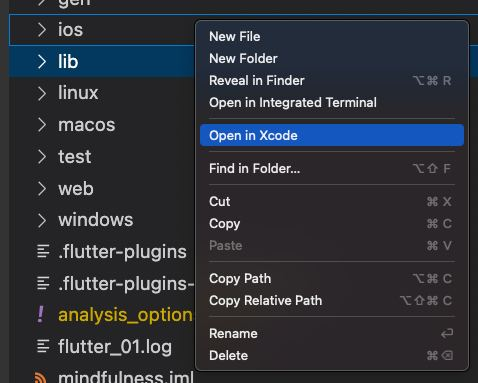
Go to "ios" folder inside the project directory, right click, and select "Open in Xcode" option.
-
Connect your iPhone to your MacBook using a USB or USB-c cable (data transfer cable).
-
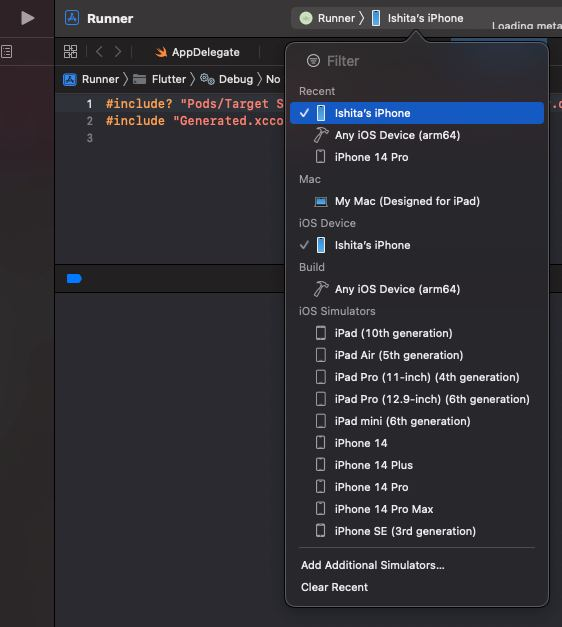
Select your iPhone as the debbuging device on Xcode.
-
Click on "run" button in Xcode (build will not run if installing the app for the first time on your phone).
-
Go to iPhone Settings, Go to VPN and Device Management and Trust apps from developer "Apple development {appleid} {unique code}".
-
Click on "run" button in xcode again.
The application runs!!
- The app runs code in the background to fetch user health data and pass it to the server.
- To check the background processing code on development mode, go to Xcode menu, select "Debug" and click on "Simulate Background Fetch".
Enjoy!
** NOTE: In case the build fails, try running "flutter clean" in the project directory.Then delete "Pods" folder and "Podfile.lock" file inside the ios directory. Then on the terminal run the following commands in sequence: "cd ios", "pod install" and "pod update". Try reopening the ios folder in Xcode and follow from step 8 onwards.