
Show DigiNode Tools on your website. Free to use on any site.
A small banner showing the latest DigiNode Tools release: the version, the date, a one-line summary of what's new, and a link to the release notes. When changes are waiting to be released, it also shows the date of the next release.
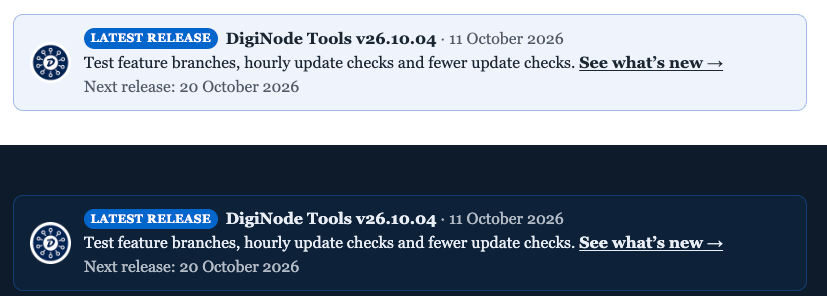
It updates itself whenever there's a new release - there's nothing to maintain. It uses your site's own font and text colour, so it fits light and dark sites. If the release information can't be loaded, nothing is shown.
-
Download
diginode-widgets.zipfrom the latest release. -
In WordPress, go to Plugins → Add New Plugin → Upload Plugin, choose the zip, then Activate.
-
Add the shortcode where you want the banner (e.g. in a Shortcode block):
[diginode_latest_release]
Options:
| Option | What it does |
|---|---|
lines="1" |
Everything on one line (the default is two lines). |
next="no" |
Never show the next release date. By default it's shown only when there are changes waiting to be released. |
logo="no" |
Hide the DigiNode logo (shown by default). |
label="..." |
The label text (default "Latest release"). label="" hides it. |
link="https://..." |
Where "See what's new" goes (default: the DigiNode Tools release notes). |
Example: [diginode_latest_release lines="1" next="no"]
To change the accent colour, add CSS such as .dlr-banner { --dlr-accent: #0066cc; }.
The plugin checks for a new release at most once an hour, and keeps the last good copy in case it can't be reached. Deleting the plugin removes everything it stored.
Add this where you want the banner:
<div class="diginode-latest-release"></div>
<script src="https://cdn.jsdelivr.net/gh/DigiNode-Tools/diginode-widgets@1/embed/latest-release.js" async></script>
Options are attributes on the div: data-lines="1", data-next="no", data-logo="no", data-label="...", data-link="https://..." and data-accent="#0066cc".
The banner is drawn in its own shadow DOM, so your site's styles can't affect it and it can't affect your site. The script is small, has no dependencies, and only fetches two public files from GitHub (below). The @1 in the address means you get fixes automatically, but never a change that could break your page.
The banner reads a small JSON file published with every DigiNode Tools release:
https://raw.githubusercontent.com/DigiNode-Tools/diginode-tools/main/docs/latest-release.json
It has the version, date, summary, highlights (each note's type and title), links, and the release schedule. Fields won't be removed or renamed, so you can rely on them.
The WordPress plugin is GPL-2.0-or-later. The embed scripts are MIT. The DigiNode Tools logo isn't covered by either: it may be shown as part of these widgets, and used to link to or write about DigiNode Tools - see LICENCE.md and the name and logo policy.
Made by Olly Stedall (@saltedlolly), the developer of DigiNode Tools. If you find DigiNode Tools useful, please consider sponsoring it on GitHub or Ko-fi.