




  ▓▓▓▓▓▓▓▓▓▓
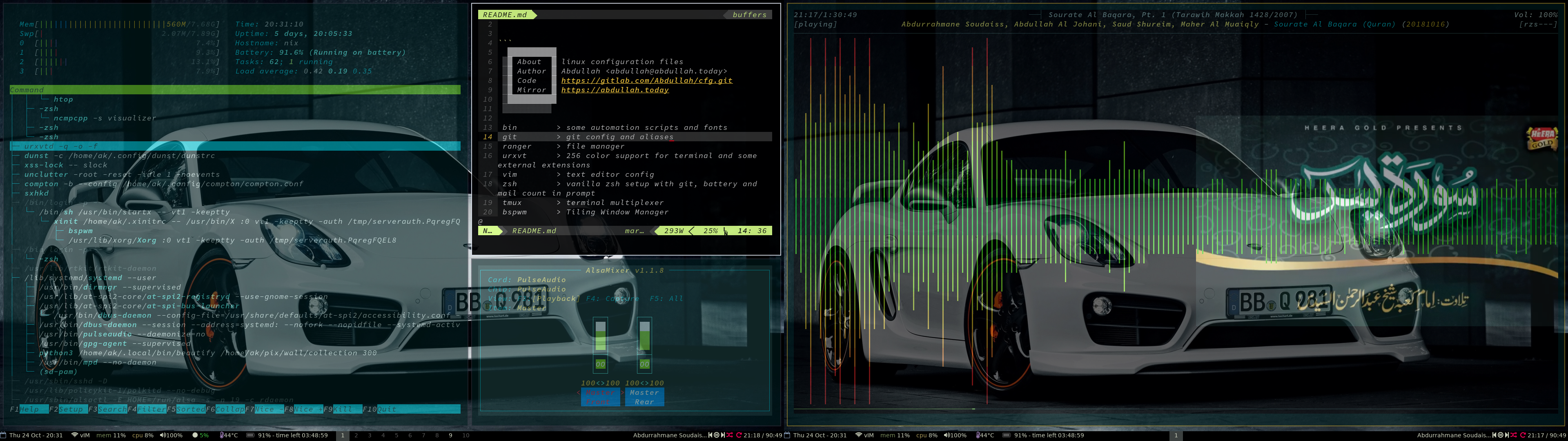
 ░▓ About  ▓ linux configuration files
 ░▓ Author ▓ Abdullah Khabir <abdullah@abdullah.support>
 ░▓ Code   ▓ https://github.com/Awan/cfg.git
 ░▓ Mirror ▓ https://abdullah.support
 ░▓▓▓▓▓▓▓▓▓▓
 ░░░░░░░░░░

 bin        > automation scripts, utilities and fonts
 git        > git configuration and aliases
 vim        > Vim configuration
 zsh        > vanilla Zsh setup with a lightweight Git-aware prompt
 tmux       > terminal multiplexer
 alacritty  > terminal emulator configuration
 bspwm      > current tiling window manager configuration
 lemonbar   > lightweight status bar and panel configuration
 picom      > compositor configuration
 dunst      > notification daemon
 sxhkd      > hotkey daemon configuration
 ranger     > file manager configuration
 feh        > image viewer configuration
 mpd        > Music Player Daemon configuration
 mpv        > media player configuration
 mutt       > Mail user agent configuration
 isync      > mailbox synchronization configuration
 notmuch    > thread-based email indexing, search and tagging
 msmtp      > mail transport configuration

 Additional configurations for other applications and desktop environments
 are also retained in the repository for optional use.
I manage my dotfiles with chezmoi, a configuration management tool designed to manage personal configuration files across machines.
Install chezmoi using the package manager available on your system. For example:
sudo apt install chezmoisudo dnf install chezmoisudo pacman -S chezmoibrew install chezmoi
Alternatively, follow the official chezmoi installation instructions.
Once chezmoi is installed, initialize this repository and apply the configuration:
chezmoi init --apply git@github.com:Awan/cfg.gitThe chezmoi source directory is stored at:
~/.local/share/chezmoi
To inspect the configuration before applying it:
chezmoi diffTo apply changes from the source repository to your home directory:
chezmoi applyTo check whether the live configuration differs from the chezmoi source:
chezmoi statusThe chezmoi source directory is also a Git repository, so configuration changes can be reviewed, committed, and pushed using the normal Git workflow.
For example:
cd ~/.local/share/chezmoi

git status
git diff
git add <file>
git commit -m "Describe the configuration change"
git push
When making changes, edit files through chezmoi or in the chezmoi source directory rather than modifying managed files in your home directory directly.
For example, to edit the Vim configuration:
chezmoi edit ~/.vimrcor edit the corresponding source file directly:
vim ~/.local/share/chezmoi/dot_vimrcAfter making changes, review them with:
chezmoi diffand apply them with:
chezmoi applyThe Zsh configuration is intentionally lightweight and modular. Configuration files are stored under ~/.zsh/ and are sourced from the main Zsh configuration.
The prompt is implemented using native Zsh features rather than a prompt framework. It provides:
- A single-line prompt
- Current working directory with
~used for the home directory - Current Git branch
- A dirty-state indicator for modified Git repositories
- Dynamic mail count from the local Maildir
- Battery status on virtual terminals
Third-party Zsh components are installed through the system package manager rather than being vendored into this repository.
On Arch Linux, the current setup uses:
zsh-autosuggestionszsh-completionszsh-history-substring-searchzsh-syntax-highlighting
The repository contains the Zsh configuration and package references, while the third-party plugin implementations are maintained by the package manager.
My current graphical setup is based on:
- Alacritty as the terminal emulator
- bspwm as the tiling window manager
- sxhkd for keyboard shortcuts
- picom as the compositor
- lemonbar-ng and my panel scripts for the status bar
- dunst for notifications
The repository also contains configurations for other window managers, compositors, terminal emulators and status bars that are not necessarily part of the current setup. These are retained as optional configurations rather than indicating that every application is currently installed or in use.
The archive/ directory contains configurations retained for historical reference or optional use. These files are kept in the repository but are not managed or deployed by chezmoi.
Archived configurations include older desktop environments, terminal emulators, status bars, and applications that are no longer part of the current setup. They can be restored or adapted for use on another system without affecting the active configuration.
The active configuration remains in the chezmoi source tree and represents the setup currently deployed on my system.
The repository contains configurations accumulated over time for additional applications and environments.
Alternative window-manager and desktop configurations include:
awesome
cagebreak
herbstluftwm
i3
hyprland
river
spectrwm
sway
weston
Alternative terminal and terminal-related configurations include:
kitty
terminator
termite
urxvt
xfce4-terminal
Other retained application configurations include, among others:
cava
cmus
colorls
htop
leafpad
ncmpc
ncmpcpp
neofetch
ranger
redshift
screenkey
waybar
wiremix
yambar
zathura
These configurations remain available in the repository even when the corresponding application is not part of my current daily environment. The repository therefore serves both as the configuration for my current system and as a collection of configurations for applications I may use on other systems or at another time.
Lemonbar NG is my maintained fork of Lemonbar XFT, focused on improved Unicode and Nerd Font support while preserving the lightweight design and XCB-based architecture of the original project.
It provides XFT rendering, full UTF-8/32-bit Unicode support, Nerd Font compatibility, basic formatting, RandR and Xinerama support, and EWMH compliance without wasting precious memory.
The source code is available on GitHub and an AUR package is available here for Arch Linux.
A Polybar configuration is still retained in the repository for optional use.
Polybar is a stylish status bar and is available in the Arch Linux official repositories. Font Awesome is also available from the official repositories.
The package inventory for my Arch Linux host is maintained through chezmoi as an encrypted age file.
The current package inventory is stored in:
~/.config/pacman/installed_packages
and its encrypted chezmoi source is:
private_dot_config/pacman/encrypted_installed_packages.age
The package inventory is encrypted so that the installed package list can remain version-controlled without storing its contents as plaintext in the repository.
I use:
mbsync + notmuch + mutt + msmtp
for email.
Mail synchronization is configured through user-level systemd services and timers that are managed by chezmoi.
After applying the configuration with:
chezmoi applythe service files are already placed under:
~/.config/systemd/user/
There is no need to copy the service files manually.
Enable the mail synchronization timer with:
systemctl --user --now enable isync.timerThe Zsh prompt also checks the local Maildir dynamically and displays the number of new messages when available.
The MPD user service configuration is also managed by chezmoi and is placed under:
~/.config/systemd/user/
After applying the configuration, enable the socket with:
systemctl --user --now enable mpd.socketNo manual copying of the MPD service configuration is required.